


0/5,
0
votes
BeamNG Engine & Transmission Swap Catalog
by bean3937 - version 1.0 - built for BeamNG.drive 0.40.5
=============================================================
WHAT IT DOES
------------
A small Windows tool that builds ONE mod for your own game, made from what you already have
installed. After that, in the in-game parts menu you can put:
- any engine (vanilla or from your engine-pack mods) into any car, and
- any transmission (vanilla or from your mods) into any car.
A swapped engine brings its own power and torque, its own engine and exhaust sound, and its
own tuning parts (ECU, turbo/supercharger, intake, internals...).
A swapped transmission brings its own gears, clutch / torque converter, shift behaviour,
gearbox sounds and tuning parts (converter, flywheel, gear ratios...).
The car keeps its own body, engine mounts, exhaust, transfer case, differentials and all visuals.
Engine 3D models are not swapped: the car keeps showing its own engine.
WHAT YOU NEED
-------------
1. Windows 10 or 11 with BeamNG.drive.
2. Python 3 (free): https://www.python.org/downloads/windows/
During setup tick "Add python.exe to PATH" and keep "tcl/tk and IDLE" selected.
No other downloads or packages are needed.
INSTALL
-------
1. Unzip this package anywhere, for example to your Desktop.
(Do NOT put it in the BeamNG mods folder. This is the tool, not the mod.)
2. Double-click START.cmd. If Python is missing, the window tells you what to install.
BUILD THE MOD (first time, and every time you add/remove mods or BeamNG updates)
---------------------------------------------------------------------------------
1. Close BeamNG (recommended).
2. Start the tool with START.cmd.
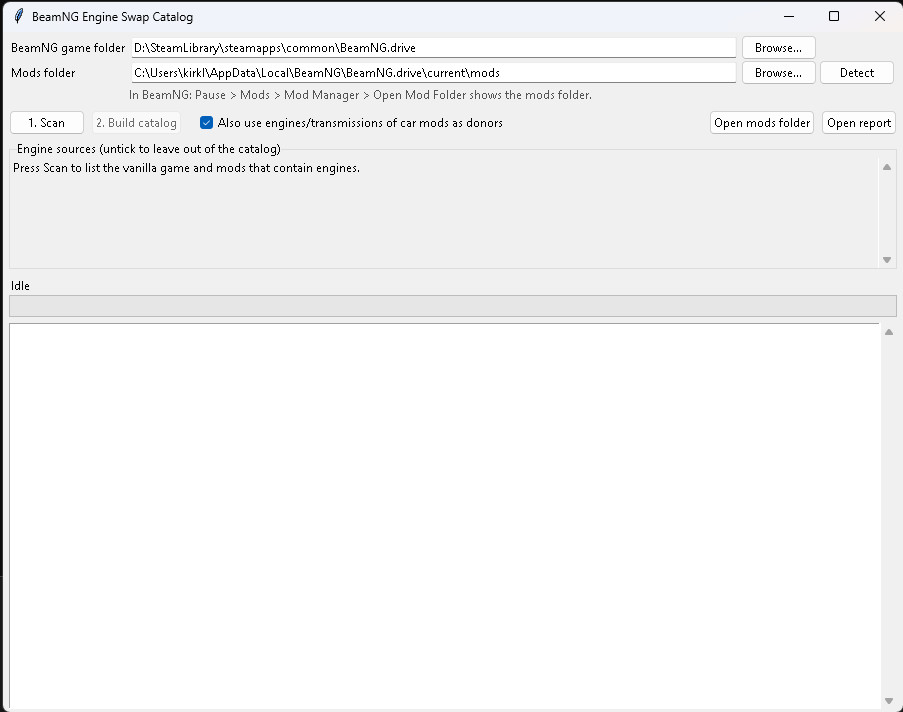
3. Check the two folders at the top:
- BeamNG game folder: found automatically from your Steam libraries.
If it is wrong, click Browse and pick the folder that contains BeamNG.drive.exe.
- Mods folder: found automatically. In the game you can see it under
Pause > Mods > Mod Manager > Open Mod Folder.
4. Click "1. Scan" (about a minute). The list shows which of your mods contain engines and
transmissions. Untick any mod you do not want in the catalog.
Optional: "Also use engines/transmissions of car mods" also takes them from car mods
(normally a car mod's engine is only offered in that car).
5. Click "2. Build catalog" (one to three minutes). When it says Done, the tool has written:
- engine_swap_catalog.zip -> your mods folder (or mods\repo\ if BeamNG moved it there)
- engine_swap_catalog.report.json -> your mods folder
6. Start BeamNG. In Mod Manager make sure "engine_swap_catalog" is enabled.
Rebuilding always replaces the old catalog; you never end up with two copies.
USE IT IN GAME
--------------
Engine:
Vehicle Config (Ctrl+E) > Parts > Engine slot > choose "Engine catalog"
> a new sub-slot "Catalog engine" appears > pick any engine > Apply.
The engine's own tuning parts appear as sub-slots under it.
Transmission:
Vehicle Config > Parts > Transmission slot (on most cars it is under Engine)
> choose "Transmission catalog" > sub-slot "Catalog transmission" > pick any gearbox.
You can use both at the same time. To go back to normal, pick the car's original engine or
transmission in the same slot. Each catalog starts on the car's own engine/transmission.
Names in the list show where a part comes from, e.g.
"Vanilla ETK: 3.0L I6 Engine" or "Ford Engines: Ford Coyote V8 Engines".
A [folder] tag at the end means several different versions with the same name exist.
UNINSTALL
---------
Delete engine_swap_catalog.zip (mods folder or mods\repo\) and engine_swap_catalog.report.json.
Delete this tool's folder. Settings are in %APPDATA%\beamng-swap-catalog (safe to delete).
Your game files and other mods are never changed by this tool.
KNOWN ISSUES / LIMITATIONS
--------------------------
- Keep the engine packs enabled. Some packs (for example CEEP, RK's engines, Dream Engines)
run their own engine code that stays inside their mod.
- The parts list is long (often several hundred entries), sorted by name and source.
- Engine-bay parts of the car's original engine (intake, turbo pipes) stay visible as
decoration, even if the new engine has no turbo.
- A diesel engine in a petrol car runs on the car's tank (the car keeps its own fuel system).
- The car's own exhaust still slightly changes the power of a swapped engine.
- Turbo/supercharger damage may never trigger on a swapped engine.
- The shifter lever animation inside the car stays the car's own.
- Some engines/transmissions are left out on purpose because the source mod is broken
(missing sound files, wrong parts, missing gear ratios). The report lists every one with
the reason (see below).
- Saved configurations that use a catalog part go back to the default part if you rebuild after
a source mod changed or was removed. Re-pick it in the parts menu.
- Cars without a combustion engine (electric cars, trailers, props) get no engine catalog.
- The generated zip can be large (hundreds of MB) because it copies mod sounds.
- The catalog must be rebuilt after a BeamNG update or after adding/removing mods.
NOT TESTED
----------
Tested in game by the author: engine swaps and transmission swaps (vanilla and mod parts, in
vanilla and mod cars, engine + transmission together) on BeamNG.drive 0.40.5 with Python 3.15.
Not tested:
- Other BeamNG versions (newer game updates may change the part format).
- Python versions other than 3.15 (3.10 or newer should work).
- Career mode (part shop / inventory) and BeamMP multiplayer.
- Non-Steam installs (should work: pick the game folder with Browse).
- Mods other than the ones the author had installed.
IF SOMETHING GOES WRONG
-----------------------
- The tool's window shows a log. Errors are shown there and in a popup.
- engine_swap_catalog.report.json (in your mods folder) explains, for every car, engine and
transmission, what was used, what was skipped and why. "validation" -> "errors" should be [].
- Game problems: send BeamNG's log right after the problem, before restarting:
%LOCALAPPDATA%\BeamNG\BeamNG.drive\current\beamng.log
together with the report, the car, and the engine/transmission you picked.
FOR ADVANCED USERS
------------------
Command line (from the tool folder): py -m swapcat build py -m swapcat validate
Options: --game DIR --mods DIR --out DIR --car-mod-engines --no-validate
Tests: py -m unittest discover -s tests
Technical notes: NOTES.md and README.md.
RIGHTS AND POLICY
-----------------
This tool is an independent work by bean3937. Its code was written from scratch; no code,
models, sounds or other content from BeamNG GmbH or any mod author is included in this package.
The tool is released under the MIT License (see LICENSE.txt).
IMPORTANT: the catalog mod the tool BUILDS on your PC (engine_swap_catalog.zip) is made from
your own installed game and mods. It contains copies of their engine and transmission data and
sound files, which belong to BeamNG GmbH and to the respective mod authors. It is for your
personal use only. Do not upload or share engine_swap_catalog.zip; share this tool instead,
so everyone builds their own from what they have installed.
This project is not affiliated with or endorsed by BeamNG GmbH. "BeamNG" and "BeamNG.drive"
are trademarks of BeamNG GmbH. All mod names mentioned belong to their authors.
Use at your own risk; the tool only reads your game and mod files and writes its own two files.
by bean3937 - version 1.0 - built for BeamNG.drive 0.40.5
=============================================================
WHAT IT DOES
------------
A small Windows tool that builds ONE mod for your own game, made from what you already have
installed. After that, in the in-game parts menu you can put:
- any engine (vanilla or from your engine-pack mods) into any car, and
- any transmission (vanilla or from your mods) into any car.
A swapped engine brings its own power and torque, its own engine and exhaust sound, and its
own tuning parts (ECU, turbo/supercharger, intake, internals...).
A swapped transmission brings its own gears, clutch / torque converter, shift behaviour,
gearbox sounds and tuning parts (converter, flywheel, gear ratios...).
The car keeps its own body, engine mounts, exhaust, transfer case, differentials and all visuals.
Engine 3D models are not swapped: the car keeps showing its own engine.
WHAT YOU NEED
-------------
1. Windows 10 or 11 with BeamNG.drive.
2. Python 3 (free): https://www.python.org/downloads/windows/
During setup tick "Add python.exe to PATH" and keep "tcl/tk and IDLE" selected.
No other downloads or packages are needed.
INSTALL
-------
1. Unzip this package anywhere, for example to your Desktop.
(Do NOT put it in the BeamNG mods folder. This is the tool, not the mod.)
2. Double-click START.cmd. If Python is missing, the window tells you what to install.
BUILD THE MOD (first time, and every time you add/remove mods or BeamNG updates)
---------------------------------------------------------------------------------
1. Close BeamNG (recommended).
2. Start the tool with START.cmd.
3. Check the two folders at the top:
- BeamNG game folder: found automatically from your Steam libraries.
If it is wrong, click Browse and pick the folder that contains BeamNG.drive.exe.
- Mods folder: found automatically. In the game you can see it under
Pause > Mods > Mod Manager > Open Mod Folder.
4. Click "1. Scan" (about a minute). The list shows which of your mods contain engines and
transmissions. Untick any mod you do not want in the catalog.
Optional: "Also use engines/transmissions of car mods" also takes them from car mods
(normally a car mod's engine is only offered in that car).
5. Click "2. Build catalog" (one to three minutes). When it says Done, the tool has written:
- engine_swap_catalog.zip -> your mods folder (or mods\repo\ if BeamNG moved it there)
- engine_swap_catalog.report.json -> your mods folder
6. Start BeamNG. In Mod Manager make sure "engine_swap_catalog" is enabled.
Rebuilding always replaces the old catalog; you never end up with two copies.
USE IT IN GAME
--------------
Engine:
Vehicle Config (Ctrl+E) > Parts > Engine slot > choose "Engine catalog"
> a new sub-slot "Catalog engine" appears > pick any engine > Apply.
The engine's own tuning parts appear as sub-slots under it.
Transmission:
Vehicle Config > Parts > Transmission slot (on most cars it is under Engine)
> choose "Transmission catalog" > sub-slot "Catalog transmission" > pick any gearbox.
You can use both at the same time. To go back to normal, pick the car's original engine or
transmission in the same slot. Each catalog starts on the car's own engine/transmission.
Names in the list show where a part comes from, e.g.
"Vanilla ETK: 3.0L I6 Engine" or "Ford Engines: Ford Coyote V8 Engines".
A [folder] tag at the end means several different versions with the same name exist.
UNINSTALL
---------
Delete engine_swap_catalog.zip (mods folder or mods\repo\) and engine_swap_catalog.report.json.
Delete this tool's folder. Settings are in %APPDATA%\beamng-swap-catalog (safe to delete).
Your game files and other mods are never changed by this tool.
KNOWN ISSUES / LIMITATIONS
--------------------------
- Keep the engine packs enabled. Some packs (for example CEEP, RK's engines, Dream Engines)
run their own engine code that stays inside their mod.
- The parts list is long (often several hundred entries), sorted by name and source.
- Engine-bay parts of the car's original engine (intake, turbo pipes) stay visible as
decoration, even if the new engine has no turbo.
- A diesel engine in a petrol car runs on the car's tank (the car keeps its own fuel system).
- The car's own exhaust still slightly changes the power of a swapped engine.
- Turbo/supercharger damage may never trigger on a swapped engine.
- The shifter lever animation inside the car stays the car's own.
- Some engines/transmissions are left out on purpose because the source mod is broken
(missing sound files, wrong parts, missing gear ratios). The report lists every one with
the reason (see below).
- Saved configurations that use a catalog part go back to the default part if you rebuild after
a source mod changed or was removed. Re-pick it in the parts menu.
- Cars without a combustion engine (electric cars, trailers, props) get no engine catalog.
- The generated zip can be large (hundreds of MB) because it copies mod sounds.
- The catalog must be rebuilt after a BeamNG update or after adding/removing mods.
NOT TESTED
----------
Tested in game by the author: engine swaps and transmission swaps (vanilla and mod parts, in
vanilla and mod cars, engine + transmission together) on BeamNG.drive 0.40.5 with Python 3.15.
Not tested:
- Other BeamNG versions (newer game updates may change the part format).
- Python versions other than 3.15 (3.10 or newer should work).
- Career mode (part shop / inventory) and BeamMP multiplayer.
- Non-Steam installs (should work: pick the game folder with Browse).
- Mods other than the ones the author had installed.
IF SOMETHING GOES WRONG
-----------------------
- The tool's window shows a log. Errors are shown there and in a popup.
- engine_swap_catalog.report.json (in your mods folder) explains, for every car, engine and
transmission, what was used, what was skipped and why. "validation" -> "errors" should be [].
- Game problems: send BeamNG's log right after the problem, before restarting:
%LOCALAPPDATA%\BeamNG\BeamNG.drive\current\beamng.log
together with the report, the car, and the engine/transmission you picked.
FOR ADVANCED USERS
------------------
Command line (from the tool folder): py -m swapcat build py -m swapcat validate
Options: --game DIR --mods DIR --out DIR --car-mod-engines --no-validate
Tests: py -m unittest discover -s tests
Technical notes: NOTES.md and README.md.
RIGHTS AND POLICY
-----------------
This tool is an independent work by bean3937. Its code was written from scratch; no code,
models, sounds or other content from BeamNG GmbH or any mod author is included in this package.
The tool is released under the MIT License (see LICENSE.txt).
IMPORTANT: the catalog mod the tool BUILDS on your PC (engine_swap_catalog.zip) is made from
your own installed game and mods. It contains copies of their engine and transmission data and
sound files, which belong to BeamNG GmbH and to the respective mod authors. It is for your
personal use only. Do not upload or share engine_swap_catalog.zip; share this tool instead,
so everyone builds their own from what they have installed.
This project is not affiliated with or endorsed by BeamNG GmbH. "BeamNG" and "BeamNG.drive"
are trademarks of BeamNG GmbH. All mod names mentioned belong to their authors.
Use at your own risk; the tool only reads your game and mod files and writes its own two files.
External Download Links:
About Mod
| Latest Version | 1.0 |
| Game | BeamNG.drive |
| Category | Other |
| Game Version | 0.40.x |
| Downloads | 8 |
| Created | 57 minutes ago |
You Might Also Like »
0 Comments
There are no comments. Be first to comment!