BeamNG.drive Career Vehicle Fixer 1.0
365
downloads
10
comments
0
videos
by
Guest
6 months ago
![BMW X6 G06/F96 [PACK]](https://temp2.modland.net/i/6a8ff76445a04/0_modland.webp)

1/5,
6
votes
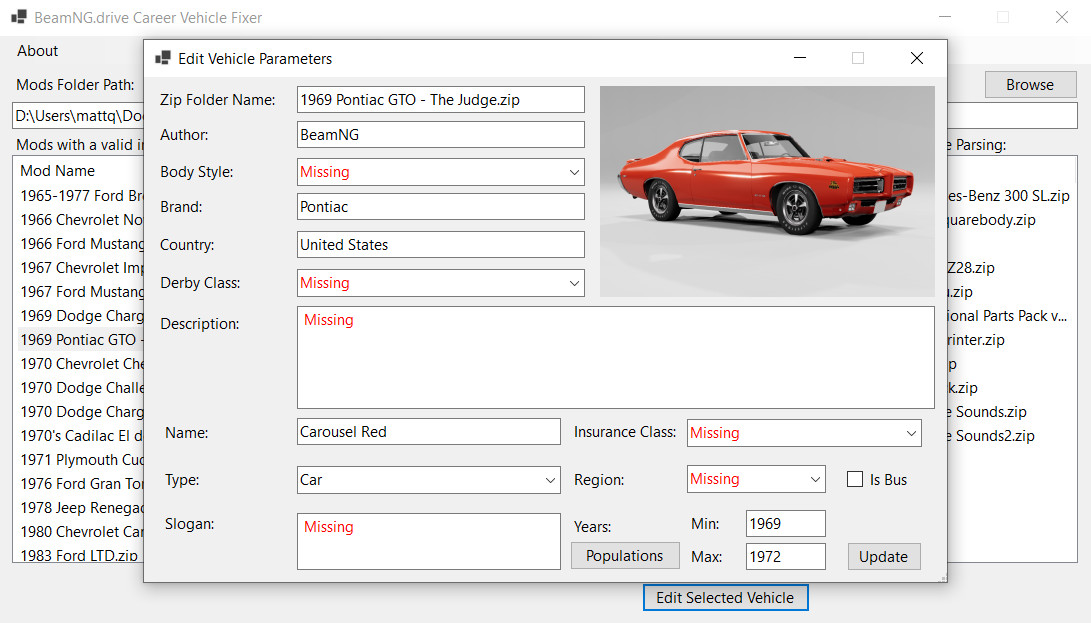
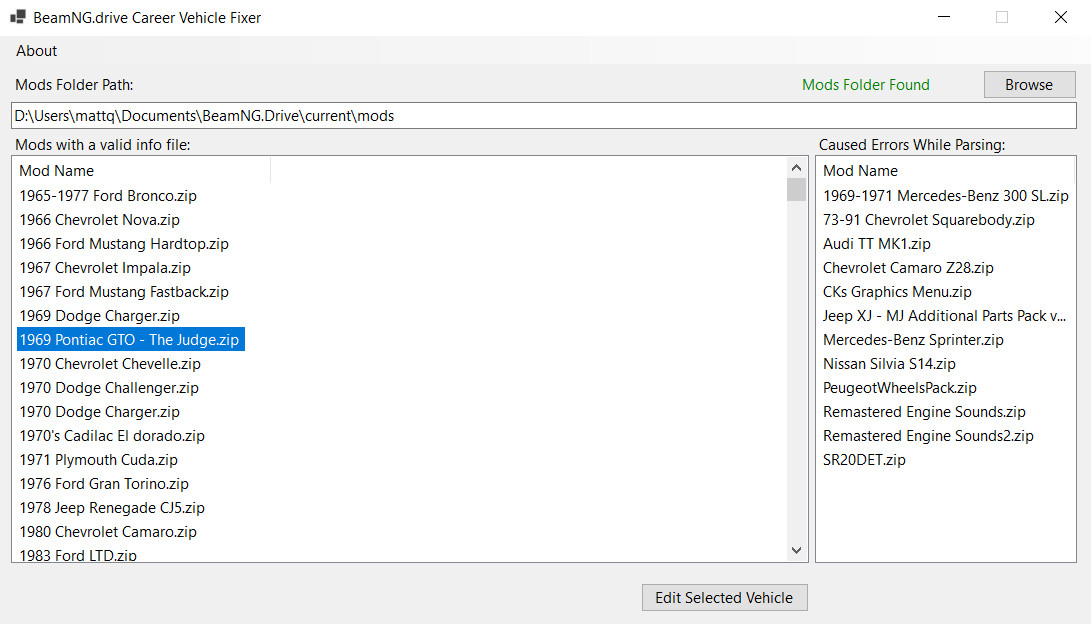
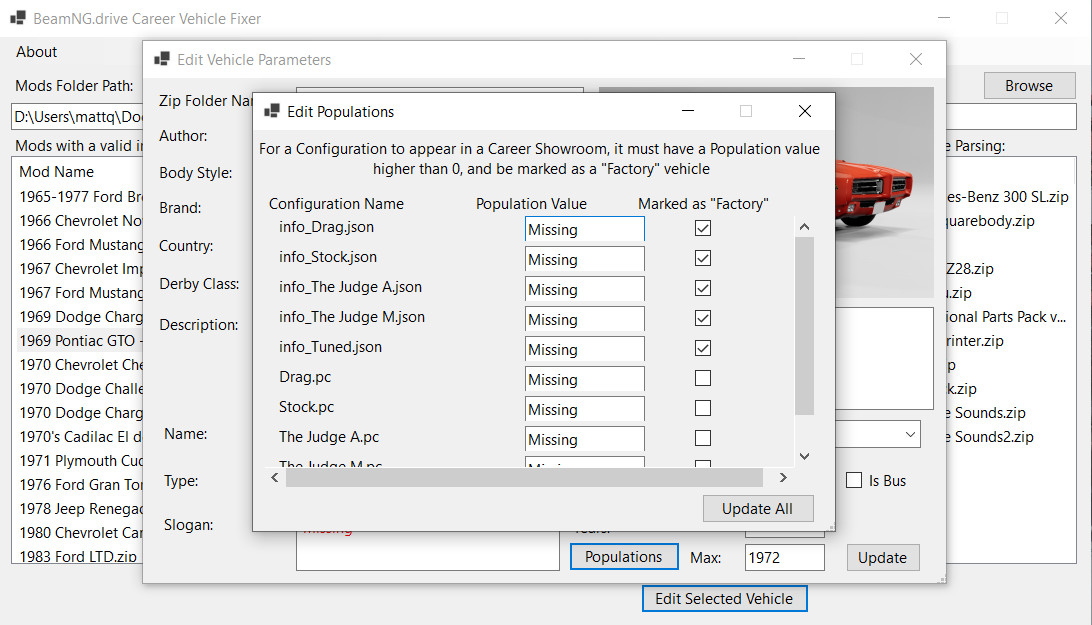
As the BeamNG developers continue to update the game, they have added extra parameters that each vehicle must possess if they are to appear in Career Mode. This tool allows you to update the info.json and configuration files for each .zip file found in your mods folder, so that they have all necessary values to allow them to appear in Showrooms in Career Mode.
External Download Links:
About Mod
| Latest Version | 1.0 |
| Game | BeamNG.drive |
| Category | Other |
| Game Version | 0.38.x |
| Downloads | 365 |
| Created | 6 months ago |
![BMW X6 G06/F96 [PACK]](https://temp2.modland.net/i/6a8ff76445a04/0_modland.jpg)



![Ford Mustang Mach-E [PACK]](https://temp2.modland.net/i/6aa50a7184eaa/0_modland.jpg)
bro how are you i want this but i put my card to pay and get declined its a some way to pay you from binance?
you can edit these parameters yourself and for free. there are guides on the Internet
@Antonkrd1 howww?
Didn't work for me either
"An error occurred trying to start the process" lists mod folder name and then lists the folder where the app is "the specified executable is not a valid application for this platfrom"
It pulls up the cars but i can't make changes
Don't worked for me...Dont even have a tutorial of how or where to extract the files. Dont create the archives for career and dont even change the values of existent filesI got scammed
@JohndogJenkins bro can you put it in other server or i can pay you in binance because i try to pay in the page and idk my card its declined
@felipemartins7447 Version 1.1 is now live on Ko-Fi. As you have already purchased it, you should be able to return to the same link to download it. If you have any issues with this, please let me know
@JohndogJenkins i think now beamng files are in appdata, so program cant find them
@felipemartins7447 Sorry it didnt work for you. I plan to add a readme file with tutorial very soon as well as fixing some bugs I have noticed. For now here is an initial draft of the tutorial:When the program opens, it will automatically attempt to find your mods folder in "My Documents/BeamNG.drive/current/"If the mods folder cannot be found here, you can use the Browse button to select the folder manually.Open the Edit Parameters window by selecting a vehicle zip file from the list on the left and clicking the "Edit Selected Vehicle" button.Click the Populations button to open its window. For each vehicle you would like to appear in Career, ensure its "Population" is more than 0 and that "Marked As Factory" is ticked. Click "Update" when you have all values as you like them.Fill in any missing infomation for the vehicle in the Edit Parameters window. The vehicle also needs to have an "Insurance Class" and "Region" to appear in Showrooms in Career. Click "Update" when you have entered all values.Bug: The next dialog box will state that the info.json file was updated successfully. It should ask if you would like to see the updated file. Selecting "Yes" will attempt to open the new Json file which will not work. This does not appear the file being updated and you should select "No" on this dialog until it has been fixed.The program will then return to the main window, you are now free to close the program.Hopefully this should help and do let me know again if you're still having issues.-JohndogJenkins
Bro please make it free