
![Ford Bronco [PACK]](https://temp2.modland.net/i/6abb8bc6ce51c/0_modland.webp)



5/5,
1
votes
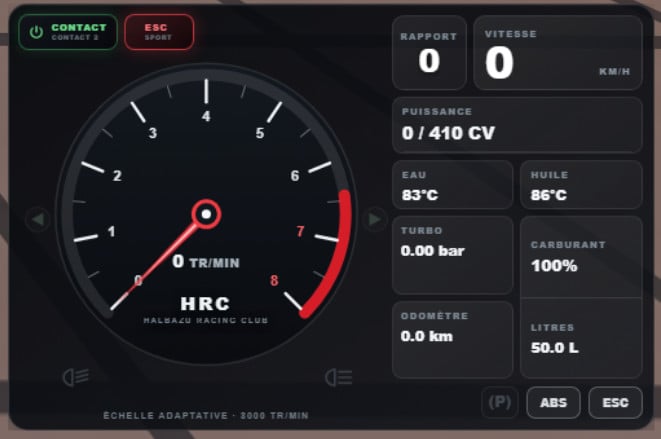
HRC Telemetry is a complete vehicle interface designed to combine the most useful BeamNG.drive information and controls into one compact, modern and immersive dashboard. Its purpose is to provide a single, easy-to-read interface inspired by a real automotive dashboard while preserving the visual identity of the Halbazu Racing Club.
Features
- Analog tachometer with an animated needle
- Dynamic RPM scale adapted to the vehicle’s maximum engine speed
- Speed displayed in km/h
- Current gear
- Coolant and oil temperature
- Real-time power output in metric horsepower
- Turbo pressure in bar
- Fuel level percentage and remaining quantity in litres
- Odometer in kilometres
- ABS, ESC, and handbrake warning lights
- Turn signal, low-beam, and high-beam indicators
- Collision warning
- CHECK ENGINE and ENGINE FAILURE warnings
- Start-up and shutdown animations with needle sweep
- Smooth information transitions and animated indicators
- Integrated ignition control and engine start button
- ESC and driving mode selection (when supported by the vehicle)
Compatibility
The mod is designed to work with as many BeamNG.drive vehicles as possible. However, some information depends on the data provided by the vehicle. On certain vehicles, particularly modded ones, some values such as oil temperature, power output, turbo pressure, and ESC modes may be unavailable or behave differently. In such cases, the interface uses a clean fallback display.
Installation Instructions
1. Download the mod’s ZIP file.
2. Do not extract the file.
3. Place the ZIP file directly into: C:\Users\USER\AppData\Local\BeamNG\BeamNG.drive\current\mods (Replace USER with your Windows username).
4. Alternatively, use BeamNG.drive’s built-in Mod Manager.
5. Launch or restart BeamNG.drive.
6. Open the UI editor: UI Apps / Add App
7. Search for HRC Telemetry V1 and add it to your HUD.
Important: If you were using an older version of HRC Telemetry, it is recommended to remove it before installing this version to prevent conflicts.
Credits
halbazu
Features
- Analog tachometer with an animated needle
- Dynamic RPM scale adapted to the vehicle’s maximum engine speed
- Speed displayed in km/h
- Current gear
- Coolant and oil temperature
- Real-time power output in metric horsepower
- Turbo pressure in bar
- Fuel level percentage and remaining quantity in litres
- Odometer in kilometres
- ABS, ESC, and handbrake warning lights
- Turn signal, low-beam, and high-beam indicators
- Collision warning
- CHECK ENGINE and ENGINE FAILURE warnings
- Start-up and shutdown animations with needle sweep
- Smooth information transitions and animated indicators
- Integrated ignition control and engine start button
- ESC and driving mode selection (when supported by the vehicle)
Compatibility
The mod is designed to work with as many BeamNG.drive vehicles as possible. However, some information depends on the data provided by the vehicle. On certain vehicles, particularly modded ones, some values such as oil temperature, power output, turbo pressure, and ESC modes may be unavailable or behave differently. In such cases, the interface uses a clean fallback display.
Installation Instructions
1. Download the mod’s ZIP file.
2. Do not extract the file.
3. Place the ZIP file directly into: C:\Users\USER\AppData\Local\BeamNG\BeamNG.drive\current\mods (Replace USER with your Windows username).
4. Alternatively, use BeamNG.drive’s built-in Mod Manager.
5. Launch or restart BeamNG.drive.
6. Open the UI editor: UI Apps / Add App
7. Search for HRC Telemetry V1 and add it to your HUD.
Important: If you were using an older version of HRC Telemetry, it is recommended to remove it before installing this version to prevent conflicts.
Credits
halbazu
Direct Download Links
About Mod
| Latest Version | 3 |
| Game | BeamNG.drive |
| Category | Other |
| Game Version | 0.39.x |
| Tags | UI |
| Downloads | 426 |
| Created | 1 month ago |
You Might Also Like »


![Mack Anthem / Pinnacle [PACK]](https://temp2.modland.net/i/6aa50a7184eaa/6ab9344368d3b/0_modland.webp)


0 Comments
There are no comments. Be first to comment!