
![Ford Bronco [PACK]](https://temp2.modland.net/i/6abb8bc6ce51c/0_modland.webp)

5/5,
1
votes
Description
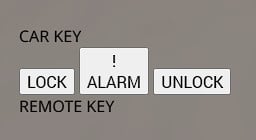
CAR KEY SYSTEM
A simple in-game car key for BeamNG.drive. Use the key to control the basic functions of your vehicle without having to use the standard controls.
Features
- LOCK: Locks the vehicle and flashes the turn signals to confirm the action.
- UNLOCK: Unlocks the vehicle with visual confirmation from the turn signals.
- ALARM / PANIC: Activates the panic function and flashes the hazard lights.
Compatibility
The Car Key System is designed to work with all standard BeamNG.drive vehicles.
⚠ MODDED VEHICLES: Vehicles from other mods may not be fully compatible. Some modded vehicles may have missing functions, different electrics or other issues that can cause the system to work incorrectly.
Current Version: ALPHA (The mod is still in development)
Game Version: BeamNG.drive 0.39.x
Installation Instructions
After installing the mod, you need to add the Car Key app to your HUD:
1. Enter any vehicle.
2. Open the UI / HUD editor.
3. Select Apps.
4. Find the Car Key application.
5. Add it to your HUD.
6. Position and resize the application however you like.
7. Save the HUD layout.
Credits
wiktorstanczyk66
CAR KEY SYSTEM
A simple in-game car key for BeamNG.drive. Use the key to control the basic functions of your vehicle without having to use the standard controls.
Features
- LOCK: Locks the vehicle and flashes the turn signals to confirm the action.
- UNLOCK: Unlocks the vehicle with visual confirmation from the turn signals.
- ALARM / PANIC: Activates the panic function and flashes the hazard lights.
Compatibility
The Car Key System is designed to work with all standard BeamNG.drive vehicles.
⚠ MODDED VEHICLES: Vehicles from other mods may not be fully compatible. Some modded vehicles may have missing functions, different electrics or other issues that can cause the system to work incorrectly.
Current Version: ALPHA (The mod is still in development)
Game Version: BeamNG.drive 0.39.x
Installation Instructions
After installing the mod, you need to add the Car Key app to your HUD:
1. Enter any vehicle.
2. Open the UI / HUD editor.
3. Select Apps.
4. Find the Car Key application.
5. Add it to your HUD.
6. Position and resize the application however you like.
7. Save the HUD layout.
Credits
wiktorstanczyk66
Direct Download Links
About Mod
| Latest Version | 1.0 |
| Game | BeamNG.drive |
| Category | Other |
| Game Version | 0.39.x |
| Downloads | 520 |
| Created | 2 months ago |

fix the link thing it says smth about the page
ej zajebiste