BeamNG RLS Carrer Tool 2.0.0


![Ford Mustang Mach-E [PACK]](https://temp2.modland.net/i/6aa50a7184eaa/0_modland.jpg)
![BMW X6 G06/F96 [PACK]](https://temp2.modland.net/i/6a8ff76445a04/0_modland.jpg)


0/5,
0
votes
Description
Convert any BeamNG.drive vehicle mod to work with RLS Career — automatically.
RLS Career is a BeamNG.drive mod that lets you play the game like real life: buy cars, insure them, pay for repairs, and manage your money. To work properly, every vehicle mod needs a set of metadata files (info.json and one info_<config>.json per configuration) that RLS reads to know the car's price, power, weight, drivetrain, and more.
Some community mods don't include these files. RLS Mod Generator reads the mod's existing data — vehicle info, physics configs, and engine definitions — and generates everything RLS needs automatically, in seconds, without you having to edit a single file by hand.
Features
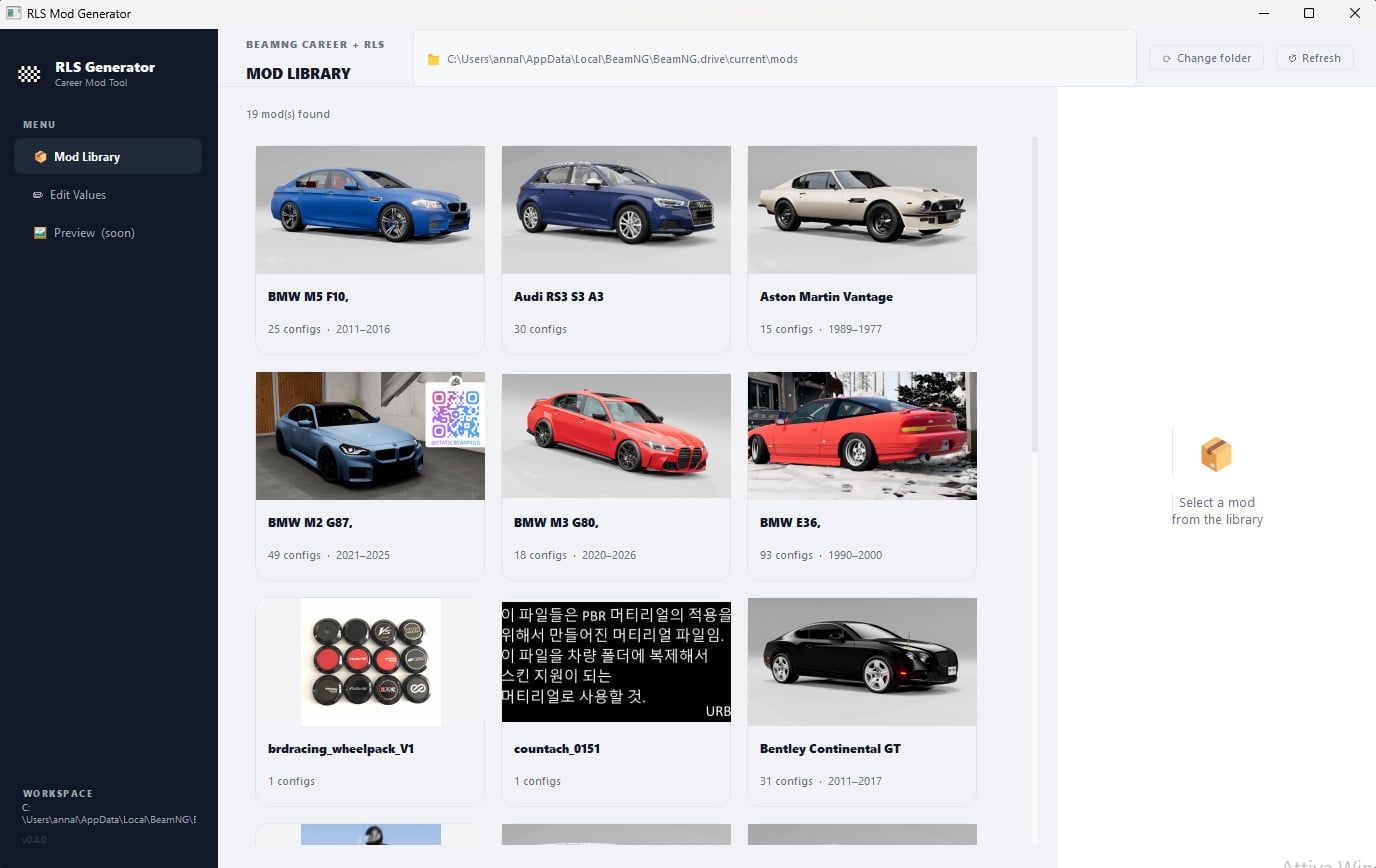
- Automatic mod library — opens your BeamNG mods folder on launch and shows every vehicle mod as a card with thumbnail, name, year range, and config count. Non-vehicle mods (rim packs, maps, UI mods) are filtered out automatically.
- One-click generation — select a mod, hit Generate, and the tool reads the .pc and .jbeam files to extract drivetrain, transmission, induction type, power, torque, RPM peaks, weight, and body style. No manual input required.
- Smart file parsing — handles BeamNG's non-standard JSON format (comments, missing commas, mixed syntax) that standard parsers can't read. Power is calculated from the engine's torque curve, not guessed.
- Clean output — repacks the mod as a new zip with the correct flat structure BeamNG requires, and removes the original so there are no conflicts in your mods folder.
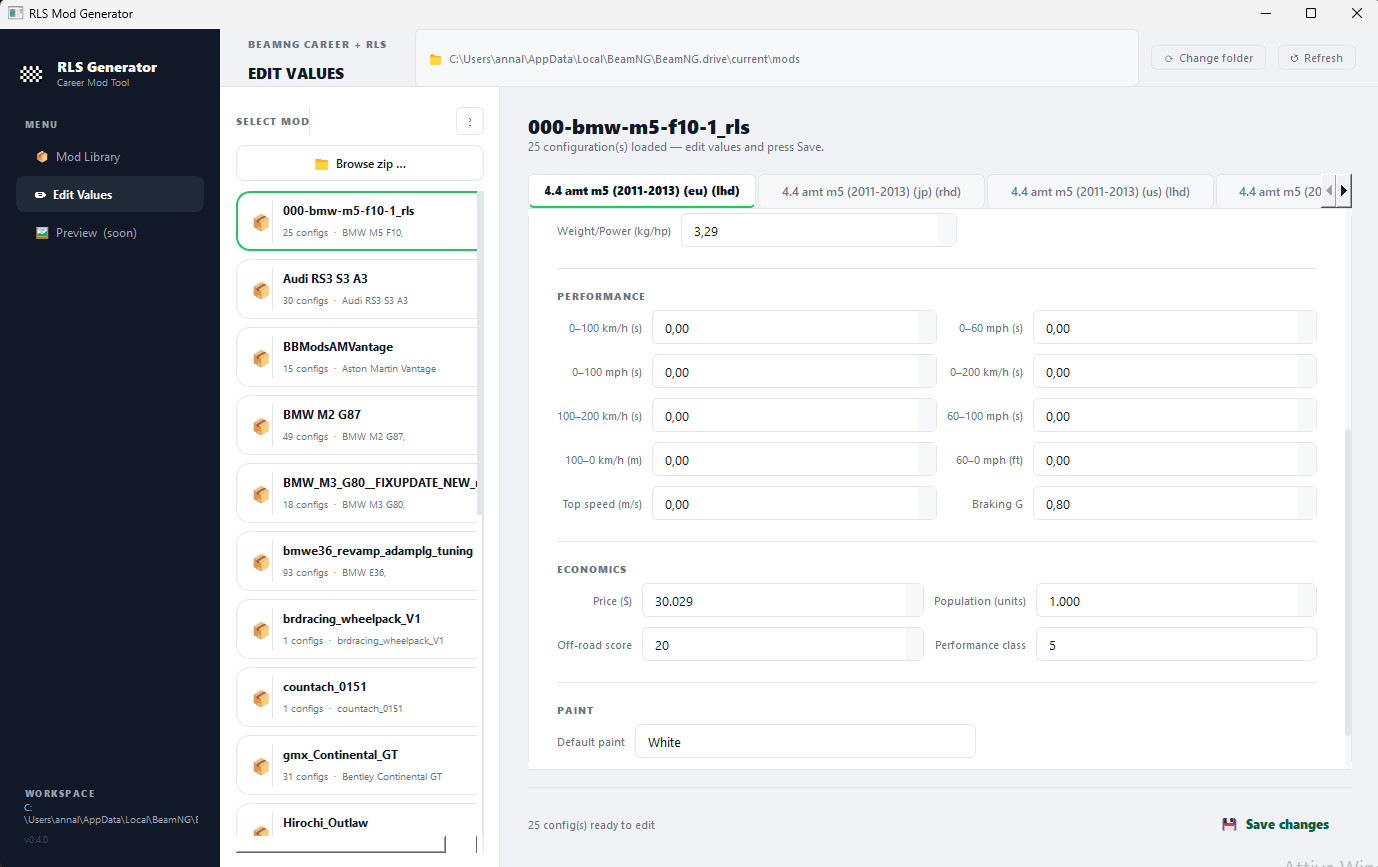
- Value editor — after generating, switch to the Edit Values page to fine-tune any field across all configurations: price, population, performance times, off-road score, paint name, and more. Changes are saved directly back into the zip.
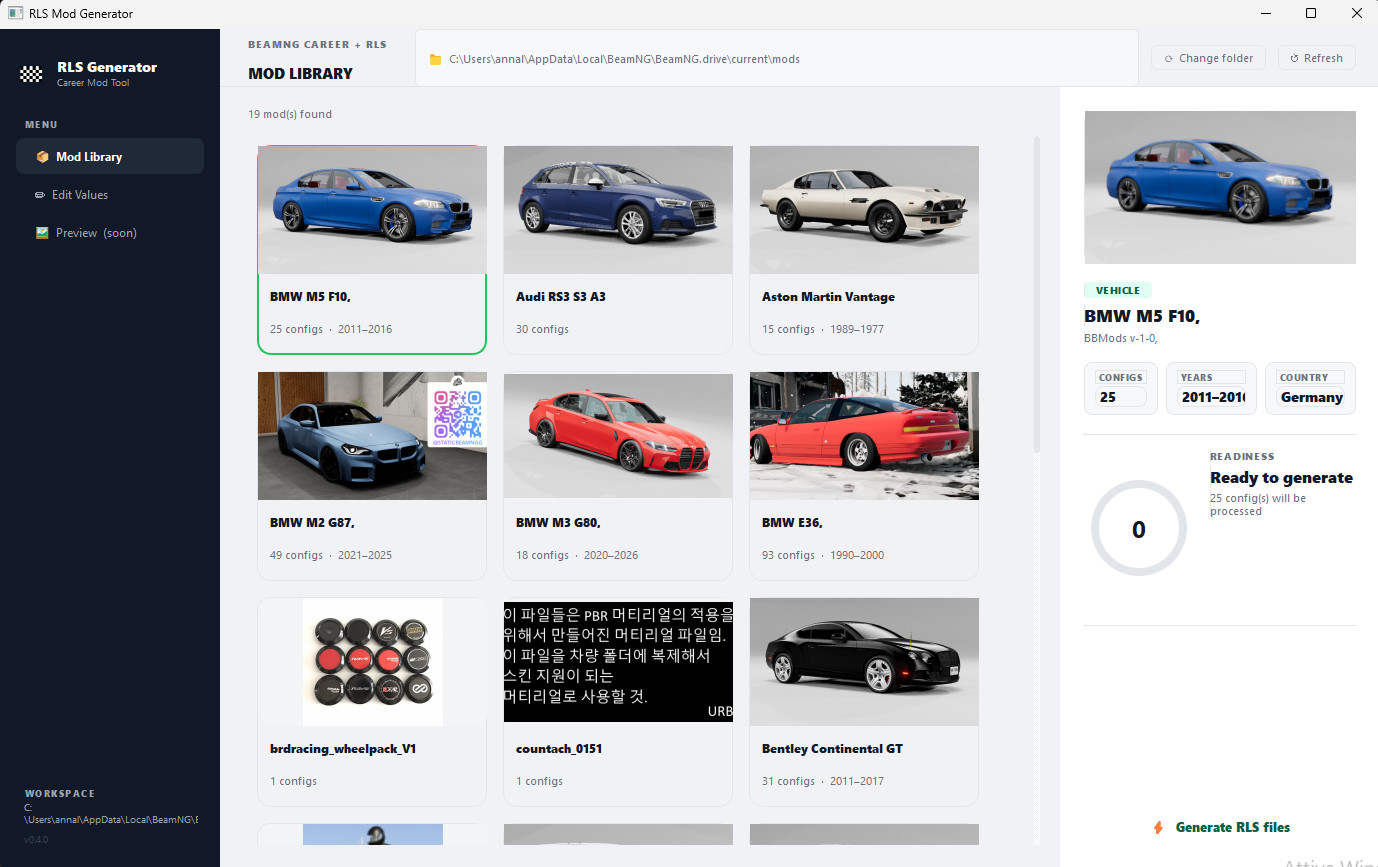
- Progress ring — live readiness indicator shows generation progress as a circular arc that fills config by config.
Installation Instructions
Requirements:
- Windows 10 / 11
- Python 3.11 or newer
- PyQt5 (pip install PyQt5)
- BeamNG.drive with the RLS Career mod installed
How to use:
Compiled:
Start the exe file and you are done.
Source:
1. Install the dependency:
pip install PyQt5
2. Launch the tool:
python main.py
Using the tool:
The tool automatically detects your BeamNG mods folder at:
%LOCALAPPDATA%\BeamNG\BeamNG.drive\current\mods
If your installation is in a different location, click Change folder in the top bar and navigate to your mods directory. Click Refresh to reload the list at any time.
Picking a mod:
The Mod Library shows all vehicle mods as cards. Click any card to select it — the right panel will show the vehicle's thumbnail, brand, model, country, year range, and config count pulled directly from the mod's own info.json.
Generating RLS files:
With a mod selected, click ⚡ Generate RLS files. The tool will:
- Extract the zip to a temporary folder
- Find the vehicle configuration folder (identified by its .jpg thumbnails)
- Read each .pc file to extract drivetrain, transmission, induction type, fuel, and body style
- Find and parse the engine .jbeam file to calculate peak power (hp), torque (Nm), and RPM values from the torque curve
- Write one info_<config>.json per configuration
- Repack everything into a new zip named <modname>_rls.zip
- Delete the original zip to avoid conflicts
When done, a popup confirms the conversion and offers to open the output folder.
Editing values:
Switch to Edit Values in the sidebar. Select a mod that has already been converted — its configurations will load as tabs (one per config). You can edit:
- Identity: Configuration name, description, config type, body style
- Powertrain: Drivetrain, transmission, propulsion, fuel type, induction, power, torque, RPM, weight
- Performance: 0–100 km/h, 0–60 mph, top speed, braking G, and all other sprint/brake figures
- Economics: Price, population, off-road score, performance class
- Paint: Default paint name
Click 💾 Save changes to write the updated values back into the zip. The original file is overwritten in place — no new zip is created.
Convert any BeamNG.drive vehicle mod to work with RLS Career — automatically.
RLS Career is a BeamNG.drive mod that lets you play the game like real life: buy cars, insure them, pay for repairs, and manage your money. To work properly, every vehicle mod needs a set of metadata files (info.json and one info_<config>.json per configuration) that RLS reads to know the car's price, power, weight, drivetrain, and more.
Some community mods don't include these files. RLS Mod Generator reads the mod's existing data — vehicle info, physics configs, and engine definitions — and generates everything RLS needs automatically, in seconds, without you having to edit a single file by hand.
Features
- Automatic mod library — opens your BeamNG mods folder on launch and shows every vehicle mod as a card with thumbnail, name, year range, and config count. Non-vehicle mods (rim packs, maps, UI mods) are filtered out automatically.
- One-click generation — select a mod, hit Generate, and the tool reads the .pc and .jbeam files to extract drivetrain, transmission, induction type, power, torque, RPM peaks, weight, and body style. No manual input required.
- Smart file parsing — handles BeamNG's non-standard JSON format (comments, missing commas, mixed syntax) that standard parsers can't read. Power is calculated from the engine's torque curve, not guessed.
- Clean output — repacks the mod as a new zip with the correct flat structure BeamNG requires, and removes the original so there are no conflicts in your mods folder.
- Value editor — after generating, switch to the Edit Values page to fine-tune any field across all configurations: price, population, performance times, off-road score, paint name, and more. Changes are saved directly back into the zip.
- Progress ring — live readiness indicator shows generation progress as a circular arc that fills config by config.
Installation Instructions
Requirements:
- Windows 10 / 11
- Python 3.11 or newer
- PyQt5 (pip install PyQt5)
- BeamNG.drive with the RLS Career mod installed
How to use:
Compiled:
Start the exe file and you are done.
Source:
1. Install the dependency:
pip install PyQt5
2. Launch the tool:
python main.py
Using the tool:
The tool automatically detects your BeamNG mods folder at:
%LOCALAPPDATA%\BeamNG\BeamNG.drive\current\mods
If your installation is in a different location, click Change folder in the top bar and navigate to your mods directory. Click Refresh to reload the list at any time.
Picking a mod:
The Mod Library shows all vehicle mods as cards. Click any card to select it — the right panel will show the vehicle's thumbnail, brand, model, country, year range, and config count pulled directly from the mod's own info.json.
Generating RLS files:
With a mod selected, click ⚡ Generate RLS files. The tool will:
- Extract the zip to a temporary folder
- Find the vehicle configuration folder (identified by its .jpg thumbnails)
- Read each .pc file to extract drivetrain, transmission, induction type, fuel, and body style
- Find and parse the engine .jbeam file to calculate peak power (hp), torque (Nm), and RPM values from the torque curve
- Write one info_<config>.json per configuration
- Repack everything into a new zip named <modname>_rls.zip
- Delete the original zip to avoid conflicts
When done, a popup confirms the conversion and offers to open the output folder.
Editing values:
Switch to Edit Values in the sidebar. Select a mod that has already been converted — its configurations will load as tabs (one per config). You can edit:
- Identity: Configuration name, description, config type, body style
- Powertrain: Drivetrain, transmission, propulsion, fuel type, induction, power, torque, RPM, weight
- Performance: 0–100 km/h, 0–60 mph, top speed, braking G, and all other sprint/brake figures
- Economics: Price, population, off-road score, performance class
- Paint: Default paint name
Click 💾 Save changes to write the updated values back into the zip. The original file is overwritten in place — no new zip is created.
Direct Download Links
About Mod
| Latest Version | 2.0.0 |
| Game | BeamNG.drive |
| Category | Other |
| Game Version | 0.38.x |
| Tags | Tuning UI |
| Downloads | 1220 |
| Created | 3 months ago |





Works
Работает
Guys dont download it has nothing to do with python if you look in windows virus securtiy it is marked as trojan do not download
@beam dude, false positives happen, its prolly cus its an unverified .exe
@Buck3ts41 well, i guess i cant use this because windows security thinks it a virus , even though its not
dont dowload this!! windows detected this as a virus, and plus, it doesnt even look real!
@12321432 As is made in python it need to be packed to an exe, autopytoexe is flagged as virus and that is know from ages now. There is the source, try it and tell me if it is not real ;)