Crash Survival Rating Pro | Real-Time Crash Survivability Monitor 3.0

![Ford Bronco [PACK]](https://temp2.modland.net/i/6abb8bc6ce51c/0_modland.webp)


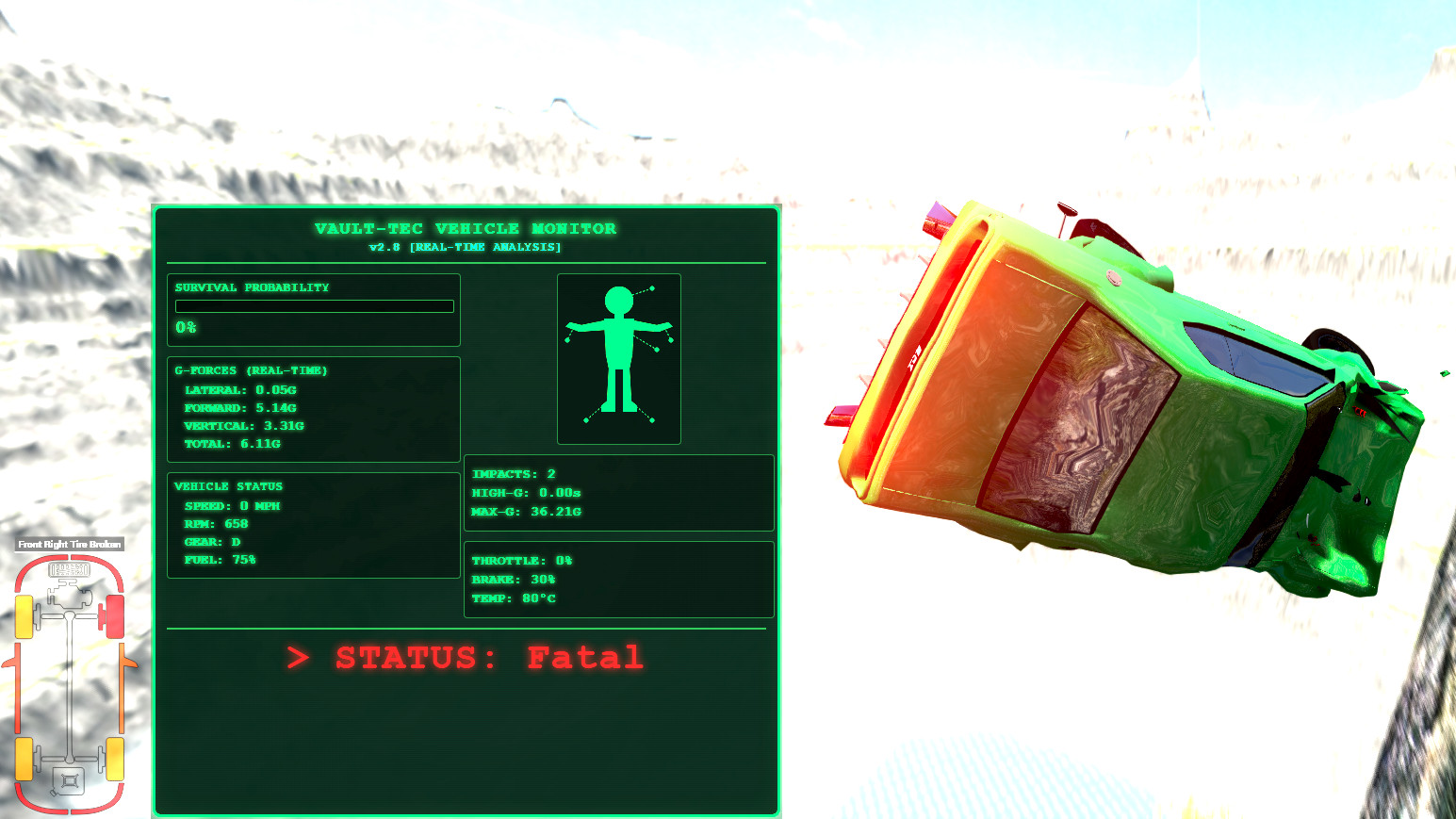
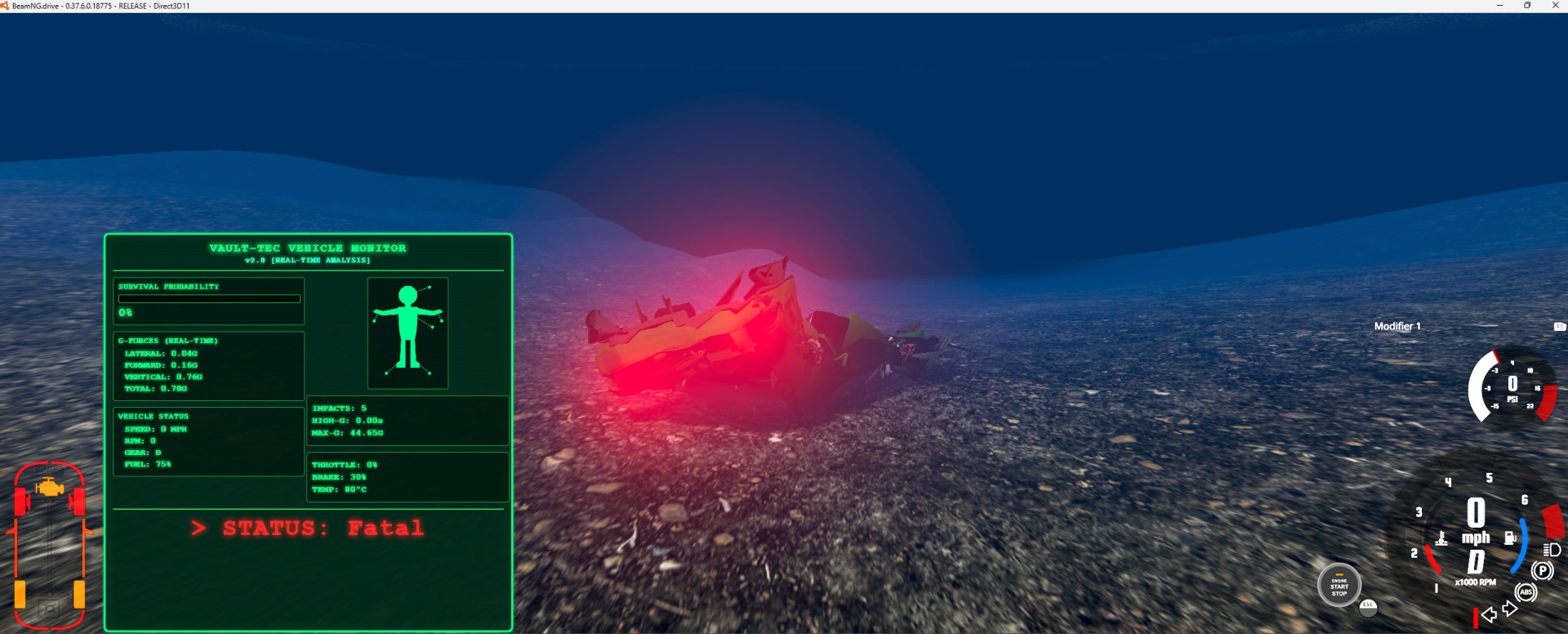
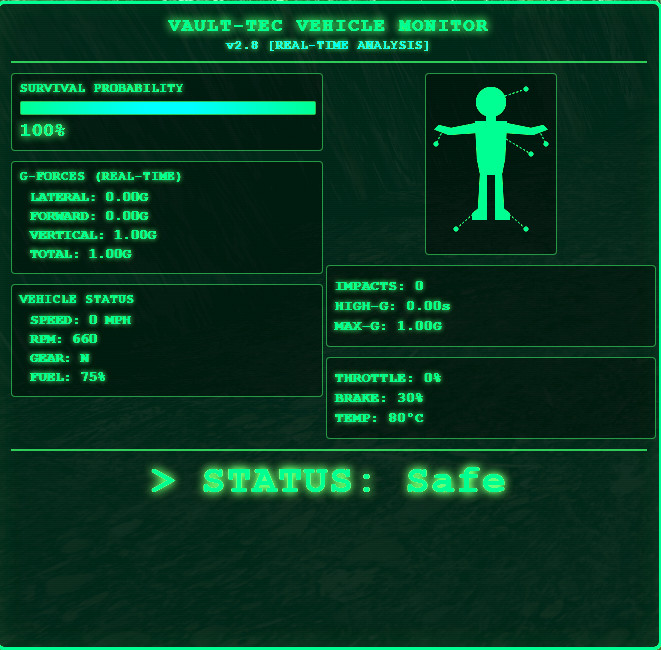
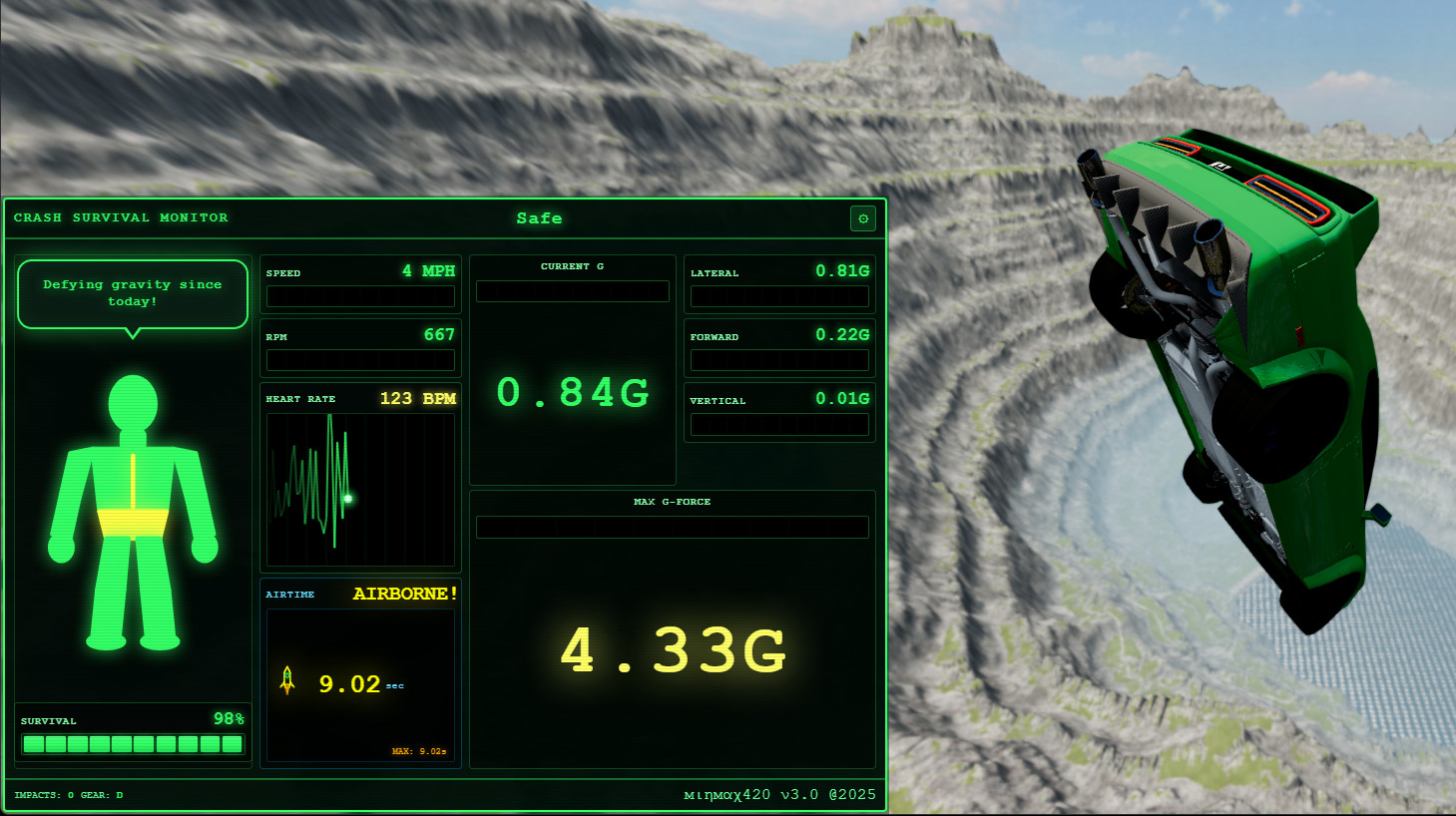
Updates
New Features
-
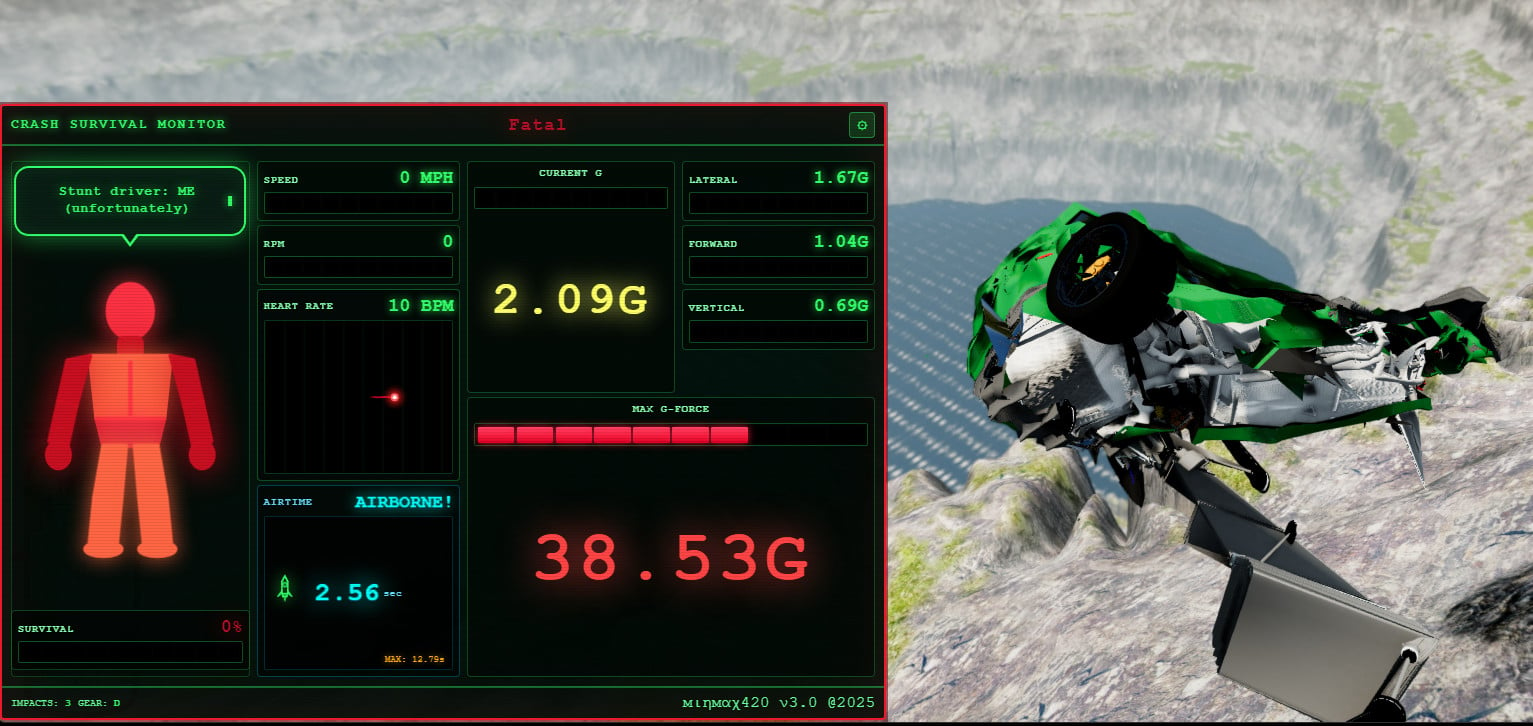
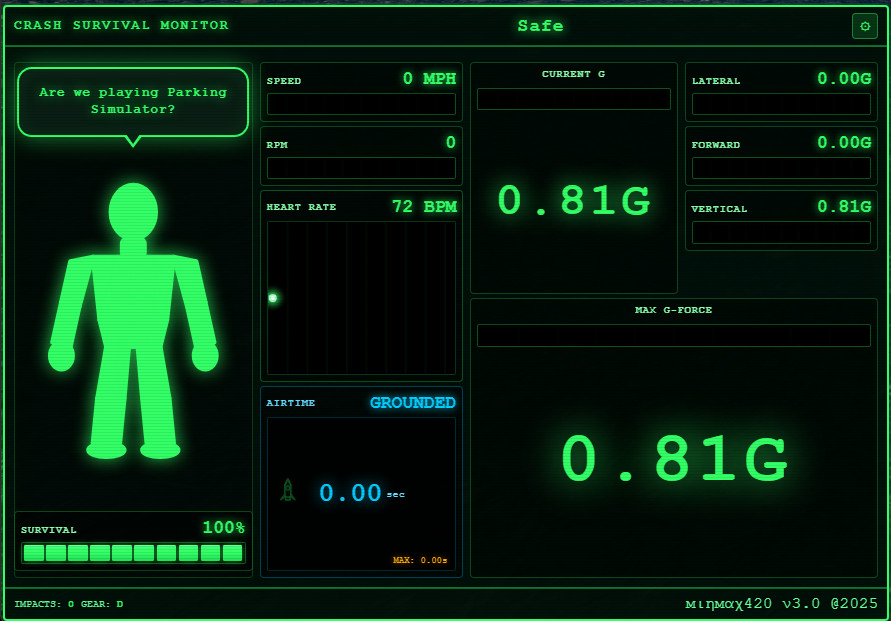
Airtime Tracker - Tracks how long your vehicle is airborne with animated Pip-Boy style rocket
- Rocket launches when you go airborne
- Rocket crashes and explodes on landing
- Displays current airtime and max jump record
-
Heart Rate Monitor - Real-time ECG display that responds to crashes and airtime
- Heart rate increases with injury severity
- Adrenaline boost during jumps (+20 BPM per second airborne)
- Flatlines on fatal crashes
-
Dynamic Border Colors - UI border changes color based on survival status
- Green (Safe) -> Yellow (Minor) -> Orange (Moderate) -> Red (Severe) -> Pulsing Red (Critical/Fatal)
-
Character Sayings System - Over 500 unique phrases with typewriter effect
- Context-aware responses based on driving state
- Airborne excitement phrases
- Colorized curse words during critical crashes
- Wingdings/symbols on fatal crashes
-
Improved Body Part Visualization - Enhanced Pip-Boy style character with color-coded injury display
Technical Improvements
- Based on NATO RTO-EN-HFM-113 and NHTSA FMVSS 208 crash research
- Real-time G-force monitoring (Lateral, Forward, Vertical)
- Impact detection and counting system
- Responsive UI that scales to any window size
Installation
Compatible with: BeamNG.drive v0.37+ (Current version as of November 2025)
Based on official BeamNG documentation: https://documentation.beamng.com/tutorials/mods/installing-mods/
Method 1: Repository Installation (Easiest)
If this mod is available on the BeamNG Repository:
- In-Game: Open the game > Main Menu > Repository
- Search for "Crash Survival Rating"
- Click Subscribe - the mod downloads and activates automatically
Method 2: Manual Installation (ZIP File)
-
Download the mod as a .zip file (DO NOT extract it!)
-
Open your User Folder:
-
Launch BeamNG.drive
-
Go to Options > Other > Open User Folder
-
Or navigate manually to:
%LocalAppData%\BeamNG\BeamNG.drive\current\mods\Note: As of v0.37, the user folder location changed to BeamNG\BeamNG.drive\current\
-
-
Create the mods folder if it doesn't exist:
- Inside your user folder, create a folder named mods
-
Drop the ZIP file into the mods folder
- Do NOT extract the ZIP - BeamNG reads it directly
-
Launch the game - the mod loads automatically and appears in your Mod Manager
Method 3: Unpacked Installation (For Modders/Testing)
-
Navigate to:
%LocalAppData%\BeamNG\BeamNG.drive\current\mods\unpacked\ -
Create the unpacked folder if it doesn't exist
-
Extract/place the crashSurvivalRating folder here
-
Launch the game - unpacked mods load with priority for testing
Warning: Be wary of mods in EXE format - legitimate BeamNG mods are always ZIP files!
Adding the App to Your Screen
Based on official BeamNG documentation: https://documentation.beamng.com/getting_started/user_interface/
Step 1: Enter UI Edit Mode
-
Load into any map with a vehicle (Freeroam mode)
-
Press ESC to open the pause/sidebar menu
-
Click "UI Apps" to enter UI Edit Mode
Step 2: Add the App
-
Click the "Add App" button (appears in the center of the screen)
-
The Apps Menu opens showing all available apps
-
Scroll or search for:
Crash Survival Rating -
Click on it to add it to your layout
Step 3: Position and Resize
-
Drag the app to your preferred position (recommended: left side or bottom)
-
Resize by dragging the corners or edges
- Minimum recommended: 800 x 400 pixels
- Optimal size: 1200 x 620 pixels
-
Optional: Check "Hide in cockpit" if you don't want it visible in Driver camera mode
Step 4: Save Your Layout
-
Click "Select Layout" to save or switch between layouts
-
Use "Reset App Layout" if you want to start over with defaults
-
Press ESC to exit edit mode - your layout saves automatically
Note: Only one instance of each app is allowed. If the app doesn't appear in the list, it may already be on your screen.
Using the App
Main Display Elements
Element Description Body Figure Shows injury levels for each body part (color-coded) Speech Bubble Character commentary on your driving (typewriter effect) Survival % Overall survival probability (100% = Safe, 0% = Fatal) Heart Rate BPM with live ECG waveform Airtime Seconds airborne with rocket animation Speed/RPM Current vehicle stats with segmented bars G-Forces Current and Max G-forces (Total, Lateral, Forward, Vertical) Impacts Number of significant impacts detectedColor Legend
Color Survival Status Heart Rate Green Safe / Healthy Normal (60-100 BPM) Yellow Minor Injury Elevated (100-140 BPM) Orange Moderate Injury High (140-180 BPM) Red Severe Injury Danger (180+ BPM) Pulsing Red Critical Critical (200+ BPM) Dark Red Fatal Flatline (0 BPM)Settings
Click the gear icon (top-right corner) to access:
- Use Metric (KPH) - Toggle between MPH and KPH
- Debug Mode - Show additional diagnostic information
Resetting Stats
Press your vehicle Reset key (default: R or Insert) to:
- Reset survival rating to 100%
- Clear max G-force records
- Reset impact counter
- Reset airtime records
- Restore heart rate to normal
Tips & Tricks
- The app tracks your worst stats until you reset - try to survive!
- Lateral G-forces (side impacts) are the most dangerous according to crash research
- Watch the heart rate - it responds to both crashes AND airtime excitement
- Try to beat your max airtime record on jump maps!
- The speech bubble changes based on your driving state (idle, safe, crashing, airborne)
- Border color gives you a quick glance at your current status
Troubleshooting
App doesn't appear in the list
- Make sure the mod is in the correct mods folder
- Check the in-game Mod Manager to ensure it's enabled
- Try restarting the game
App appears but shows no data
- Make sure you have a vehicle spawned
- The app requires the vehicle's electrics stream (automatic)
Layout not saving
- Make sure you exit UI Edit mode properly (press ESC)
- Try using "Select Layout" to manually save
Credits
Created by: minMAX420
License: CC BY-NC-SA 4.0 (Personal Use Only)
- Free to share with credit
- Modifications allowed for personal use
- No commercial use permitted
Research Sources:
- NATO RTO-EN-HFM-113 (Human Tolerance to Impact)
- NHTSA FMVSS 208 (Occupant Crash Protection)
Links
- BeamNG Official Documentation: https://documentation.beamng.com/
- BeamNG Mod Installation Guide: https://documentation.beamng.com/tutorials/mods/installing-mods/
- BeamNG UI Guide: https://documentation.beamng.com/getting_started/user_interface/
Crash responsibly!
WILL YOU SURVIVE?
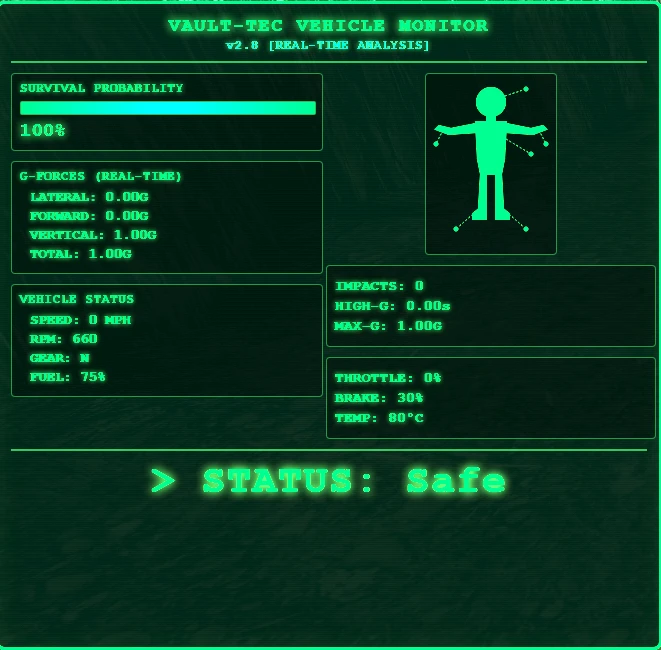
Crash Survival Rating Pro brings real-world crash biomechanics to BeamNG.drive! Using actual NATO and NHTSA research standards, this mod calculates your survival probability in real-time based on the G-forces you're experiencing.
What Makes This Special?
Scientifically Accurate
- Built on NATO RTO-EN-HFM-113 and NHTSA FMVSS 208 crash test standards
- Direction-specific injury modeling (lateral impacts are WAY more dangerous than frontal!)
- Accounts for sustained G-force exposure using the Wayne State Tolerance Curve
- Real biomechanical thresholds based on human anatomy
- 3-Axis G-Force Tracking: Lateral, longitudinal, and vertical forces analyzed independently
- 6 Injury Levels: Safe → Minor → Moderate → Severe → Critical → Fatal
- Impact Counter: Automatically detects discrete crashes
- Peak G-Force Records: See the maximum forces you've survived
- Duration Tracking: Sustained high-G events are more dangerous
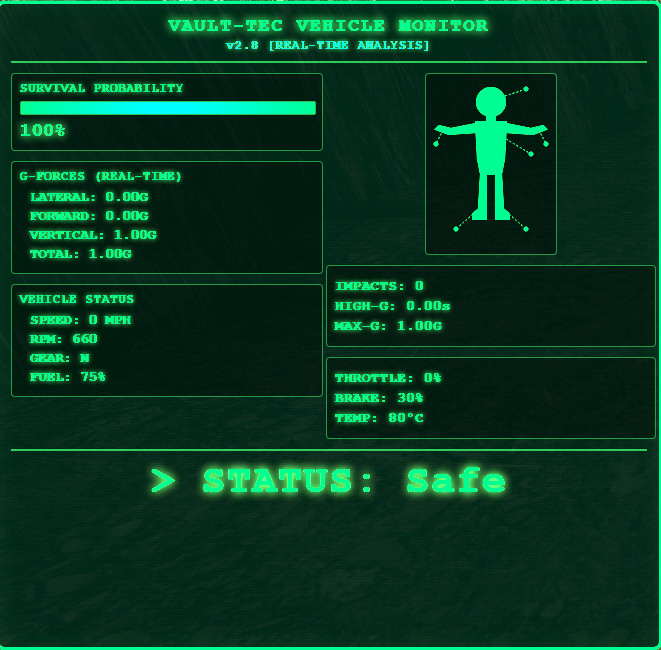
- Retro Pip-Boy inspired interface with authentic CRT scanline effects
- Animated Vault Boy figure that changes color based on injury severity
- Phosphor green glow with that classic post-apocalyptic vibe
- Pulsing warnings for critical/fatal injury states
The mod reads acceleration data directly from BeamNG's physics engine and converts it to G-forces. It then applies real-world biomechanical models to estimate injury probability:
Example Thresholds:
- Lateral (side) impact at 25G: High risk of fatal injury (organs exposed, no crumple zone)
- Frontal impact at 45G: Serious chest trauma likely, but survivable with restraints
- Vertical impact at 40G: Catastrophic spinal compression
Features at a Glance
✅ Real-time survival probability (0-100%) ✅ Live 3-axis G-force display ✅ Automatic impact detection and counting ✅ Vehicle telemetry (speed, RPM, gear, fuel, throttle, brake, temp) ✅ Peak G-force tracking across all axes ✅ Duration monitoring for sustained high-G events ✅ Console logging for detailed crash analysis ✅ Lightweight and performance-friendly
Educational Value
Ever wonder why race cars have side-impact protection? Or why F1 drivers can survive 50G+ frontal crashes but 25G lateral hits are extremely dangerous?
This mod demonstrates real crash biomechanics:
- Lateral tolerance: ~12G safe limit (poor human tolerance to side impacts)
- Longitudinal tolerance: ~25G safe limit (modern restraints help significantly)
- Vertical tolerance: ~15G safe limit (spinal compression risk)
Installation
- Download the mod
- Extract to: %LOCALAPPDATA%/BeamNG.drive/[version]/mods/
- Restart BeamNG or reload mods (Ctrl+Shift+R)
- Press F11 → Select "Crash Survival Rating" to activate
Reset your vehicle (I key) to clear crash data and start fresh Check the console (~ key) for detailed impact analysis logs Try different crash scenarios - front vs side vs rollover impacts have very different survivability Compare vehicles - better crash structures = better survival ratings
Technical Details
- Update Rate: 20Hz Lua backend, 30Hz UI frontend
- Impact Detection: 200ms cooldown, 5G threshold with rise detection
- Performance: Negligible - optimized for real-time calculations
- Compatibility: BeamNG.drive 0.27+, no conflicts
Q: Is this realistic? A: The G-force thresholds are based on real crash research, but remember BeamNG is a game. Survival estimates assume ideal conditions (proper seatbelt, modern vehicle, healthy adult). Real crashes have many variables.
Q: Why does lateral (side) impact hurt my rating so much? A: Humans tolerate side impacts very poorly compared to frontal crashes. There's no crumple zone protecting your torso, and your organs are directly exposed to lateral forces. This is why side-impact protection is so important in real cars!
Q: Can I survive 100G crashes? A: In BeamNG, sure! In real life, absolutely not. The highest recorded survivable crash was ~180G for a very brief moment (0.01s) in NASCAR. Sustained forces above 50-60G are generally unsurvivable.
Q: Does vehicle choice matter? A: Yes! Vehicles with better crash structures will deform more gradually, reducing peak G-forces. A modern car with crumple zones will show better survival ratings than a rigid vintage car in the same crash.
Disclaimer
This mod is for entertainment and education only. The survival estimates are based on research data but should NOT be used for real-world safety assessment. Always wear your seatbelt and drive safely in real life!
Credits
Research:
- NATO RTO-EN-HFM-113 (Biomechanics of Impact Injury)
- NHTSA FMVSS 208 (Occupant Crash Protection)
- Wayne State University (Head Injury Criterion)
- minMAX420
- Fallout series (Vault-Tec/Pip-Boy aesthetic)
If you enjoy this mod, please:
- ⭐ Leave a rating
- Share your crash screenshots
- Report any bugs in the discussion thread
v2.0 - Current
- Renamed to "Crash Survival Rating Pro"
- Enhanced injury classification
- Improved biomechanical calculations
- Better worst-case state tracking
Videos


Direct Download Links
About Mod
| Latest Version | 3.0 |
| Game | BeamNG.drive |
| Category | Other |
| Game Version | 0.37.x |
| Downloads | 7109 |
| Created | 10 months ago |
| Last Updated | 10 months ago |
| Last Virus Scan |
0/97
More Details |
Download Latest Version
Version: 3.0Updated: 10 months ago
Total Size: 195.66 KB
![Ford Bronco [PACK]](https://temp2.modland.net/i/6abb8bc6ce51c/0_modland.jpg)



![Mack Anthem / Pinnacle [PACK]](https://temp2.modland.net/i/6aa50a7184eaa/6ab9344368d3b/0_modland.jpg)

I'm sure this will be a really cool mod, but right now it doesn't work at all.
@mindmatters Could you please upsate this mod to make sure it works in the latest becuase i have been trouble shooting for along time and it is still not working
UI app don't showing beacuse the mod is broken, even when i fixed it, it's still bad (I crashed the dragster into a tree and 54%)
Mod doesn't show in UI Apps. Downloaded it, kept it zipped, threw it into mods, the mod shows its installed via the in-game manager, but no UI app
@mommykhaos I'm having the exact same issue. I've downloaded the V.3 multiple times, but it just doesn't show up.
I downloaded from here and website both just dont show up in UI Apps i did everything right @mindmatters
I downloaded from here and website both just dont show up ;c
The mod does not work, It seems like an issue on the creator's end, I have restarted my game multiple times, removed all of my mods and the mod still has yet to work.
@mindmatters
@. V3 uploaded. Please try the new version when it’s approved. Hopefully today. I fully revamped v2.8. Updated install instructions also to help those with issues on v2.8.
ver 3 uploaded with new features. Enjoy when it posts!
@mindmatters https://youtu.be/gHvl5lA9oSk?si=Pfy0QKZQkp3OvQfB
Hello, I would like more information about the mod because I don't know where it is and how to open F11? And do I have to reactivate it every time I restart the game?
@Samoht64 good news. Yes it’s a very alpha idea. Solo dev here so will work to make it more compatible. Glad you got it working. I think it’s a simple dependency that’s missing. :)
@joe fixed in v3 :) DL from minmaxgg com mods
@mindmatters Thank you anyway for the incredible concept you gave us, and I had to fix it with ChatGPT, which works on my end.
@Samoht64 took me a couple hours to figure out this mod, had to literally go inside the files and put the Lua and Ui files into my BeamNG folder just for the mod to be ass. I cant even put the guy in critical condition even after throwing the car multiple times
@Samoht64 try our website. We uploaded there (v3) this morning for an alternative download location: minmaxgg com ==> mods
@mindmatters I can't wait to see what happens next, even if I can't see it in the apps.
@Samoht64 the approval process is taking longer but I have v3 (wicked version) posted there also. Still waiting on admins to approve on the main Beamng website :)
@mindmatters Okay, thank you, but I don't see it in the apps UI. Also, I haven't tested your mod, but it's a very nice concept you're proposing, and it's very well done. I wonder why you don't offer it on the BeamNG website. You would get a lot more help and things like that
@Samoht64 Please ignore the F11. Use the UI Apps button top right. Then edit the workspace in Freeroam. You should see it then unless another app is overlaid or is not compatible. I run it alogside 20 other mods without issues as my mod is suprt lighweight by design.
it doesnt show up at the ui apps
@schuf app enabled, restarted game client, etc?
Heya all, what issues are you seeing? I may have assumed on the UI/UX addition in the main panel. I’ll make a better how-to. Thanks for the feedback, I’m new to modding.
@Recxless_LBZ please read messages, others have resoved :)
@King Cool Guy 🖕🖕🖕🖕🖕🖕🖕🖕🖕🖕🖕🖕🖕🖕🖕🖕🖕 Click UIApps > Edit Apps (Make sure you are using the right Layout). Freeroam is the default layout. Then you will want to make sure you have the mod enabled in Beam.ng. In the Edit Apps UI/UX you will see alll the apps show up in a glass pane view to edit and move around. Hope that helps!
@mindmatters Hello, I am unable to find the option to enable the mod in the F11 menu, I think the only issue right now is that. I would recommend making the instructions more clear but it sounds like a really good mod.
@nate higgers, @Akj can one of you guys ask the creator? the videos dont work too
how to install coorrectly i tried pressing f11 and i get brought to world editor and i dont see this mod
can someone help
@nate higgers not working
@juanisrad fck u
@nate higgers i still dont see it
@Akj try and look in ui apps