LookAround - The Missing App 0.5

![Ford Bronco [PACK]](https://temp2.modland.net/i/6abb8bc6ce51c/0_modland.webp)
4/5,
4
votes
Updates
latest
Version
0.5
· LookAround 0.5 — the film-maker update
· BeamNG.drive
0.40.x
1 day ago
NEW
• Stabilization when zoomed: filters hand shake, stronger the more you zoom,
without delaying deliberate moves. Adjustable 0–200 % (pause menu).
• LED flashlight: one tap on the phone lights where you look. Power, beam
width and colour (warm to cold) in the phone settings.
• For video makers, right on the phone:
– Freeze: hold the framing while you move the phone; unfreeze carries on
without a jump.
– Level: ignore the phone's tilt for a straight horizon.
– Hide UI: clean shots without the HUD.
– Blur: depth of field with autofocus on what you look at.
– Game speed: slow motion from 100 % down to 5 %.
Everything goes back to normal when the phone disconnects.
IMPROVED
• Zoom keeps your frame rate up: detail is lowered while zoomed
(can be turned off in the pause menu).
• Max zoom now matches what the game can render (BeamNG stops at a 10° view).
Works on Windows and Linux, BeamNG.drive 0.40.3.
• Stabilization when zoomed: filters hand shake, stronger the more you zoom,
without delaying deliberate moves. Adjustable 0–200 % (pause menu).
• LED flashlight: one tap on the phone lights where you look. Power, beam
width and colour (warm to cold) in the phone settings.
• For video makers, right on the phone:
– Freeze: hold the framing while you move the phone; unfreeze carries on
without a jump.
– Level: ignore the phone's tilt for a straight horizon.
– Hide UI: clean shots without the HUD.
– Blur: depth of field with autofocus on what you look at.
– Game speed: slow motion from 100 % down to 5 %.
Everything goes back to normal when the phone disconnects.
IMPROVED
• Zoom keeps your frame rate up: detail is lowered while zoomed
(can be turned off in the pause menu).
• Max zoom now matches what the game can render (BeamNG stops at a 10° view).
Works on Windows and Linux, BeamNG.drive 0.40.3.
You have probably seen that nice QR code in BeamNG's options, the one you
scan with your phone. You scanned it. And... nothing. No official app, a
link that goes nowhere. Your phone went back into your pocket, slightly
offended.
So we finished the job. Well, to be honest: a human had the idea and did the
in-game testing, and an AI (Claude, by Anthropic) wrote the code, dug
through the engine and did the maths. It would like to point out that it
did not need a QR code for that.
WHAT IT DOES
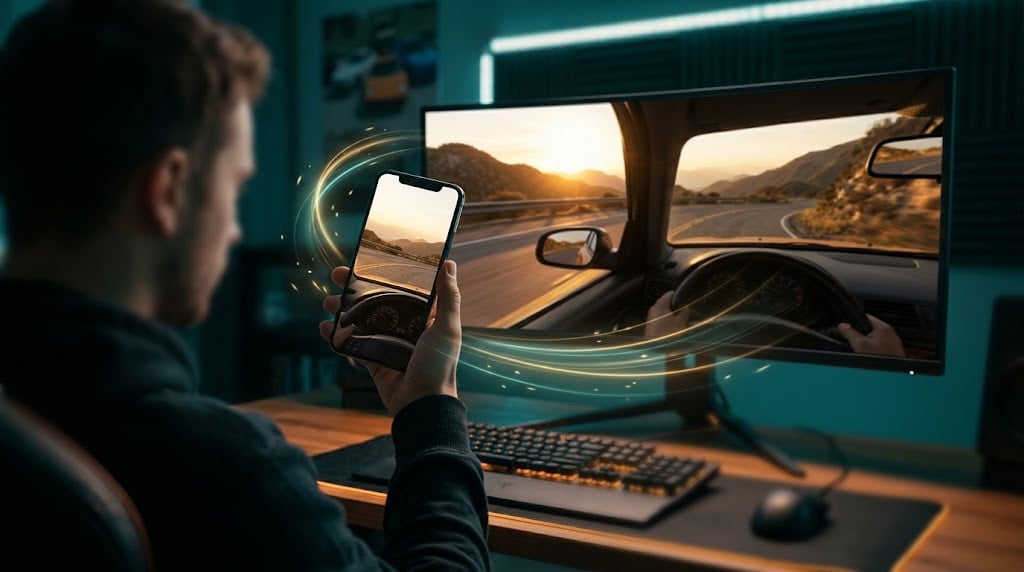
* Turn your phone: the game camera looks the same way (left/right,
up/down, tilt). Like a TrackIR.
* Pinch the screen: zoom (0.6x to 6x, up to 12x in the settings). Double
tap: recentre. Pause button: normal view.
* Works on every view: interior, chase, hood, free camera, and other mods'
views. It is applied on top of the current view, exactly like the game's
own TrackIR support.
* NO APP TO INSTALL (yes, for "The Missing App", that is the joke): the
game itself serves the page to your phone over HTTPS (required for
browsers to give access to the gyroscope). A QR code that actually works
is in the pause menu, "LookAround" tab.
* Phone disconnected or screen off: the view eases back to centre. Bogus
values (exploding car...) are ignored.
* Settings on the phone: left/right and up/down sensitivity, roll, max
zoom, invert axes. In game: smoothing, port.
* Phone page in English, French and Japanese.
INSTALL
1. Copy the mod zip for your system ("LookAround 0.4 Windows.zip" or
"LookAround 0.4 Linux.zip"), as is, into BeamNG's mods folder. Do
not unzip it, do not put it inside another zip, only one of the two.
2. Set up the phone connection, once (see below).
3. Load a map. Pause menu > LookAround tab > scan the QR code (phone on
the same Wi-Fi as the PC).
4. The browser says "connection not private": expected, the certificate is
made by the game. Advanced > Proceed.
5. Tap "Start", hold the phone like a window onto the game. That's it.
PHONE CONNECTION
BeamNG's web server only listens to the PC itself, so the phone cannot
reach it directly. A tiny relay forwards port 8096 to the game (8095). The
QR code already points to 8096. Keep the relay files anywhere you like,
NOT in the mods folder.
WINDOWS: double-click "LookAround relay.bat", accept the admin prompt,
press I. It uses Windows' own port forwarding and opens port 8096 in the
firewall for your local network only. Nothing to install, nothing to
leave running, and it stays set after a reboot. Run it again and press R
to remove it.
LINUX: run the relay (Python 3, nothing to install) and leave it running
while you play:
python3 lookaround_relay.py
COMMON ISSUES
* "No motion data" / "denied": allow motion sensors for the site (icon left
of the address > Site settings > Motion sensors). Brave: also lower
Shields. Chrome on Android works best.
* Page does not load: same Wi-Fi? not on mobile data? relay set up /
running? firewall?
* You changed the port in the game: Windows, edit GAMEPORT= at the top of
the .bat; Linux, python3 lookaround_relay.py <port+1> <port>.
Goes without saying: don't look at your phone while driving a real car.
scan with your phone. You scanned it. And... nothing. No official app, a
link that goes nowhere. Your phone went back into your pocket, slightly
offended.
So we finished the job. Well, to be honest: a human had the idea and did the
in-game testing, and an AI (Claude, by Anthropic) wrote the code, dug
through the engine and did the maths. It would like to point out that it
did not need a QR code for that.
WHAT IT DOES
* Turn your phone: the game camera looks the same way (left/right,
up/down, tilt). Like a TrackIR.
* Pinch the screen: zoom (0.6x to 6x, up to 12x in the settings). Double
tap: recentre. Pause button: normal view.
* Works on every view: interior, chase, hood, free camera, and other mods'
views. It is applied on top of the current view, exactly like the game's
own TrackIR support.
* NO APP TO INSTALL (yes, for "The Missing App", that is the joke): the
game itself serves the page to your phone over HTTPS (required for
browsers to give access to the gyroscope). A QR code that actually works
is in the pause menu, "LookAround" tab.
* Phone disconnected or screen off: the view eases back to centre. Bogus
values (exploding car...) are ignored.
* Settings on the phone: left/right and up/down sensitivity, roll, max
zoom, invert axes. In game: smoothing, port.
* Phone page in English, French and Japanese.
INSTALL
1. Copy the mod zip for your system ("LookAround 0.4 Windows.zip" or
"LookAround 0.4 Linux.zip"), as is, into BeamNG's mods folder. Do
not unzip it, do not put it inside another zip, only one of the two.
2. Set up the phone connection, once (see below).
3. Load a map. Pause menu > LookAround tab > scan the QR code (phone on
the same Wi-Fi as the PC).
4. The browser says "connection not private": expected, the certificate is
made by the game. Advanced > Proceed.
5. Tap "Start", hold the phone like a window onto the game. That's it.
PHONE CONNECTION
BeamNG's web server only listens to the PC itself, so the phone cannot
reach it directly. A tiny relay forwards port 8096 to the game (8095). The
QR code already points to 8096. Keep the relay files anywhere you like,
NOT in the mods folder.
WINDOWS: double-click "LookAround relay.bat", accept the admin prompt,
press I. It uses Windows' own port forwarding and opens port 8096 in the
firewall for your local network only. Nothing to install, nothing to
leave running, and it stays set after a reboot. Run it again and press R
to remove it.
LINUX: run the relay (Python 3, nothing to install) and leave it running
while you play:
python3 lookaround_relay.py
COMMON ISSUES
* "No motion data" / "denied": allow motion sensors for the site (icon left
of the address > Site settings > Motion sensors). Brave: also lower
Shields. Chrome on Android works best.
* Page does not load: same Wi-Fi? not on mobile data? relay set up /
running? firewall?
* You changed the port in the game: Windows, edit GAMEPORT= at the top of
the .bat; Linux, python3 lookaround_relay.py <port+1> <port>.
Goes without saying: don't look at your phone while driving a real car.
Direct Download Links
About Mod
| Latest Version | 0.5 |
| Game | BeamNG.drive |
| Category | Other |
| Game Version | 0.40.x |
| Downloads | 498 |
| Created | 1 day ago |
| Last Updated | 1 day ago |
Download Latest Version
Version: 0.5Updated: 1 day ago
Total Size: 50.3 KB LookAround 0.5 Linux_modland.zip direct download · 20.71 KB · added 1 day ago LookAround 0.5 Windows_modland.zip direct download · 20.71 KB · added 1 day ago readme + tools_modland.zip direct download · 8.87 KB · added 1 day ago
![Ford Bronco [PACK]](https://temp2.modland.net/i/6abb8bc6ce51c/0_modland.jpg)

how do i use it?
@loupp thanks
@1622009 download the zip for windows or linux, this is the mod, it go to the mod folder.
the zip called "tools + readme" you open it, if you are on windows you launch the .bat file, the.py file is for linux.
In the game, go to the pause menu, LookAround tab, you scan the qrcode, open the link and that's it.
For 0.6 I’ve added the cannon from the game, which fires 850kg steel balls straight at wherever you’re looking.
IS THIS SAFE AN SOMEONE TEST IF ITS GOOOD?
@sacred yes in
readme + tools_modland.zip
becuz like most mod have inside of the file a readme
@loupp in the file ?
@sacred no? there is a readme
tell me like this >?????>??????>?????
@loupp do i go beamng>content>???????
@sacred mod zip as usual in the mod folder. Then you launch the bat file from the tools zip in you are on windows. Launch the .py file if you are on linux.
@loupp which beamng file i put it in
@sacred is it working?
@loupp w mod man i use arch linux thank you
@kurkn47 there is no app, only your web browser, and you can open and read the bridge bat or py
0.5 will have image stabilizer and light ! :)
Does it work on Android or only iPhone?
@Original Even on Microsoft phones i guess, you only need a web explorer , wifi and gyros