🚗 Tow Bar — la barre de remorquage rigide pour BeamNG.drive
Salut à tous !
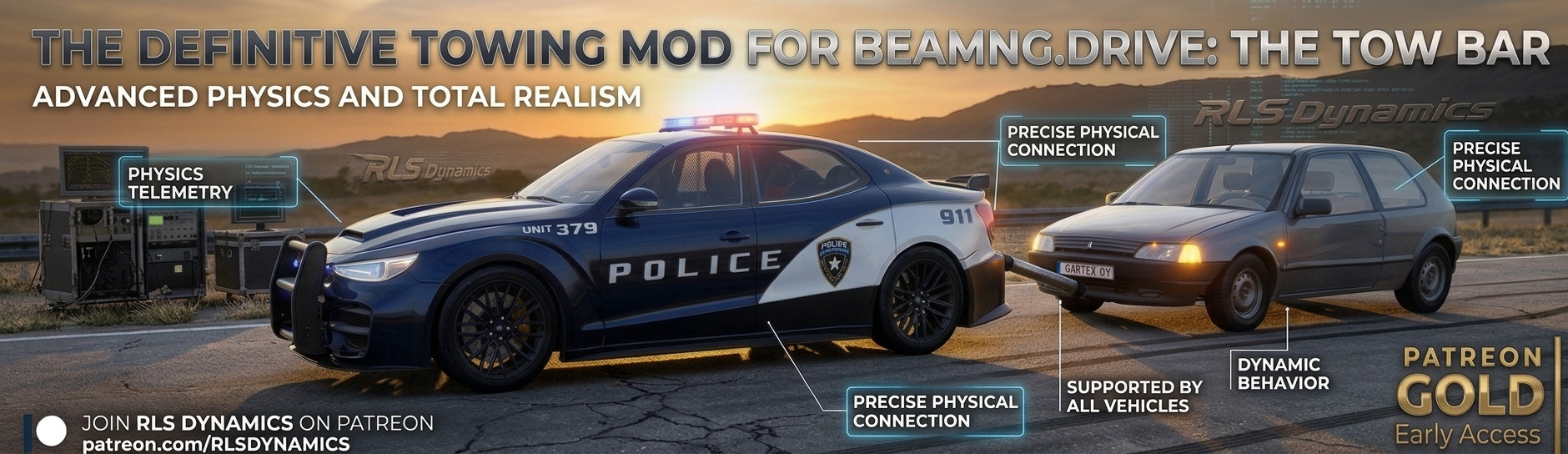
Aujourd'hui je vous partage Tow Bar, un mod de remorquage pour BeamNG.drive : une barre rigide qui relie deux voitures et permet de tracter n'importe quel véhicule avec une seule touche.
Fini les remorquages bricolés où la voiture de derrière part en travers : ici, la barre est un vrai objet physique avec les couplers natifs de BeamNG. C'est le jeu qui gère la physique, pas un script approximatif.
✨ Les points forts
-
Accrochage automatique : on s'approche, on appuie, la barre se clipse entre l'arrière du tracteur et l'avant de la voiture remorquée.
-
La voiture remorquée suit dans les virages : ses roues avant braquent automatiquement dans l'axe de la barre.
-
Compatible avec toutes les voitures, vanilla ou moddées. Aucune modification des véhicules n'est nécessaire.
-
Ancrage sur le châssis : le point d'accroche est choisi sur un nœud solide (crochet d'attelage officiel, longeron, traverse), pas sur la peau du pare-chocs.
-
Mesh 3D rigide : la barre ne se déforme pas et ne « danse » pas.
-
Frein à main de la remorquée desserré automatiquement à l'accrochage.
-
Compatible RLS Career Overhaul (prop ignoré par le garage, la concession et la minimap).
-
Détachement automatique si une voiture est supprimée ou remplacée (changement de carte, garage…).
⚠️ IMPORTANT : il faut régler une touche
Le mod n'impose aucune touche par défaut, volontairement, pour ne pas écraser vos réglages existants.
Il faut donc aller dans :
Options → Contrôles → Barre de remorquage / Tow Bar → « Tow Bar - Attacher / Détacher »
et assigner la touche de votre choix (n'importe laquelle, y compris un bouton de manette).
👉 Sans cette étape, la touche ne fera rien : c'est la seule manipulation obligatoire.
📦 Installation
-
Téléchargez towbar.zip.
-
Placez-le dans votre dossier mods/ : Documents/BeamNG.drive/mods/ (ou AppData/Local/BeamNG/BeamNG.drive/current/mods/).
-
Lancez BeamNG.drive et vérifiez que le mod est bien activé.
-
Assignez votre touche (voir ci-dessus).
🕹️ Utilisation
-
Placez la voiture qui doit tirer devant, et la voiture à remorquer derrière, nez vers l'arrière de la première (moins de ~4 m entre les pare-chocs, à peu près dans l'axe).
-
Approchez-vous (à pied ou en voiture) et appuyez sur votre touche : la barre s'accroche automatiquement.
-
Montez dans la voiture de devant et roulez : la remorquée suit, y compris dans les virages.
-
Réappuyez sur la touche pour détacher.
💡 Bon à savoir
-
Mettez la voiture remorquée au point mort avant de la tracter : si une vitesse est engagée, le frein moteur la retient fortement.
-
La barre peut rentrer légèrement dans le pare-chocs : c'est normal, c'est le prix d'un ancrage sur le châssis plutôt que sur la peau du pare-chocs.
-
Fonctionne en solo. En multijoueur (BeamMP), le visuel et les forces ne sont pas synchronisés.
Bon remorquage, et n'hésitez pas à me dire avec quelles voitures vous l'utilisez — je peux ajuster les points d'accroche si une caisse pose problème. 🚗💨
🚗 Tow Bar — The Rigid Tow Bar for BeamNG.drive
Hey everyone!
Today I'm sharing Tow Bar, a towing mod for BeamNG.drive: a rigid bar that connects two cars and lets you tow any vehicle with a single key.
No more makeshift towing where the car behind swings sideways: here the bar is a real physics object using BeamNG's native couplers. The game handles the physics, not some approximate script.
✨ Highlights
-
Automatic hookup: get close, press the key, and the bar snaps between the rear of the towing car and the front of the towed car.
-
The towed car follows through corners: its front wheels automatically steer along the bar's axis.
-
Works with any car, vanilla or modded. No vehicle edits required.
-
Chassis mounting: the attach point is picked on a solid node (official tow hook, frame rail, crossmember), not on the bumper skin.
-
Rigid 3D mesh: the bar doesn't bend or "dance" around.
-
The towed car's parking brake is released automatically on hookup.
-
Compatible with RLS Career Overhaul (the prop is ignored by the garage, dealership, and minimap).
-
Automatically detaches if a car is deleted or replaced (map change, garage, etc.).
⚠️ IMPORTANT: You must bind a key
The mod deliberately does not assign a default key, so it won't overwrite your existing bindings.
You need to go to:
Options → Controls → Tow Bar → "Tow Bar - Attach / Detach"
and assign the key of your choice (any key, including a controller button).
👉 Without this step, the key will do nothing — it's the only required setup.
📦 Installation
-
Download towbar.zip.
-
Place it in your mods/ folder: Documents/BeamNG.drive/mods/ (or AppData/Local/BeamNG/BeamNG.drive/current/mods/).
-
Launch BeamNG.drive and make sure the mod is enabled.
-
Bind your key (see above).
🕹️ How to use
-
Place the car that will tow in front, and the car to be towed behind it, nose facing the rear of the first one (less than ~4 m between bumpers, roughly in line).
-
Approach it (on foot or in a car) and press your key: the bar attaches automatically.
-
Get in the front car and drive: the towed car follows, including through corners.
-
Press the key again to detach.
💡 Good to know
-
Put the towed car in neutral before towing it: if a gear is engaged, engine braking will hold it back hard.
-
The bar may sink slightly into the bumper: that's normal — it's the trade-off for mounting on the chassis rather than the bumper skin.
-
Works in single-player. In multiplayer (BeamMP), the visual and forces are not synchronized.
Credits: mesh by Scepka (Towing Triangle), mod and scripts by FlowUP.
Happy towing — and feel free to tell me which cars you're using it with, so I can adjust the attach points if a specific vehicle gives you trouble. 🚗💨
External Download Links:
About Mod
| Latest Version | 1 |
| Game | BeamNG.drive |
| Category | Other |
| Game Version | 0.40.x |
| Downloads | 14 |
| Created | 10 hours ago |