




0/5,
0
votes
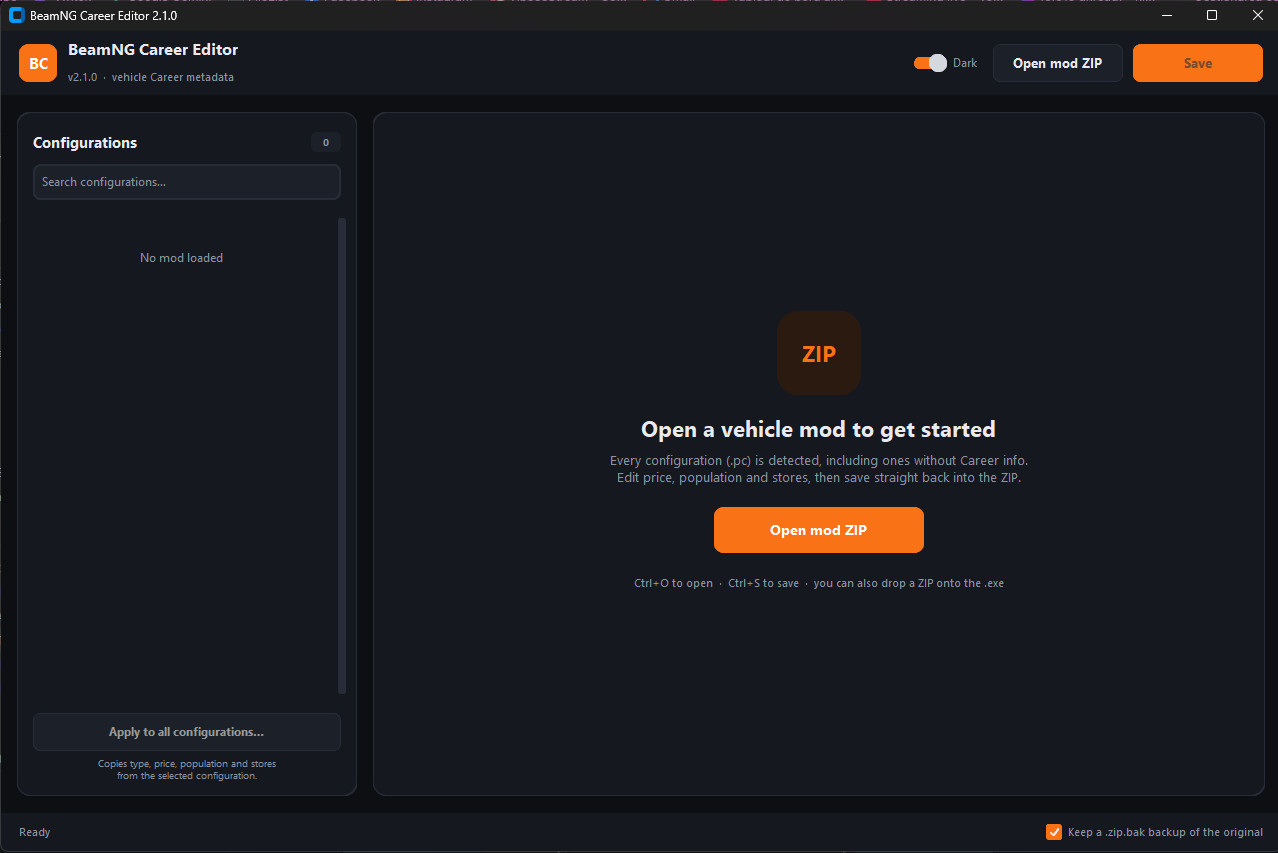
Edit the Career info of any BeamNG.drive vehicle mod without unpacking it.
Many vehicle mods have wrong prices, are missing from the dealerships, or have no Career info at all. This tool fixes that in a few clicks. Open the mod ZIP, change what you want, save, and you’re done.
Features
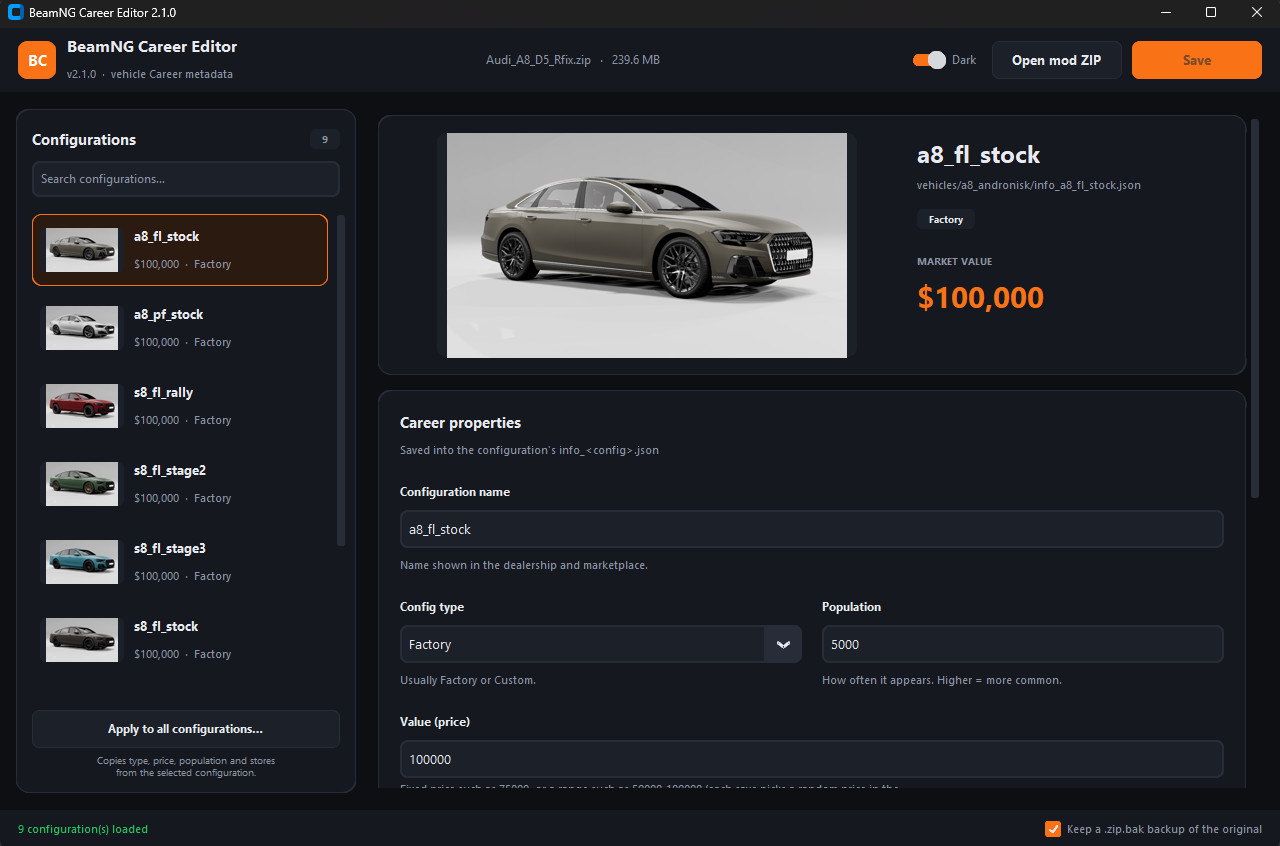
Edit every configuration: name, config type, price, population and the stores that sell it.
Price ranges: enter a range like 50000-100000 and each configuration gets a random price inside it. Good for a more realistic used-car market.
Apply to all: copy price, type, population and stores from one configuration to every configuration of the mod at once.
Detects missing Career info: finds .pc configurations with no info file and creates it for you.
Safe saving:
It makes an automatic backup of the original mod (.zip.bak, which BeamNG ignores).
Only the configurations you changed are written. Everything else stays untouched.
It checks your values as you type and won’t save invalid ones.
Works with messy mods: handles comments in the JSON, ZIPs with an extra top-level folder, and info files that are broken or missing fields.
Clean interface: thumbnails for every configuration, search for big mod packs, dark and light themes.
Handy shortcuts: Ctrl+O to open, Ctrl+S to save, or drag a mod ZIP onto the .exe.
How to use
Extract the archive and run BeamNG_Career_Editor_2.1.0.exe. No installation needed.
Click Open mod ZIP and choose a vehicle mod.
Select a configuration and edit its fields.
Click Save. The changes are written straight into the mod ZIP.
Notes
Close BeamNG before saving if the mod is loaded in the game.
Windows SmartScreen may warn about an unknown publisher because the .exe is not code-signed. Click More info → Run anyway.
Windows only.
Feedback and bug reports are welcome!
Many vehicle mods have wrong prices, are missing from the dealerships, or have no Career info at all. This tool fixes that in a few clicks. Open the mod ZIP, change what you want, save, and you’re done.
Features
Edit every configuration: name, config type, price, population and the stores that sell it.
Price ranges: enter a range like 50000-100000 and each configuration gets a random price inside it. Good for a more realistic used-car market.
Apply to all: copy price, type, population and stores from one configuration to every configuration of the mod at once.
Detects missing Career info: finds .pc configurations with no info file and creates it for you.
Safe saving:
It makes an automatic backup of the original mod (.zip.bak, which BeamNG ignores).
Only the configurations you changed are written. Everything else stays untouched.
It checks your values as you type and won’t save invalid ones.
Works with messy mods: handles comments in the JSON, ZIPs with an extra top-level folder, and info files that are broken or missing fields.
Clean interface: thumbnails for every configuration, search for big mod packs, dark and light themes.
Handy shortcuts: Ctrl+O to open, Ctrl+S to save, or drag a mod ZIP onto the .exe.
How to use
Extract the archive and run BeamNG_Career_Editor_2.1.0.exe. No installation needed.
Click Open mod ZIP and choose a vehicle mod.
Select a configuration and edit its fields.
Click Save. The changes are written straight into the mod ZIP.
Notes
Close BeamNG before saving if the mod is loaded in the game.
Windows SmartScreen may warn about an unknown publisher because the .exe is not code-signed. Click More info → Run anyway.
Windows only.
Feedback and bug reports are welcome!
External Download Links:
About Mod
| Latest Version | 1.2 |
| Game | BeamNG.drive |
| Category | Other |
| Game Version | 0.40.x |
| Tags | UI |
| Downloads | 2 |
| Created | 1 hour ago |
You Might Also Like »








0 Comments
There are no comments. Be first to comment!