VOX Road Refuel - Jerrycan Refueling Anywhere v1.0

![Mack Anthem / Pinnacle [PACK]](https://temp2.modland.net/i/6aa50a7184eaa/6ab9344368d3b/0_modland.webp)


0/5,
0
votes
Description
VOX Road Refuel is a small UI app for BeamNG.drive that lets you carry realistic jerrycans and refuel your vehicle anywhere, without resetting or repairing it.
It was made for road trips on maps that do not have fuel stations, especially when playing with friends or doing roleplay-style driving. Instead of teleporting to a gas station or resetting the car, you can stop on the side of the road, turn the ignition off, and slowly pour fuel into the tank from your jerrycans.
Features
- Carry 5 L, 10 L, or 20 L steel jerrycans.
- Choose how many jerrycans you want to load.
- Realistic fuel weight using gasoline density.
- Optional experimental vehicle weight simulation.
- Refuel progressively by holding a button.
- No instant refuel, unless the tank receives fuel progressively from your carried supply.
- Refueling only works when the vehicle is stopped or almost stopped.
- Refueling only works when the ignition / engine is off.
- Fuel used from the jerrycan is removed from your carried fuel supply.
- If the fuel tank is full, refueling locks automatically to avoid wasting fuel.
- Does not reset, repair, or respawn the vehicle.
How it works
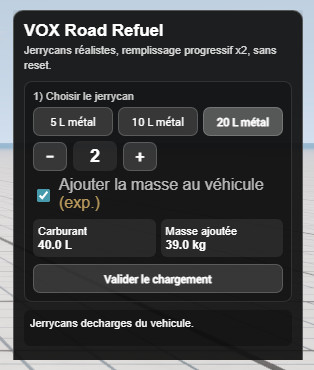
The mod adds a UI app called VOX Road Refuel. First, you choose the type and number of jerrycans you want to carry. Once confirmed, the loadout is locked. After that, you can stop your vehicle, turn off the ignition, and hold the Hold to refuel button to pour fuel into the tank.
The fuel is added gradually at 0.50 L/s, so a 20 L jerrycan takes about 40 seconds to empty.
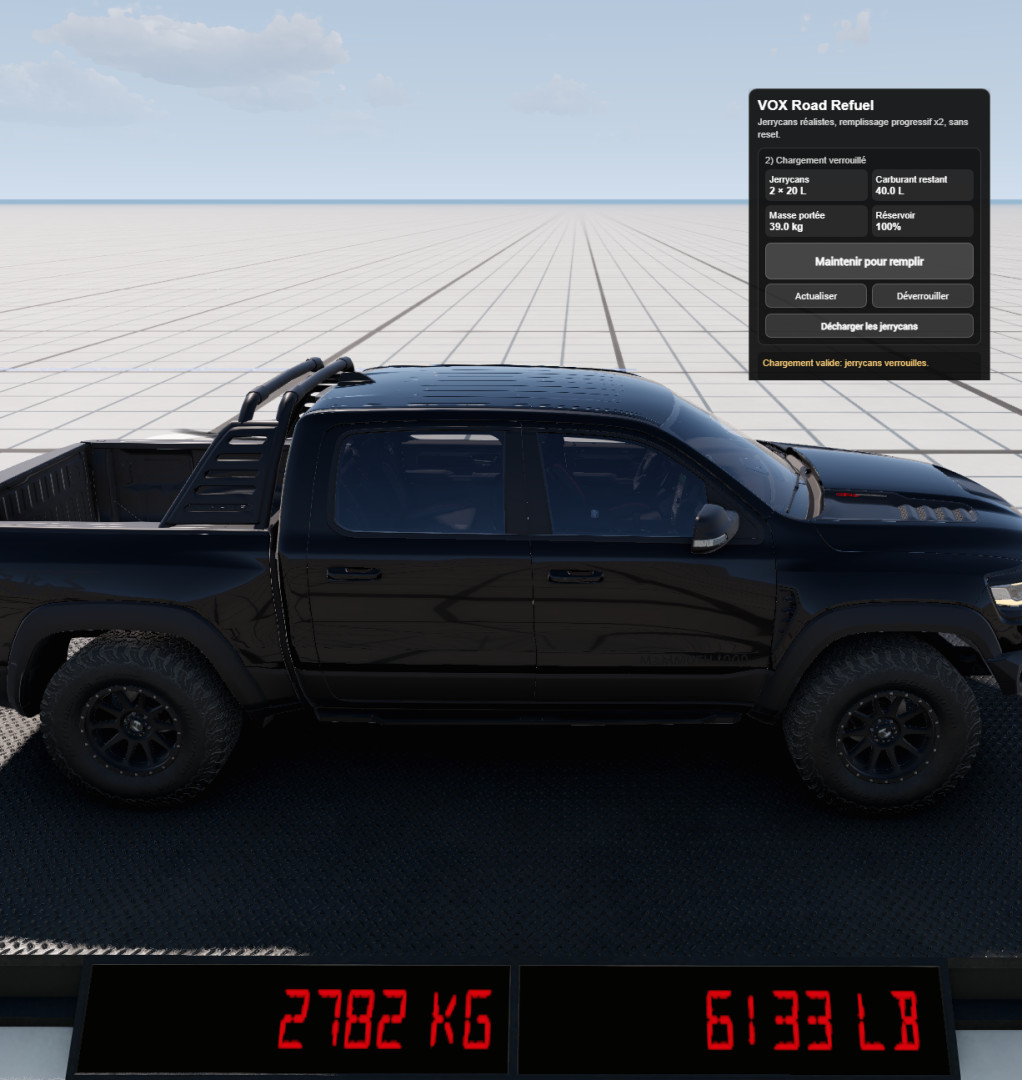
The vehicle’s own fuel tank is filled directly, while the fuel amount is deducted from your carried jerrycans. If the experimental weight option is enabled, the carried jerrycans and remaining fuel also add weight to the vehicle.
Installation Instructions
- Download the .zip.
- Place it in your BeamNG user mods folder:
SteamLibrary/beamuser/current/mods
or your current user folder mods directory, depending on your BeamNG installation.
- Start the game.
- Open the UI Apps menu.
- Add VOX Road Refuel to your screen.
- Choose your jerrycans, confirm the loadout, then refuel when stopped with ignition off.
VOX Road Refuel is a small UI app for BeamNG.drive that lets you carry realistic jerrycans and refuel your vehicle anywhere, without resetting or repairing it.
It was made for road trips on maps that do not have fuel stations, especially when playing with friends or doing roleplay-style driving. Instead of teleporting to a gas station or resetting the car, you can stop on the side of the road, turn the ignition off, and slowly pour fuel into the tank from your jerrycans.
Features
- Carry 5 L, 10 L, or 20 L steel jerrycans.
- Choose how many jerrycans you want to load.
- Realistic fuel weight using gasoline density.
- Optional experimental vehicle weight simulation.
- Refuel progressively by holding a button.
- No instant refuel, unless the tank receives fuel progressively from your carried supply.
- Refueling only works when the vehicle is stopped or almost stopped.
- Refueling only works when the ignition / engine is off.
- Fuel used from the jerrycan is removed from your carried fuel supply.
- If the fuel tank is full, refueling locks automatically to avoid wasting fuel.
- Does not reset, repair, or respawn the vehicle.
How it works
The mod adds a UI app called VOX Road Refuel. First, you choose the type and number of jerrycans you want to carry. Once confirmed, the loadout is locked. After that, you can stop your vehicle, turn off the ignition, and hold the Hold to refuel button to pour fuel into the tank.
The fuel is added gradually at 0.50 L/s, so a 20 L jerrycan takes about 40 seconds to empty.
The vehicle’s own fuel tank is filled directly, while the fuel amount is deducted from your carried jerrycans. If the experimental weight option is enabled, the carried jerrycans and remaining fuel also add weight to the vehicle.
Installation Instructions
- Download the .zip.
- Place it in your BeamNG user mods folder:
SteamLibrary/beamuser/current/mods
or your current user folder mods directory, depending on your BeamNG installation.
- Start the game.
- Open the UI Apps menu.
- Add VOX Road Refuel to your screen.
- Choose your jerrycans, confirm the loadout, then refuel when stopped with ignition off.
External Download Links:
Direct Download Links
About Mod
| Latest Version | v1.0 |
| Game | BeamNG.drive |
| Category | Other |
| Game Version | 0.38.x |
| Downloads | 175 |
| Created | 3 months ago |
You Might Also Like »
![Mack Anthem / Pinnacle [PACK]](https://temp2.modland.net/i/6aa50a7184eaa/6ab9344368d3b/0_modland.jpg)






_modland.jpg)

0 Comments
There are no comments. Be first to comment!