Wheel Preview v1.1.1


![Ford Bronco [PACK]](https://temp2.modland.net/i/6abb8bc6ce51c/0_modland.jpg)

4/5,
3
votes
Description
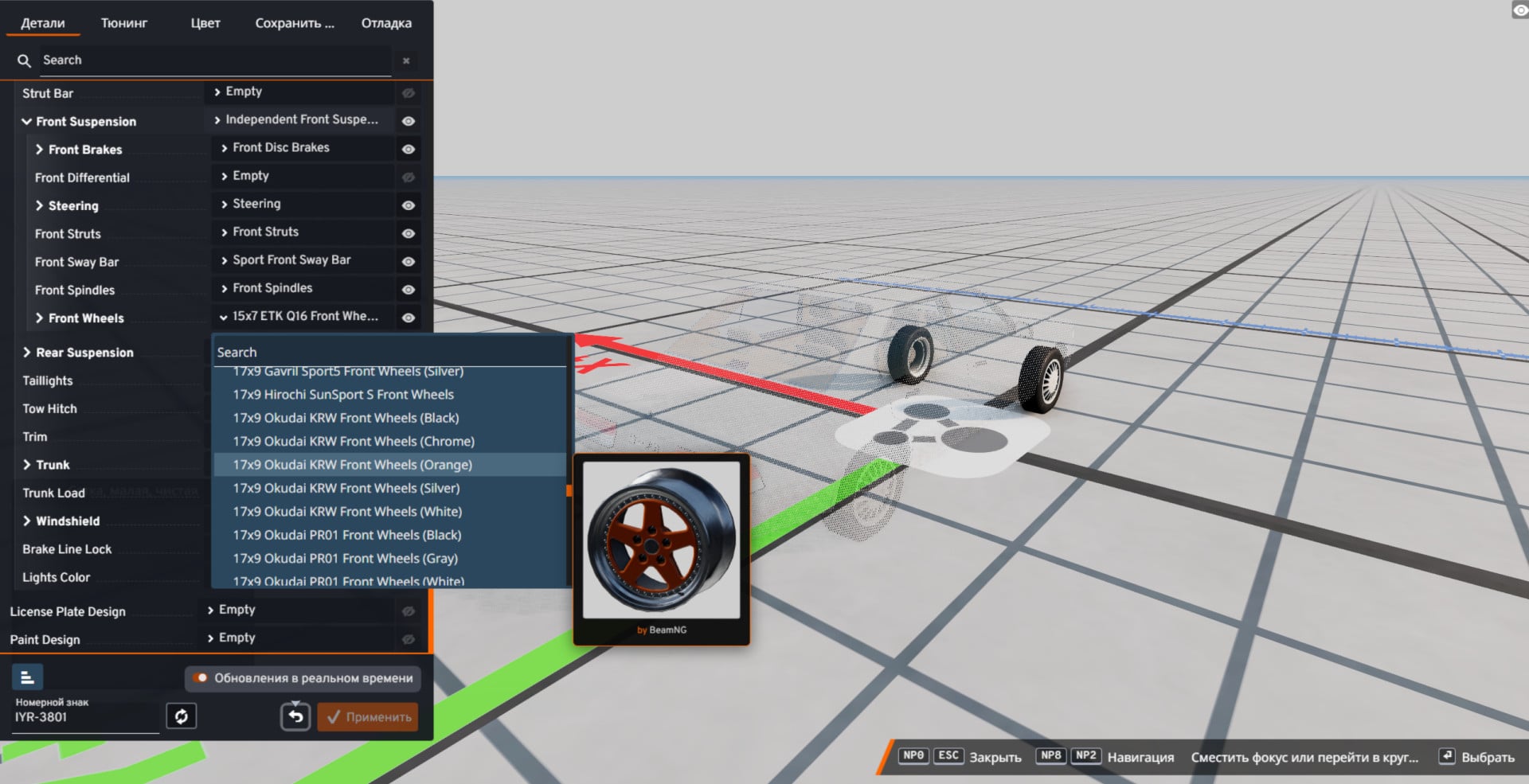
Preview your wheels before installing them. This mod adds a preview tooltip to the Parts Selector, allowing you to see exactly how a wheel looks before equipping it. No more guessing what a wheel design looks like.
Features
- Wheel Preview. Hover over any wheel in the Parts Selector dropdown to display a live preview.
- Over 1,000 built-in previews. Includes every stock wheel along with many popular wheel packs, all pre-rendered and ready to use.
- Author information. Displays whether the wheel was created by BeamNG or a mod author.
- Mod support. Generate previews for custom wheel packs with a single console command.
- Mod author support. Include preview images in your own wheel mods for automatic compatibility.
- Lightweight. The complete preview library is only about 13 MB.
Supported Wheel Packs
The following Repository mods are supported out of the box:
- KLJP Wheels
- D-Troxx Wheel Pack
- D-Troxx 6 & 8 Lug Pack
- KyushaVault
- Chodspeed Wheel Pack
- Klassiker Wheels (KLK)
- blkfxx Wheels Pack
- Silver Wheel Pack
Truck and semi-truck wheels are not supported yet.
Known Issues
- This mod is still experimental and some issues may occur.
- Preview quality depends on the wheel model and materials. Some custom wheels may display minor visual artifacts.
- Only wheel previews are currently supported.
- Completely black wheels can be difficult to distinguish, although studio lighting improves visibility.
- Truck and semi-truck wheels cannot be previewed yet.
- On Linux, self-generated previews may have slight lighting differences depending on your system configuration. Built-in previews are not affected.
Installation Instructions
- Install the mod.
- Spawn any vehicle.
- Open the Parts Config menu (Ctrl + W).
- Hover over any wheel in the dropdown menu to display its preview automatically.
Generate Previews for Custom Wheel Mods
If you install a wheel pack that is not already supported:
- Spawn the Part Info Wheel Rig from the Vehicle Selector.
- Open the GE Console with the ~ key.
- Run the following command: extensions.partInfo.generateAllFocus()
The rig will automatically cycle through every installed wheel and generate clean preview images. To regenerate a single wheel preview, use: extensions.partInfo.generateCurrent()
Generated previews are saved in: settings/partInfoPreviews/
For Mod Authors
- Install Wheel Preview together with your wheel mod.
- Generate preview images using the commands above.
- Copy the generated images from settings/partInfoPreviews/ into your mod's art/partInfo/ folder. Both PNG and AVIF formats are supported.
- Publish your mod. Wheel previews will work automatically for all Wheel Preview users.
For the complete modding guide, run: extensions.partInfo.modderGuide()
Credits
- Author: fylhtq7779
- D-Troxx, for allowing the preview rig to be based on the Single Wheel mod.
- Doug.N87, for the single-wheel prop concept and detailed feedback.
- N_S, for the idea of using vdata for wheel mesh detection.
- DaddelZeit, ItsJustCurtis, and crashmaster, for ideas, feedback, and troubleshooting assistance.
- Creamgravy, for the Green Screen map used during early preview generation.
Preview your wheels before installing them. This mod adds a preview tooltip to the Parts Selector, allowing you to see exactly how a wheel looks before equipping it. No more guessing what a wheel design looks like.
Features
- Wheel Preview. Hover over any wheel in the Parts Selector dropdown to display a live preview.
- Over 1,000 built-in previews. Includes every stock wheel along with many popular wheel packs, all pre-rendered and ready to use.
- Author information. Displays whether the wheel was created by BeamNG or a mod author.
- Mod support. Generate previews for custom wheel packs with a single console command.
- Mod author support. Include preview images in your own wheel mods for automatic compatibility.
- Lightweight. The complete preview library is only about 13 MB.
Supported Wheel Packs
The following Repository mods are supported out of the box:
- KLJP Wheels
- D-Troxx Wheel Pack
- D-Troxx 6 & 8 Lug Pack
- KyushaVault
- Chodspeed Wheel Pack
- Klassiker Wheels (KLK)
- blkfxx Wheels Pack
- Silver Wheel Pack
Truck and semi-truck wheels are not supported yet.
Known Issues
- This mod is still experimental and some issues may occur.
- Preview quality depends on the wheel model and materials. Some custom wheels may display minor visual artifacts.
- Only wheel previews are currently supported.
- Completely black wheels can be difficult to distinguish, although studio lighting improves visibility.
- Truck and semi-truck wheels cannot be previewed yet.
- On Linux, self-generated previews may have slight lighting differences depending on your system configuration. Built-in previews are not affected.
Installation Instructions
- Install the mod.
- Spawn any vehicle.
- Open the Parts Config menu (Ctrl + W).
- Hover over any wheel in the dropdown menu to display its preview automatically.
Generate Previews for Custom Wheel Mods
If you install a wheel pack that is not already supported:
- Spawn the Part Info Wheel Rig from the Vehicle Selector.
- Open the GE Console with the ~ key.
- Run the following command: extensions.partInfo.generateAllFocus()
The rig will automatically cycle through every installed wheel and generate clean preview images. To regenerate a single wheel preview, use: extensions.partInfo.generateCurrent()
Generated previews are saved in: settings/partInfoPreviews/
For Mod Authors
- Install Wheel Preview together with your wheel mod.
- Generate preview images using the commands above.
- Copy the generated images from settings/partInfoPreviews/ into your mod's art/partInfo/ folder. Both PNG and AVIF formats are supported.
- Publish your mod. Wheel previews will work automatically for all Wheel Preview users.
For the complete modding guide, run: extensions.partInfo.modderGuide()
Credits
- Author: fylhtq7779
- D-Troxx, for allowing the preview rig to be based on the Single Wheel mod.
- Doug.N87, for the single-wheel prop concept and detailed feedback.
- N_S, for the idea of using vdata for wheel mesh detection.
- DaddelZeit, ItsJustCurtis, and crashmaster, for ideas, feedback, and troubleshooting assistance.
- Creamgravy, for the Green Screen map used during early preview generation.
External Download Links:
- Modsfire.com - partInfo.zip [15.24 MB]
Direct Download Links
latest
initial
Version
v1.1.1
· BeamNG.drive
0.38.x
3 months ago
Game Versions:
0.38.x
partInfo_modland.zip
direct download
· 15.24 MB
· added 3 months ago
This File is Scanned by Antivirus and is Safe.
More Details
About Mod
| Latest Version | v1.1.1 |
| Game | BeamNG.drive |
| Category | Other |
| Game Version | 0.38.x |
| Downloads | 2996 |
| Created | 3 months ago |
| Last Virus Scan |
0/90
More Details |
You Might Also Like »


0 Comments
There are no comments. Be first to comment!