Traffic Chaos 1.5.0 + HELL UNLEASHED

![Ford Bronco [PACK]](https://temp2.modland.net/i/6abb8bc6ce51c/0_modland.jpg)


0/5,
0
votes
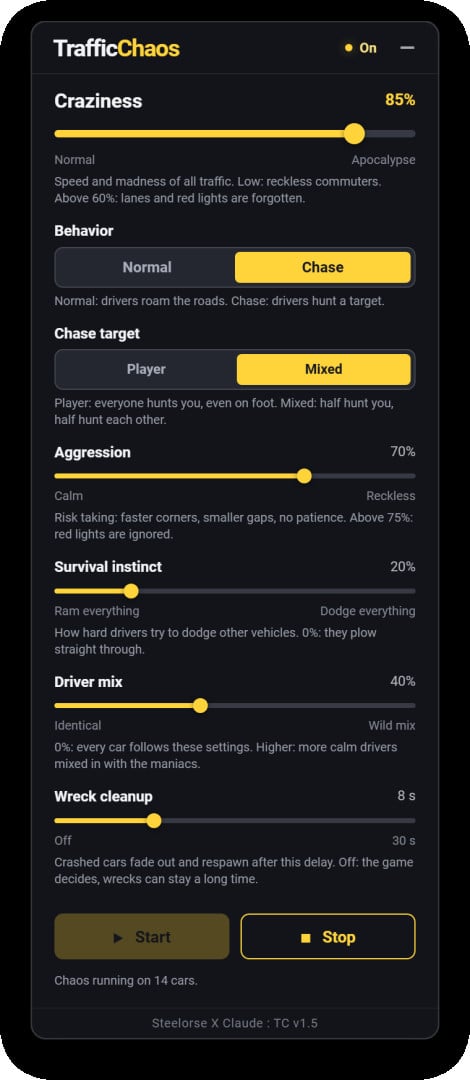
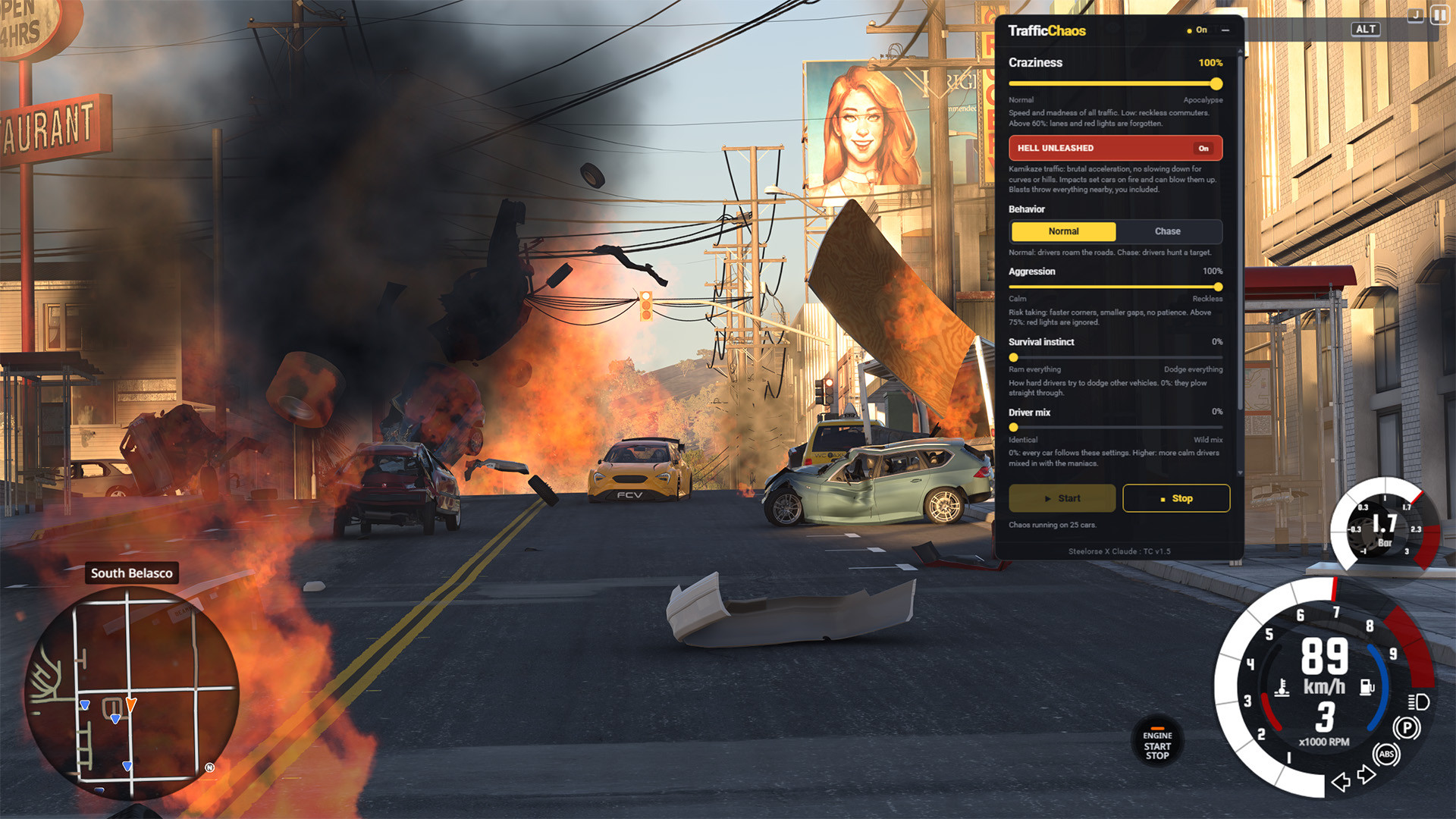
TrafficChaos is a free, lightweight HUD app that takes control of BeamNG's own traffic. One slider takes it from slightly reckless commuters to a full-blown apocalypse on wheels: the higher you push it, the faster the cars go and the less their drivers remember how to drive.
Features
- Craziness: Controls the speed and madness of all traffic. Above 60%, drivers forget about lanes and red lights. Pushing this to 100% unlocks a hidden, extreme mode.
- Behavior (Normal / Chase): Let traffic roam the roads, or turn them into hunters. In Chase mode, choose Player (everyone hunts you) or Mixed (half hunt you, half hunt each other).
- Aggression: Controls risk-taking. Higher values result in faster corners, smaller gaps, and zero patience. Above 75%, red lights are ignored.
- Survival instinct: Determines how hard drivers try to dodge other vehicles. At 0%, they plow straight through anything.
- Driver mix: Mix calmer drivers in with the maniacs. At 0%, every car follows your settings exactly.
- Wreck cleanup: Crashed cars fade out and respawn after 1 to 30 seconds.
Performance note: At high Craziness, violent crashes and particle effects can be heavy on any PC. If frame rate drops, spawn fewer traffic vehicles or enable Wreck cleanup.
TrafficChaos works with the traffic you spawn. It doesn't add any vehicles, and it never takes control of your own vehicle or walking character.
Installation Instructions
1. Download TrafficChaos.zip and drop it in your BeamNG user folder's mods directory. Leave it zipped.
2. Make sure TrafficChaos is enabled in the Mod Manager, then load a map.
3. Open the HUD Apps editor, add TrafficChaos to your layout, then close the editor.
4. Spawn traffic from BeamNG's Traffic menu as usual.
5. Pick your settings and press Start.
Credits
Steelorse
Programming: Claude, by Anthropic
Features
- Craziness: Controls the speed and madness of all traffic. Above 60%, drivers forget about lanes and red lights. Pushing this to 100% unlocks a hidden, extreme mode.
- Behavior (Normal / Chase): Let traffic roam the roads, or turn them into hunters. In Chase mode, choose Player (everyone hunts you) or Mixed (half hunt you, half hunt each other).
- Aggression: Controls risk-taking. Higher values result in faster corners, smaller gaps, and zero patience. Above 75%, red lights are ignored.
- Survival instinct: Determines how hard drivers try to dodge other vehicles. At 0%, they plow straight through anything.
- Driver mix: Mix calmer drivers in with the maniacs. At 0%, every car follows your settings exactly.
- Wreck cleanup: Crashed cars fade out and respawn after 1 to 30 seconds.
Performance note: At high Craziness, violent crashes and particle effects can be heavy on any PC. If frame rate drops, spawn fewer traffic vehicles or enable Wreck cleanup.
TrafficChaos works with the traffic you spawn. It doesn't add any vehicles, and it never takes control of your own vehicle or walking character.
Installation Instructions
1. Download TrafficChaos.zip and drop it in your BeamNG user folder's mods directory. Leave it zipped.
2. Make sure TrafficChaos is enabled in the Mod Manager, then load a map.
3. Open the HUD Apps editor, add TrafficChaos to your layout, then close the editor.
4. Spawn traffic from BeamNG's Traffic menu as usual.
5. Pick your settings and press Start.
Credits
Steelorse
Programming: Claude, by Anthropic
Direct Download Links
About Mod
| Latest Version | 1.5.0 + HELL UNLEASHED |
| Game | BeamNG.drive |
| Category | Other |
| Game Version | 0.39.x |
| Tags | Gameplay |
| Downloads | 153 |
| Created | 4 days ago |
You Might Also Like »



![Mack Anthem / Pinnacle [PACK]](https://temp2.modland.net/i/6aa50a7184eaa/6ab9344368d3b/0_modland.jpg)
0 Comments
There are no comments. Be first to comment!