GE10 Script - Spline To Field Generator (Prefab*) 1.0

0/5,
0
Stimmen
Description:
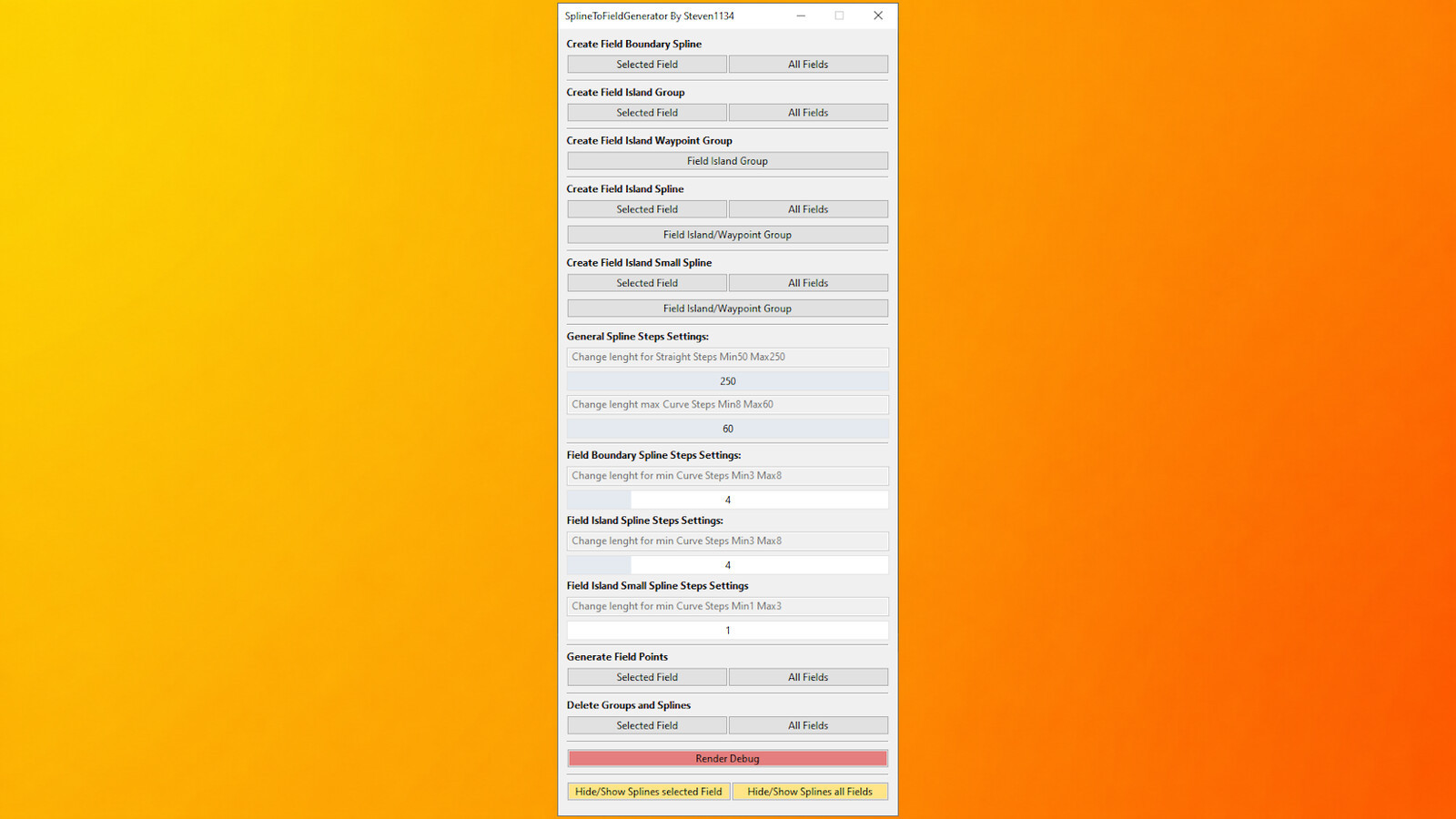
The SplineToFieldGenerator is a script for the GIANTS Editor designed to help users create fields more easily using splines while keeping the number of polygonPoints as low as possible. This script can save a significant amount of work, especially when working with very large or irregularly shaped fields.
Features:
- Simple field generation using fieldBoundarySpline
- Field island generation using fieldIslandSpline/fieldIslandSmallSpline (optional)
- Creation of all required splines and groups
- Generation of polygonPoints
- Ability to show and hide splines
- Render debug mode for a better overview of the generated polygonPoints with live updates
- Delete all splines and groups from a selected field or all fields
Notes: When deleting splines and groups for the first time, a backup TransformGroup will automatically be created under: SplineToFieldGenerator -> Backup (stored as fieldXXBackup). This system preserves data in case of accidental deletion.
The script performs automatic checks and outputs messages to the GE console to explain current processes or function errors.
Example Field Structure:
You need a field created using the GIANTS Editor FieldToolkit or another compatible script.
Simple Field
fields
----└── fieldXX
--------├── polygonPoints (transformgroup)
--------├── nameIndicator (transformgroup)
--------├── teleportIndicator (transformgroup)
--------└── fieldBoundarySpline (Spline)
Field With Field Islands
fields
----└── fieldXX
--------├── polygonPoints (transformgroup)
--------├── nameIndicator (transformgroup)
--------├── teleportIndicator (transformgroup)
--------├── fieldBoundarySpline (Spline)
--------└── fieldIsland (transformgroup)
------------└── fieldIslandSpline (Spline)
The fieldIsland TransformGroup must be properly aligned with the field islands. Blue debug lines in Render Debug mode help visualize detection.
Field With Hard-To-Reach Field Islands
fields
----└── fieldXX
--------├── polygonPoints (transformgroup)
--------├── nameIndicator (transformgroup)
--------├── teleportIndicator (transformgroup)
--------├── fieldBoundarySpline (Spline)
--------└── fieldIsland (transformgroup)
------------├── fieldIslandSpline (Spline)
------------├── fieldIslandSpline (Spline)
------------└── fieldIslandWaypoint (transformgroup)
----------------└── fieldIslandSpline (Spline)
The fieldIslandWaypoint provides additional TransformGroups for accurate generation of complex or twisted field layouts.
Important Notes:
The hierarchy does not need to follow the exact order shown. Internally, the script processes: fieldBoundarySpline -> fieldIsland (transformgroup).
The only requirement is: Everything containing "fieldIsland" in its name must be located inside the fieldIsland TransformGroup to avoid unexpected generation patterns.
Due to technical limitations of splines, 90-degree edges cannot be perfectly precise; corners may be slightly rounded and may require minor manual adjustments.
Installation Instructions:
1.) Start the latest version of the GIANTS Editor
2.) Navigate to: Window -> Script Editor and open the Script Editor
3.) Right-click the folder where you want to store the script (e.g., Shared Scripts) and select: Explore Folder
4.) Copy the SplineToFieldGenerator.lua file into the folder and restart the GIANTS Editor
5.) The script will be available under the Scripts menu in the top menu bar
Credits:
Steven1134
The SplineToFieldGenerator is a script for the GIANTS Editor designed to help users create fields more easily using splines while keeping the number of polygonPoints as low as possible. This script can save a significant amount of work, especially when working with very large or irregularly shaped fields.
Features:
- Simple field generation using fieldBoundarySpline
- Field island generation using fieldIslandSpline/fieldIslandSmallSpline (optional)
- Creation of all required splines and groups
- Generation of polygonPoints
- Ability to show and hide splines
- Render debug mode for a better overview of the generated polygonPoints with live updates
- Delete all splines and groups from a selected field or all fields
Notes: When deleting splines and groups for the first time, a backup TransformGroup will automatically be created under: SplineToFieldGenerator -> Backup (stored as fieldXXBackup). This system preserves data in case of accidental deletion.
The script performs automatic checks and outputs messages to the GE console to explain current processes or function errors.
Example Field Structure:
You need a field created using the GIANTS Editor FieldToolkit or another compatible script.
Simple Field
fields
----└── fieldXX
--------├── polygonPoints (transformgroup)
--------├── nameIndicator (transformgroup)
--------├── teleportIndicator (transformgroup)
--------└── fieldBoundarySpline (Spline)
Field With Field Islands
fields
----└── fieldXX
--------├── polygonPoints (transformgroup)
--------├── nameIndicator (transformgroup)
--------├── teleportIndicator (transformgroup)
--------├── fieldBoundarySpline (Spline)
--------└── fieldIsland (transformgroup)
------------└── fieldIslandSpline (Spline)
The fieldIsland TransformGroup must be properly aligned with the field islands. Blue debug lines in Render Debug mode help visualize detection.
Field With Hard-To-Reach Field Islands
fields
----└── fieldXX
--------├── polygonPoints (transformgroup)
--------├── nameIndicator (transformgroup)
--------├── teleportIndicator (transformgroup)
--------├── fieldBoundarySpline (Spline)
--------└── fieldIsland (transformgroup)
------------├── fieldIslandSpline (Spline)
------------├── fieldIslandSpline (Spline)
------------└── fieldIslandWaypoint (transformgroup)
----------------└── fieldIslandSpline (Spline)
The fieldIslandWaypoint provides additional TransformGroups for accurate generation of complex or twisted field layouts.
Important Notes:
The hierarchy does not need to follow the exact order shown. Internally, the script processes: fieldBoundarySpline -> fieldIsland (transformgroup).
The only requirement is: Everything containing "fieldIsland" in its name must be located inside the fieldIsland TransformGroup to avoid unexpected generation patterns.
Due to technical limitations of splines, 90-degree edges cannot be perfectly precise; corners may be slightly rounded and may require minor manual adjustments.
Installation Instructions:
1.) Start the latest version of the GIANTS Editor
2.) Navigate to: Window -> Script Editor and open the Script Editor
3.) Right-click the folder where you want to store the script (e.g., Shared Scripts) and select: Explore Folder
4.) Copy the SplineToFieldGenerator.lua file into the folder and restart the GIANTS Editor
5.) The script will be available under the Scripts menu in the top menu bar
Credits:
Steven1134
Direct Download Links
Version: 1.0Aktualisiert: vor 4 Monaten
Gesamtgröße: 96.11 KB FS25_GEScript_SplineToFieldGenerator_prefab_modland.zip direct herunterladen · 96.11 KB · hinzugefügt vor 4 Monaten
Über Mod
| Neueste Version | 1.0 |
| Spiel | FS25 |
| Kategorie | Objekte » Vorgefertigtes |
| Herunterladen | 61 |
| Erstellt | vor 4 Monaten |
Das könnte Sie auch interessieren »









0 Kommentare
Es sind noch keine Kommentare vorhanden. Seien Sie der Erste, der kommentiert!