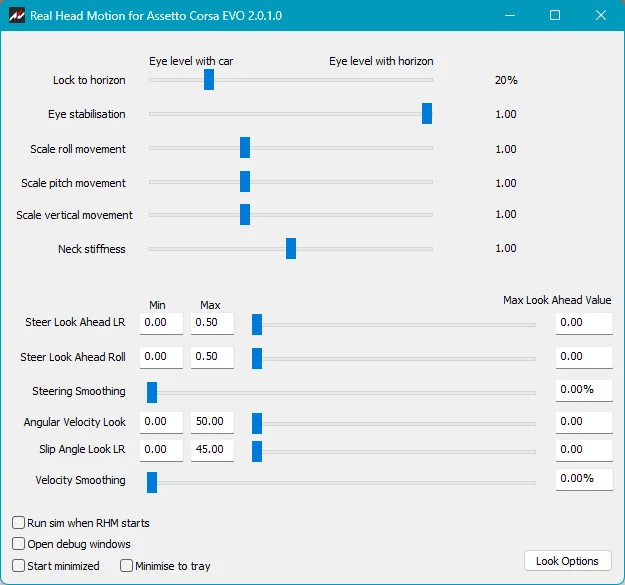
Real Head Motion for AC EVO 2.0.1

0/5,
0
votes
Real Head Motion has been ported to EVO. This is version 2, completely redesigned and rewritten by Claude AI. It adds the movements and corrections that a real driver’s head, neck and eyes would produce under the influence of G forces and car orientation.
Features
- Head inertia: Head leans toward the force (outwards in corners, forward under braking) and takes a moment to get there due to mass.
- Overshoot and settling: The neck acts like a spring with damping; sudden loads make the head swing slightly past its resting lean before settling.
- Bracing: Under sustained load, a long high-G corner stiffens the neck, reducing the lean over time.
- Headrest: Under acceleration, the head presses against the headrest, limiting backward movement.
- Vertical bounce: Bumps and kerbs create a seat-and-spine response for vertical movement, filtering out high-frequency buzz.
- View levelling: The neck and balance system keep the head level with the horizon during pitch and roll.
- Gaze stabilisation: Vestibulo-ocular reflex counter-rotates the eyes against head movement, smoothing the view over rough surfaces.
Settings
- Lock to horizon: Controls how much the view stays level with the car or with the horizon. Default is 20%.
- Eye stabilisation: Controls gaze stabilisation to keep the view steady under bumps. 0 is no stabilisation; 1 is full stabilisation. Default is 1.00.
- Scale settings: Control the magnitude of view movement in roll (sideways), pitch (dive and squat) and vertical. Default is 1.00.
- Neck stiffness: Determines how quickly the head/neck settles into position. Default is 1.00.
Installation Instructions
Download the app HERE.
Unzip all of the files into a folder on your PC. Run RealHeadMotionACEVO.exe every time you fire up EVO (or tick 'Run sim when RHM starts' on the RHM screen).
In EVO's view settings / Motion, set both Lock To Horizon and Movement to zero.
Note: This app for EVO only works with EVO.
Credits
Wally Masterson
Features
- Head inertia: Head leans toward the force (outwards in corners, forward under braking) and takes a moment to get there due to mass.
- Overshoot and settling: The neck acts like a spring with damping; sudden loads make the head swing slightly past its resting lean before settling.
- Bracing: Under sustained load, a long high-G corner stiffens the neck, reducing the lean over time.
- Headrest: Under acceleration, the head presses against the headrest, limiting backward movement.
- Vertical bounce: Bumps and kerbs create a seat-and-spine response for vertical movement, filtering out high-frequency buzz.
- View levelling: The neck and balance system keep the head level with the horizon during pitch and roll.
- Gaze stabilisation: Vestibulo-ocular reflex counter-rotates the eyes against head movement, smoothing the view over rough surfaces.
Settings
- Lock to horizon: Controls how much the view stays level with the car or with the horizon. Default is 20%.
- Eye stabilisation: Controls gaze stabilisation to keep the view steady under bumps. 0 is no stabilisation; 1 is full stabilisation. Default is 1.00.
- Scale settings: Control the magnitude of view movement in roll (sideways), pitch (dive and squat) and vertical. Default is 1.00.
- Neck stiffness: Determines how quickly the head/neck settles into position. Default is 1.00.
Installation Instructions
Download the app HERE.
Unzip all of the files into a folder on your PC. Run RealHeadMotionACEVO.exe every time you fire up EVO (or tick 'Run sim when RHM starts' on the RHM screen).
In EVO's view settings / Motion, set both Lock To Horizon and Movement to zero.
Note: This app for EVO only works with EVO.
Credits
Wally Masterson
Direct Download Links
Version: 2.0.1Updated: 1 hour ago
Total Size: 2.09 MB RHMACE_V2_modland.zip direct download · 2.09 MB · added 1 hour ago
You Might Also Like »

0 Comments
There are no comments. Be first to comment!