In-game Keyboard Shortcuts Extension 1.2.1

0/5,
0
votes
Updates for 1.2.1 include a bug patch, a change to the default pit teleport command (P -> B), and an issue with the CTRL+P command causing input loss.
Add a shortcut key function to the game.
Pressing the shortcut key allows you to do actions like restart and return to the pit.
Keyboard commands:
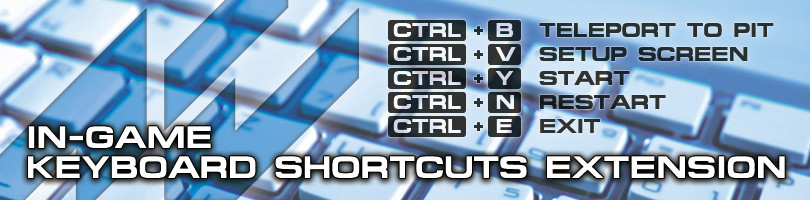
Ctrl + Y: Start (same as clicking the steering symbol in the top right).
Ctrl + B: Teleport to the pit spot.
Ctrl + V: Teleport to pit location, and the setup screen is shown.
Ctrl + N: Restart session (single play only).
Ctrl + E: Exit the game.
Automatic start mode:
The pit menu once the game starts is bypassed, and the game may be played as is.
When in VR mode, the auto- start option is enabled by default. (Oculus Rift, OpenVR)
To alter the key settings, update config.ini.
Credits:
Tsuka1427
Add a shortcut key function to the game.
Pressing the shortcut key allows you to do actions like restart and return to the pit.
Keyboard commands:
Ctrl + Y: Start (same as clicking the steering symbol in the top right).
Ctrl + B: Teleport to the pit spot.
Ctrl + V: Teleport to pit location, and the setup screen is shown.
Ctrl + N: Restart session (single play only).
Ctrl + E: Exit the game.
Automatic start mode:
The pit menu once the game starts is bypassed, and the game may be played as is.
When in VR mode, the auto- start option is enabled by default. (Oculus Rift, OpenVR)
To alter the key settings, update config.ini.
Credits:
Tsuka1427
Direct Download Links
Version: 1.2.1Updated: 1 year ago
Total Size: 713.87 KB Addon_add_shortcut_key_121_modland.zip direct download · 713.87 KB · added 1 year ago
You Might Also Like »



_modland.jpg)


0 Comments
There are no comments. Be first to comment!