Smart Rearview Mirror v1.1

0/5,
0
votes
Description
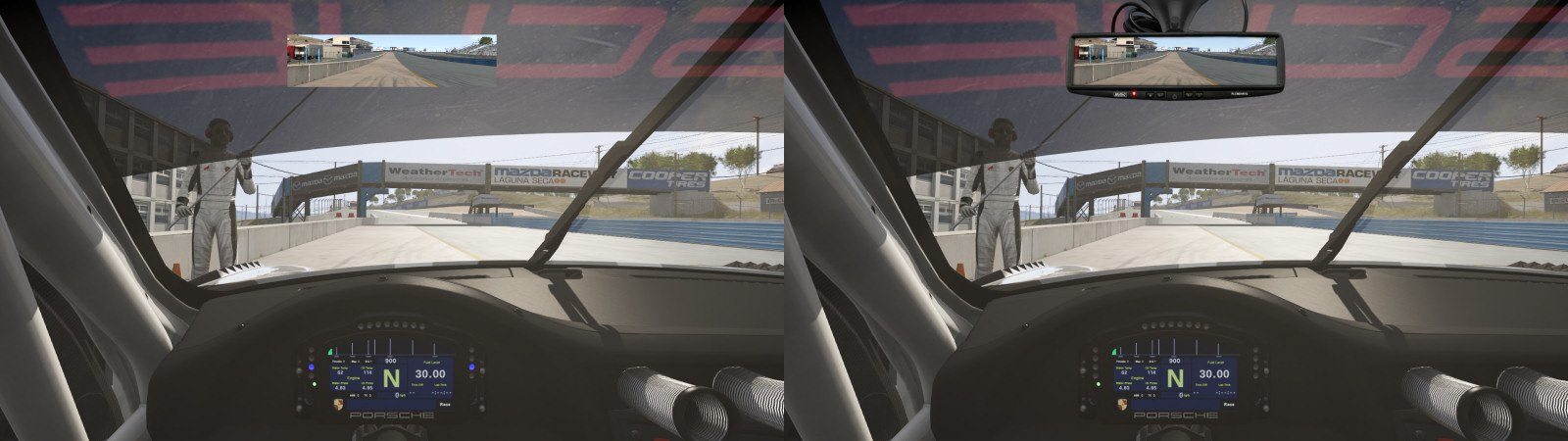
This app adds a realistic frame to the vanilla virtual mirror.
Features
- Realistic frame for the virtual mirror
- ONLY FULL HD (1920x1080) support for now
- Preview OFF/ON
Installation Instructions
1. Extract/unzip the file to your Assetto Corsa directory.
2. Start Assetto Corsa and enable the app in Options > General > UI Modules (at the bottom of the page).
3. Once you sit in the cockpit, move the mouse to the right in order to show the app sidebar.
4. Scroll down until you find the symbol of a rear view mirror and click on it.
5. Activate the virtual mirror using F11.
This app adds a realistic frame to the vanilla virtual mirror.
Features
- Realistic frame for the virtual mirror
- ONLY FULL HD (1920x1080) support for now
- Preview OFF/ON
Installation Instructions
1. Extract/unzip the file to your Assetto Corsa directory.
2. Start Assetto Corsa and enable the app in Options > General > UI Modules (at the bottom of the page).
3. Once you sit in the cockpit, move the mouse to the right in order to show the app sidebar.
4. Scroll down until you find the symbol of a rear view mirror and click on it.
5. Activate the virtual mirror using F11.
External Download Links:
- Modsfire.com - 1jwzy7.zip [342.61 KB]
You Might Also Like »



_modland.webp)



0 Comments
There are no comments. Be first to comment!