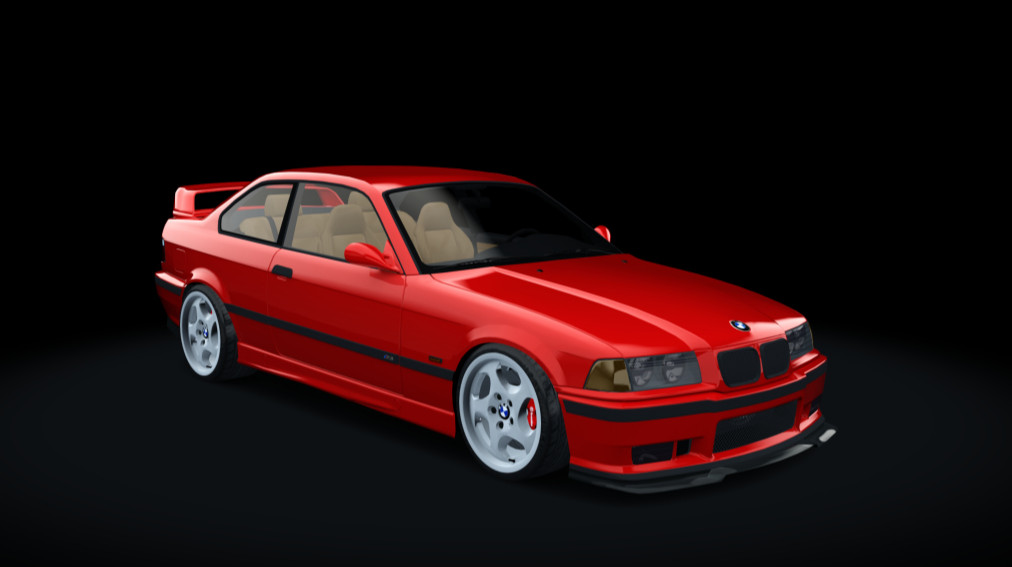
Bmw M3 E36 1.0
5/5,
1
votes
Extras
Extra A: Interior light
Extra B: Rim change
Extra C: Fogs
When you turn on your headlights, your high beams come on. To control the high beams, select Assetto Corsa from the top left of the Content Manager settings section. Then go to the Controls section and select the patch section from the right of the screen. On the ground, on the right side of the screen, it says High/Low Beams, you can assign that key to the key you want and use it as a selector.
Extra A: Interior light
Extra B: Rim change
Extra C: Fogs
When you turn on your headlights, your high beams come on. To control the high beams, select Assetto Corsa from the top left of the Content Manager settings section. Then go to the Controls section and select the patch section from the right of the screen. On the ground, on the right side of the screen, it says High/Low Beams, you can assign that key to the key you want and use it as a selector.
External Download Links:
Direct Download Links
Version: 1.0Updated: 1 year ago
Total Size: 113.06 MB
bmw_e36_modland_modland.rar
direct download
· 113.06 MB
· added 1 year ago
This File is Scanned by Antivirus and is Safe.
More Details
About Mod
| Latest Version | 1.0 |
| Game | Assetto Corsa |
| Category | Cars |
| Tags | BMW |
| Downloads | 874 |
| Created | 1 year ago |
| Last Virus Scan |
0/97
More Details |
You Might Also Like »
_modland.webp)

0 Comments
There are no comments. Be first to comment!