Acceleration and Distance timer 2.1


![Ford Bronco [PACK]](https://temp2.modland.net/i/6abb8bc6ce51c/0_modland.webp)


0/5,
0
votes
Updates
latest
Version
2.1
· Orange Theme, Simplified UI, Hidden Scrollbar, Bug Fixes
· BeamNG.drive
0.39.x
1 day ago

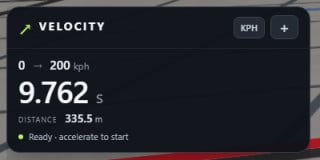
- Fixed an empty-history error that interrupted timer display updates in both acceleration and accel + brake modes.
- Fixed stop-time carryover between runs. Standing starts now require a fresh 0.2-second stop before arming.
- Fixed previous results remaining displayed after clearing history.
- Removed accent selection and standardized the interface to orange.
- Hidden the scrollbar while keeping scrolling enabled.
- Fixed stop-time carryover between runs. Standing starts now require a fresh 0.2-second stop before arming.
- Fixed previous results remaining displayed after clearing history.
- Removed accent selection and standardized the interface to orange.
- Hidden the scrollbar while keeping scrolling enabled.
Changelog
Acceleration & Braking Tests, Custom Accent Colors, Cleaner UI, Improved Previous Runs Display: Added 0–100–0 and other acceleration/braking tests, with braking measured only from the target speed down to a stop. Added lime, orange, and cyan accent choices, automatic “Previous runs” display, and a compact rearm button beside the unit switch. Simplified presets and custom range inputs, removed unnecessary labels, and replaced “Set range” with an accent-colored arrow.
Description
Velocity — Acceleration Timer
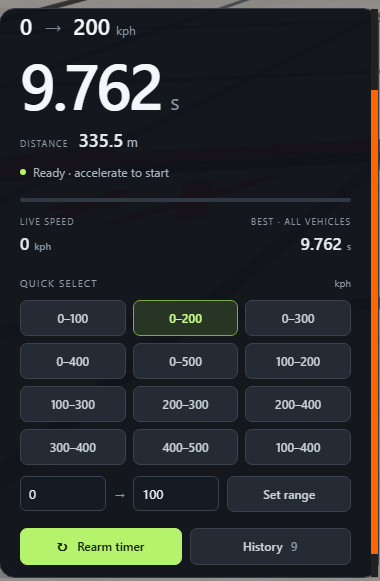
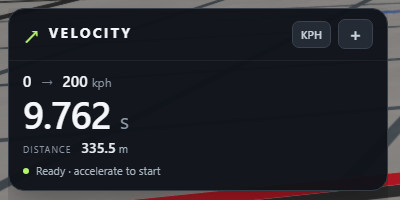
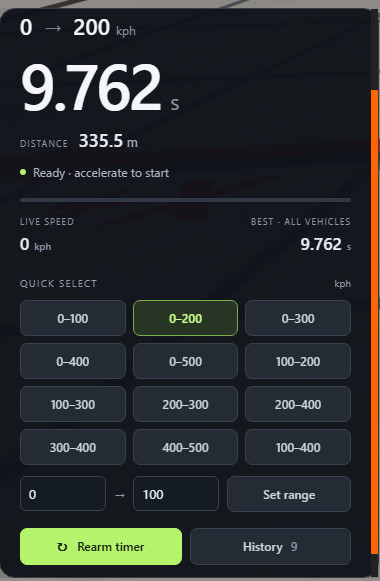
A clean, modern acceleration timer for BeamNG.drive with quick speed presets, distance tracking, and saved results that stay available after changing your vehicle configuration. Compare performance before and after tuning without losing your previous times. Completed runs remain saved when you change parts, switch vehicles, or reset your car.
Features
- One-click speed presets: 0–100, 0–200, 0–300, 0–400, and 0–500 kph, plus rolling ranges such as 100–200 kph.
- Metric and imperial support: Switch between kph and mph, with imperial presets including 0–60 and 60–130 mph.
- Custom ranges: Choose your own start and finish speeds.
- Distance per run: See how much distance the acceleration took, displayed in meters or yards.
- Automatic timing: Stop briefly for a standing start, or drive below the starting speed for a rolling run, then accelerate.
- Persistent history: Stores up to 100 completed runs with their times, distances, and vehicle models.
- Best-time display: Shows your quickest saved time for the selected range across all vehicles.
- Collapsible interface: Hide the controls while keeping the range, time, and distance visible.
- Saved preferences: Your selected range, units, and collapsed state are remembered.
Built for convenient testing. Your previous result stays visible while you prepare for another attempt. Changing a vehicle or configuration cancels an unfinished run but keeps completed results, making it easier to compare different setups.
Timing follows simulation time, so pausing adds no time to your run. Speed is measured from actual vehicle movement rather than wheel speed, so wheelspin does not inflate the speed reading. It also simulates slow motion.
Credits
mkviis
Acceleration & Braking Tests, Custom Accent Colors, Cleaner UI, Improved Previous Runs Display: Added 0–100–0 and other acceleration/braking tests, with braking measured only from the target speed down to a stop. Added lime, orange, and cyan accent choices, automatic “Previous runs” display, and a compact rearm button beside the unit switch. Simplified presets and custom range inputs, removed unnecessary labels, and replaced “Set range” with an accent-colored arrow.
Description
Velocity — Acceleration Timer
A clean, modern acceleration timer for BeamNG.drive with quick speed presets, distance tracking, and saved results that stay available after changing your vehicle configuration. Compare performance before and after tuning without losing your previous times. Completed runs remain saved when you change parts, switch vehicles, or reset your car.
Features
- One-click speed presets: 0–100, 0–200, 0–300, 0–400, and 0–500 kph, plus rolling ranges such as 100–200 kph.
- Metric and imperial support: Switch between kph and mph, with imperial presets including 0–60 and 60–130 mph.
- Custom ranges: Choose your own start and finish speeds.
- Distance per run: See how much distance the acceleration took, displayed in meters or yards.
- Automatic timing: Stop briefly for a standing start, or drive below the starting speed for a rolling run, then accelerate.
- Persistent history: Stores up to 100 completed runs with their times, distances, and vehicle models.
- Best-time display: Shows your quickest saved time for the selected range across all vehicles.
- Collapsible interface: Hide the controls while keeping the range, time, and distance visible.
- Saved preferences: Your selected range, units, and collapsed state are remembered.
Built for convenient testing. Your previous result stays visible while you prepare for another attempt. Changing a vehicle or configuration cancels an unfinished run but keeps completed results, making it easier to compare different setups.
Timing follows simulation time, so pausing adds no time to your run. Speed is measured from actual vehicle movement rather than wheel speed, so wheelspin does not inflate the speed reading. It also simulates slow motion.
Credits
mkviis
Direct Download Links
About Mod
| Latest Version | 2.1 |
| Game | BeamNG.drive |
| Category | Other |
| Game Version | 0.39.x |
| Downloads | 195 |
| Created | 6 days ago |
| Last Updated | 1 day ago |
Download Latest Version
Version: 2.1Updated: 1 day ago
Total Size: 1.14 MB VelocityTimer_modland.zip direct download · 1.14 MB · added 1 day ago
You Might Also Like »

![Ford Bronco [PACK]](https://temp2.modland.net/i/6abb8bc6ce51c/0_modland.jpg)


![Mack Anthem / Pinnacle [PACK]](https://temp2.modland.net/i/6aa50a7184eaa/6ab9344368d3b/0_modland.jpg)
0 Comments
There are no comments. Be first to comment!