




Irizar i8 Integral 6x2 (Touchscreen Tablet, Live Passenger Screens, 38 Liveries)
1732
15
15
6 days ago
by
Nevada Mods
0/5,
0
votes
This app implements an autopilot for fixed-wing aircraft.
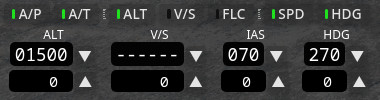
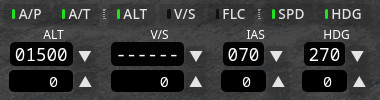
In this screenshot, both the autopilot and autothrottle are turned on, the altitude is set to 1500 feet above sea level, the airspeed at 70 knots indicated airspeed, and the heading at 270°.
It is highly recommended to use Flight Instruments to e.g. get an idea of headings and altitudes.
Important:
- The autopilot has only been tested with a couple different aircraft, and it might not support all aircraft.
- This autopilot is still in beta. It may be buggy and some features may not yet work correctly.
- Depending on the aircraft type, manual controls while the autopilot is turned on may or may not work. In some cases, manual control may cause the aircraft to go out of control.
Features
- A/P (autopilot): Controls control surfaces (ailerons, elevator and rudder).
- A/T (autothrottle): Adjusts throttle according to the current throttle mode.
- Vertical Modes:
- - ALT (altitude hold): Maintains specified altitude. Does not monitor airspeed.
- - V/S (vertical speed): Maintains specified vertical speed. Switches to ALT upon reaching target altitude. Does not monitor airspeed.
- - FLC (flight level change): Maintains specified airspeed. Switches to ALT upon reaching target altitude. Can adjust throttle if A/T is enabled.
- Lateral Mode:
- - HDG (heading): Maintains the specified heading (in degrees).
- Autothrottle Modes:
- - THR (thrust mode): Adjusts throttle as specified by the autopilot (currently only for ALT mode).
- - SPD (speed mode): Adjusts throttle to maintain specified airspeed.
UI Control
The UI has four controllable values. The display at the top shows the selected value, while the bottom field is for input. The ▼ button copies the selected value to the input, and the ▲ button selects the input value. Values can also be adjusted using the mouse wheel.
- ALT: altitude in feet (0 - 99999 ft)
- V/S: vertical speed in feet per minute (-99999 to +99999 ft/min)
- IAS: indicated airspeed in knots (0 - 999 kt)
- HDG: heading in degrees (0 - 359)
Important caveats:
- Only designed for fixed-wing aircraft. Not for ground vehicles, water vehicles, or helicopters.
- Engaging modes far from target may cause oscillatory behavior.
- FLC and SPD modes conflict; aircraft attitude may become unpredictable.
- Use FLC or V/S for smooth altitude changes instead of ALT.
- Autopilot will attempt to coordinate turns in HDG mode, though effectiveness varies by aircraft.
For developers and modders
The autopilot is configurable by vehicle LUA (VLUA) via the onAv331AutopilotSetup event handler calling extension.av331autopilot.setupAutopilotCustom.
Code:
--- Initializes model-specific details; meant to be called by a vehicle's onAv331AutopilotSetup callback.
--- @param modelName string model name
--- @param setup table custom setup.
--- @param setup.issueControls fun(table) a function that issues controls to the aircraft
--- issueControls' parameter is a table containing the following values (all are optional and may be nil if the autopilot does not input anything):
--- aileron number [minDeflectionAileron, maxDeflectionAileron]: 0 for center ailerons, - to bank left, + to bank right
--- elevator number [minDeflectionElevator, maxDeflectionElevator]: 0 to center elevator, - to pitch nose down, + to pitch nose up
--- rudder number [minDeflectionRudder, maxDeflectionRudder]: 0 to center rudder, - to yaw left, + to yaw right
--- throttle number [minThrottleChange, maxThrottleChange]: 0 to not adjust power, - to reduce power, + to add power
--- @param setup.getAircraftDataHook fun(table) a function that obtains aircraft data.
--- getAircraftDataHook's parameter is a table containing at least the following values:
--- altitude number 'barometric' alt in meters
--- trueAirspeed number true airspeed in m/s
--- indicatedAirspeed number indicated airspeed in m/s
--- verticalSpeed number vertical speed in m/s; + for climb, - for descent
--- yaw number yaw/heading in degrees
--- pitch number pitch in degrees
--- roll number roll/bank in degrees
--- @param setup.parameters table various other parameters.
--- BASIC PARAMETERS
--- forceFactor number scales the rate/amount of pitch/roll input
--- pitchForceFactor number scales the rate/amount of pitch input
--- rollForceFactor number scales the rate/amount of roll input
--- throttleForceFactor number scales the rate/amount of throttle input
--- autocoordinationFactor number auto-coordination: rudder input relative to aileron
--- maxDeflectionAileron number maximum aileron deflection when banking right
--- maxDeflectionElevator number maximum elevator deflection when pitching nose up
--- maxDeflectionRudder number maximum rudder deflection when turning right
--- maxThrottleChange number maximum throttle change when adding power
--- minDeflectionAileron number minimum aileron deflection when banking left
--- minDeflectionElevator number minimum elevator deflection when pitching nose down
--- minDeflectionRudder number minimum rudder deflection when turning left
--- minThrottleChange number minimum throttle change when removing power
---
--- ALT MODE PARAMETERS
--- altVsMultiplier number ALT mode: altitude -> vertical speed multiplier
--- altPowerAltMultiplier number ALT/THR mode: Altitude difference weight
--- altPowerVsMultiplier number ALT/THR mode: V/S weight
--- altPowerFbMultiplier number ALT/THR mode: feedback weight
--- altPowerMinAltDiff number ALT/THR mode: Min alt diff limit
--- altPowerMinVsDiff number ALT/THR mode: Min V/S limit
--- altPowerMaxVsDiff number ALT/THR mode: Max V/S limit
--- altPowerBuf number ALT/THR mode: integration buffer
--- altPowerMaxAdd number ALT/THR mode: integrated value minimum
--- altPowerExp number ALT/THR mode: exponential curve
--- altPowerMul number ALT/THR mode: constant factor
---
--- FLC MODE PARAMETERS
--- flcSpdFactor number FLC SPD passthrough throttle factor
--- flcThrottleFactor number FLC throttle factor
--- flcMaximumClimbAngle number maximum climb angle for FLC throttle
--- flcMaximumDescentAngle number maximum descent angle for FLC throttle
---
--- SPD MODE PARAMETERS
--- spdAltCrosstalk number speed differential based on alt diff when ALT mode enabled
---
--- PID TUNING PARAMETERS
--- altPitchTargetPid table PID parameters for ALT mode pitch angle target
--- altElevatorPid table PID parameters for elevator adjustments in ALT mode
--- flcPitchTargetPid table PID parameters for FLC mode pitch angle target
--- flcElevatorPid table PID parameters for elevator adjustments in FLC mode
--- flcVsTargetPid table PID parameters for FLC mode vertical speed target (for throttle)
--- flcThrottlePid table PID parameters for throttle adjustments in FLC mode
--- hdgRollTargetPid table PID parameters for HDG mode roll angle target
--- hdgRollPid table PID parameters for aileron adjustments in HDG mode
--- spdSpeedPid table PID parameters for throttle adjustments in SPD mode
--- vsPitchTargetPid table PID parameters for V/S mode pitch angle target
--- vsElevatorPid table PID parameters for elevator adjustments in V/S mode
--- PID parameters format: Kp, Ki, Kd, Kf, eMin, eMax, cMin, cMax
Credits:
aviator331, @Kisko_
Direct Download Links
About Mod
| Latest Version | 0.6 |
| Game | BeamNG.drive |
| Category | Other |
| Game Version | 0.40.x |
| Tags | Gameplay |
| Downloads | 2 |
| Created | 16 minutes ago |
You Might Also Like »





0 Comments
There are no comments. Be first to comment!