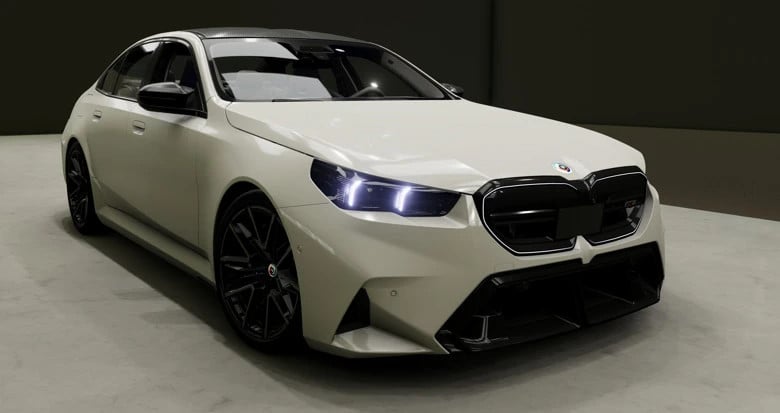
BMW M5 G90/G99 1.1.5

Latest Update
- Fixed frame drops (some may still be there)
- Increased tire grip and brake performance
- Fixed uncompressed headlight.dds error
- Fixed massive lua errors causing the crashes pre and after 0.40.2 (And some other small ones)
- Deleted some materials from the ambient change (looks wise more realistic, less frame drops when changing the ambient color)
- Working odometer
- Home screen on the center display actually displaying real data (WIP, its not perfect yet)
- Fixed engine sounds
BMW M5 G90/G99 v.0.39
Hey! I'm Pascal, the guy who works on the BMW M5 mod since a few month now, to make it work with the 0.39 version of BeamNG. I was allowed to upload the Mod updates here and on the forums, as they now were only done via the discord server. So what is the changelog with this one?
- !! DONT COMPLAIN THAT THE MOD IS NOT FINISHED, ITS AN UNFINISHED RELEASE !! -
- Optimized the touchscreen (no more fps drops when using it. General performance updates)
- Album covers now appear when using the new Media Player (+ Fade in animation), thanks to gurkenkrieger
- 0.39 Lights (All of them), thanks to _crxw_, really appreaciate that
- Reduced interior noise
- Fixed ambient light lag
- Added a Speed Limiter warning tone, On by default (turn it off in the Driving Settings)
- Some front light updates (little details, dont really matter)
- Fixed instant check engine light due to the intakes breaking instantly on spawn (changed values from 0.001 to 0.01; crashes still result in an engine check light).
- Fixed time and temperature on the dash.
To use the media player, put it in the beamng mod folder, unpack it and launch the bat file.
Recomendations/ bug reports can me made through my or laws discord server (thats also where you always can get the newest updates):
https://discord.gg/XUCJgxq5fd (Mine)
https://discord.gg/HzTcXxEpgD (LMR Group)
last updated by Marcel and iamthelaw105 in September 2025 received some fixes by myself! This modification is not a final release or anything of that sort, all involved creators just recently have made the decision to make the last worked on version of the mod accessable for anyone for free. We believe the mod even in it's unfinished state will be very usefull for educational purposes and contains a lot of stuff that the beam community never had imagined to be possible to make for beamNG back then when we started this car in july 2024. A lot of people have followed and supported us on this way and are still asking for it.
Long story short, our real lives have been changing so massively in many terms and time for such projects has been slipping away more and more until our works came end of 2025 to a final stop and we will not come back in near future or propably never again, who knows we can't tell today. Note: It's a unfinished mod and may have issues/bugs which we might never fix
Credits:
- Myself for latest fixes to make the car work again in 0.39
- Zuweisung (Marcel) for all the genius LUA Systems including the best replica of the iDrive 8.5 OS ever in a game. All made by hand in PS and SVJ (zero AI involvement, it's all done with genius ideas of him that has to be mentioned in times like today !
- iamthelaw105 for anything else involved to make a car mod
- BeamNG.drive for jbeam and other assets
- Natural Motion for source 3d model
Videos


Direct Download Links
Version: 1.1.5Updated: 22 hours ago
Total Size: 387.44 MB
About Mod
| Latest Version | 1.1.5 |
| Game | BeamNG.drive |
| Category | Cars |
| Game Version | 0.39.x |
| Downloads | 11493 |
| Created | 1 week ago |
| Last Updated | 22 hours ago |
![Ford Bronco [PACK]](https://temp2.modland.net/i/6abb8bc6ce51c/0_modland.webp)


![Mack Anthem / Pinnacle [PACK]](https://temp2.modland.net/i/6aa50a7184eaa/6ab9344368d3b/0_modland.webp)
why dose the camera back up not working is it the mod or my game help me how to solve the problem but relly good mod
very good mod ty so much for this free mod
crash physics are bad, sounds are bad, there are beeps and things when you stop, every time, and not to mention the entire ROOF was missing on the m5 touring. exterior is good, interior is meh 3/10, would not reccomend i'm deleting it
Do i need the media player, if so how does it work
@hi you dont need it. Only need it when you want to display your media session onto the screens
can you fix the reverse cam
@pascal.n
@kk no
This is the best mod I have ever seen. However, the image in the rearview mirror is pixelated—it looks like individual pixels—whereas the side mirrors are fine. Could you please fix this?
@BilalShnn I'll look into it
I need some feedback regarding the new 0.40 update. My build runs fine, but i know i did some optimizations on it.
how do i play music
It wont let me go in interior camera? how can i fix? @pascal.n
@Armski G99 (Touring) does not work as of now. I am working on a fix.
rls career supported
Will there be a video for the rearview camera at some point?
kommt irgendwann auch ein video für die rückfahrkamera
@@nilss im working on it, but its very buggy and WIP. Maybe in like 2 or 3 updates there will be a camera.
Good mod overall, but I see a big frame drop after spawning this car. Also It would be cool to add drivemode with ESC and DSE. Removing them form car config, just breaking the car, and some errors pops up.
@CoolGuy They can be disabled or enabled via the center console (there are buttons). Frame drop is to be expected for this kind of mod.
@CoolGuy
hi do i have to replace the old media player file with the new one or not? @pascal.n
@rique, it can't hurt, especially because this update includes album covers, which require the new media player.
How do you replace the screen behind the steering wheel?
wie kann man den screen hinterm lenkrad wechseln
@pascal.n I understand, but I haven't found anything similar.
@.doctorzxc its in the beamng settings where you do the bindings
@pascal.n You provided what seemed like clear instructions, but I can’t find the steering wheel settings; I’ve gone through all the settings menus, but I still can’t locate them under the controls section.
@.doctorzxc go into beamng settings, controls and search for "Steering Wheel", bind the Open Menu, Up and Down buttons to whatever keys
@pascal.n I still don’t understand how to do this—which buttons should I use?
@pascal.n
@@nils You have to bind the Steering Wheel buttons onto your keyboard.
will you make more updates?
@pascal.n perfect thank you
@equrax677 Yes! I continue to work on it every day, to make it better.
@equrax677 Yes! I continue to work on it every day, to make it better.