
![Ford Mustang Mach-E [PACK]](https://temp2.modland.net/i/6aa50a7184eaa/0_modland.webp)
![BMW X6 G06/F96 [PACK]](https://temp2.modland.net/i/6a8ff76445a04/0_modland.webp)


5/5,
1
votes
Description
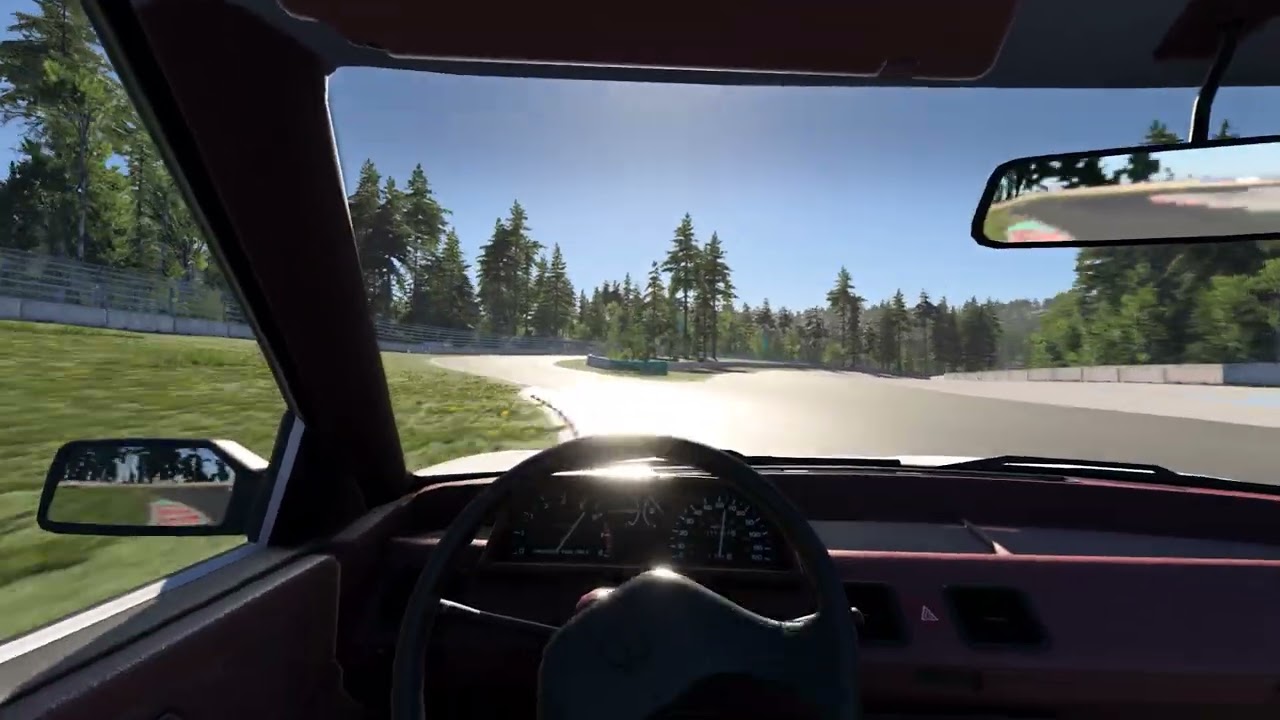
Driver Body Camera is a separate cockpit camera mode that makes the view feel like it belongs to a person sitting in the car, rather than to a camera bolted to the chassis.
It is not a shake mod. Instead of simply adding motion on top of the stock view, it tries to model which motion would reach the driver's eyes and which would be absorbed by the body. Much of the effect comes from what you stop seeing: the head takes the hit while the eyes try to hold the road.
Most body movement is driven by the force you would feel in the seat. Braking, acceleration, cornering, road camber, bumps, airtime and landings naturally affect the body rather than being added as separate scripted camera effects. The body leans and settles in the seat, the head lags behind during sudden motion, and gaze stabilization helps keep the road readable without locking the view to the horizon.
The driver also leans into corners and turns the head slightly into a bend ahead of the chassis orientation.
Features
- Body movement under braking, acceleration and cornering
- Seat and spine compliance over bumps, airtime and landings
- Head and neck lag during sudden motion
- Gaze stabilization - the eyes counter-rotate against head shake
- Automatic look-ahead into corners
- Active head tilt into the turn
- Subtle breathing and postural movement
- Separate controls for the main effects
- Presets for normal driving, mouse steering and a calmer setup
- Seat position and angle saved per vehicle
- FOV saved separately for the camera
- Main spring dynamics sub-stepped at up to 240 Hz for consistent behaviour across different frame rates
- Does not replace the stock Driver camera or overwrite any game files
Settings
Pause → Mods → Driver Body Camera
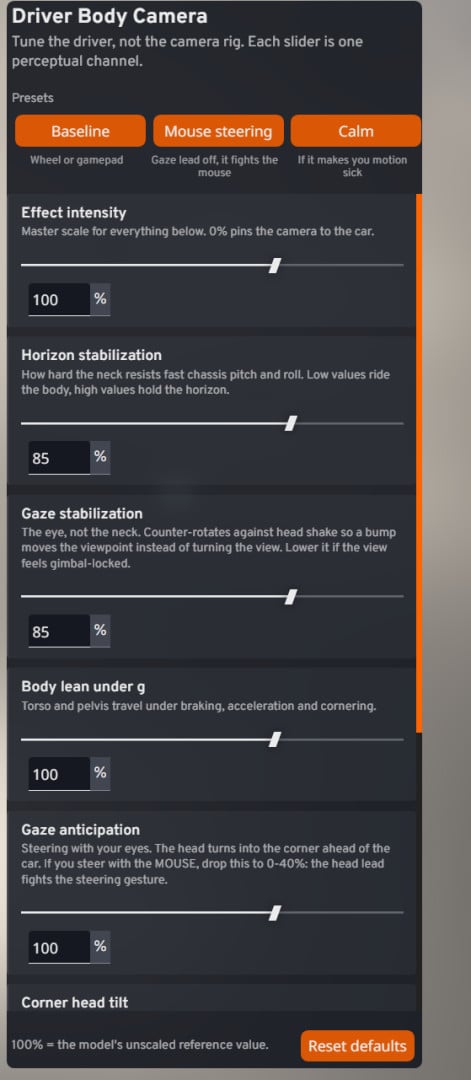
Effect intensity - master scale for the camera effects. 0% pins the camera to the car.
Horizon stabilization - how strongly the neck resists fast chassis pitch and roll.
Gaze stabilization - counter-rotation of the eyes against head shake.
Body lean under g - torso and pelvis movement under braking, acceleration and cornering.
Gaze anticipation - how far the head turns into a corner ahead of the chassis orientation.
Corner head tilt - active lean into the turn.
Seat and spine - vertical compliance over bumps, compressions, airtime and landings.
Neck pivot - how far the viewpoint moves around the neck joint when the head turns.
Troubleshooting
- Floating, like a camera crane - turn Gaze stabilization down.
- View glued to the horizon - turn Gaze stabilization down.
- Too much shake or motion sickness - turn Gaze stabilization up and Seat and spine down.
- Not enough road texture - turn Seat and spine up.
- Can't see the car leaning in corners - turn Horizon stabilization and Gaze stabilization down.
- Braking doesn't register enough - turn Body lean up.
- Thrown around too much sideways - turn Body lean down and Corner head tilt up.
- The camera steers my view for me - turn Gaze anticipation down.
- Looking around drifts oddly - turn Neck pivot down.
Notes
If you steer with the mouse, use the Mouse steering preset or reduce Gaze anticipation manually. The automatic head lead can otherwise interfere with the steering gesture.
Cockpit apps and the in-car HUD follow your normal game setting, just like they do with the stock cockpit camera.
Effects are disabled in VR.
Using Driver Body Camera together with other cockpit camera replacements is not recommended.
Installation Instructions
Place the ZIP file in your mods folder and remove any older version first.
After installation, Driver Body Camera appears as a separate mode in the camera selector.
Credits
LaserFL
Driver Body Camera is a separate cockpit camera mode that makes the view feel like it belongs to a person sitting in the car, rather than to a camera bolted to the chassis.
It is not a shake mod. Instead of simply adding motion on top of the stock view, it tries to model which motion would reach the driver's eyes and which would be absorbed by the body. Much of the effect comes from what you stop seeing: the head takes the hit while the eyes try to hold the road.
Most body movement is driven by the force you would feel in the seat. Braking, acceleration, cornering, road camber, bumps, airtime and landings naturally affect the body rather than being added as separate scripted camera effects. The body leans and settles in the seat, the head lags behind during sudden motion, and gaze stabilization helps keep the road readable without locking the view to the horizon.
The driver also leans into corners and turns the head slightly into a bend ahead of the chassis orientation.
Features
- Body movement under braking, acceleration and cornering
- Seat and spine compliance over bumps, airtime and landings
- Head and neck lag during sudden motion
- Gaze stabilization - the eyes counter-rotate against head shake
- Automatic look-ahead into corners
- Active head tilt into the turn
- Subtle breathing and postural movement
- Separate controls for the main effects
- Presets for normal driving, mouse steering and a calmer setup
- Seat position and angle saved per vehicle
- FOV saved separately for the camera
- Main spring dynamics sub-stepped at up to 240 Hz for consistent behaviour across different frame rates
- Does not replace the stock Driver camera or overwrite any game files
Settings
Pause → Mods → Driver Body Camera
Effect intensity - master scale for the camera effects. 0% pins the camera to the car.
Horizon stabilization - how strongly the neck resists fast chassis pitch and roll.
Gaze stabilization - counter-rotation of the eyes against head shake.
Body lean under g - torso and pelvis movement under braking, acceleration and cornering.
Gaze anticipation - how far the head turns into a corner ahead of the chassis orientation.
Corner head tilt - active lean into the turn.
Seat and spine - vertical compliance over bumps, compressions, airtime and landings.
Neck pivot - how far the viewpoint moves around the neck joint when the head turns.
Troubleshooting
- Floating, like a camera crane - turn Gaze stabilization down.
- View glued to the horizon - turn Gaze stabilization down.
- Too much shake or motion sickness - turn Gaze stabilization up and Seat and spine down.
- Not enough road texture - turn Seat and spine up.
- Can't see the car leaning in corners - turn Horizon stabilization and Gaze stabilization down.
- Braking doesn't register enough - turn Body lean up.
- Thrown around too much sideways - turn Body lean down and Corner head tilt up.
- The camera steers my view for me - turn Gaze anticipation down.
- Looking around drifts oddly - turn Neck pivot down.
Notes
If you steer with the mouse, use the Mouse steering preset or reduce Gaze anticipation manually. The automatic head lead can otherwise interfere with the steering gesture.
Cockpit apps and the in-car HUD follow your normal game setting, just like they do with the stock cockpit camera.
Effects are disabled in VR.
Using Driver Body Camera together with other cockpit camera replacements is not recommended.
Installation Instructions
Place the ZIP file in your mods folder and remove any older version first.
After installation, Driver Body Camera appears as a separate mode in the camera selector.
Credits
LaserFL
Videos
Direct Download Links
About Mod
| Latest Version | 1.0 |
| Game | BeamNG.drive |
| Category | Other |
| Game Version | 0.39.x |
| Tags | UI |
| Downloads | 546 |
| Created | 1 month ago |
![Ford Mustang Mach-E [PACK]](https://temp2.modland.net/i/6aa50a7184eaa/0_modland.jpg)
![BMW X6 G06/F96 [PACK]](https://temp2.modland.net/i/6a8ff76445a04/0_modland.jpg)

Mükemmel Perfect!