MPG Tracker + Odometer 0.2

![Ford Bronco [PACK]](https://temp2.modland.net/i/6abb8bc6ce51c/0_modland.jpg)



0/5,
0
votes
Description
Fuel Economy Tracker
A small, lightweight UI app that shows how much fuel you're really using, and remembers it for every vehicle you drive.
Features
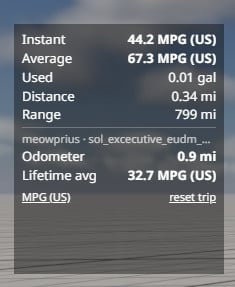
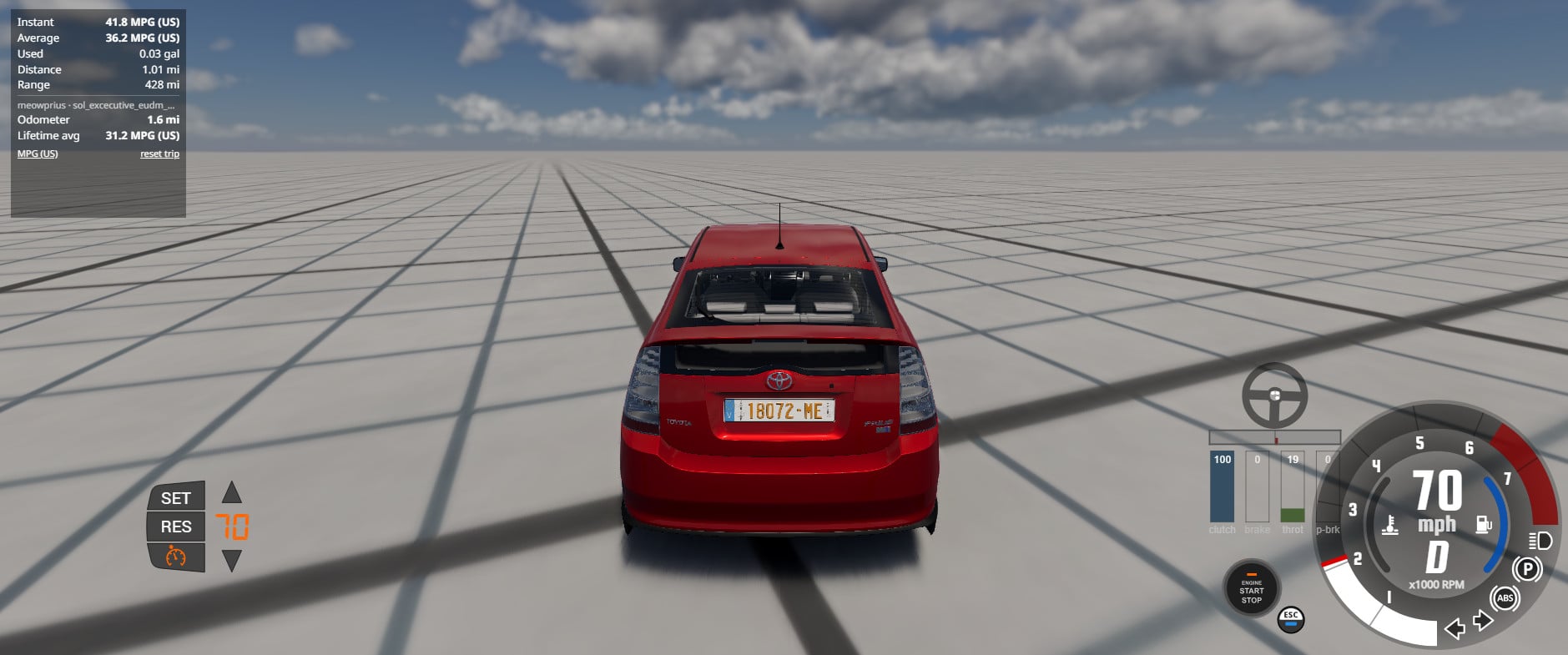
- Instant economy – smoothed live reading while driving; switches to a flow rate (L/h or gal/h) when you're stopped or idling.
- Trip average – average economy since your last trip reset.
- Fuel used and distance – running totals for the current trip.
- Range estimate – how far the remaining fuel will take you at your trip average.
- Per-vehicle odometer – total distance driven in each vehicle, saved between sessions.
- Lifetime average – fuel economy over everything you've driven in that vehicle.
- Three unit modes – L/100km, MPG (US) and km/L. Click the unit label to switch; your choice is remembered.
How it works
Each model and configuration is tracked separately, so two engine variants of the same car each get their own odometer and average.
"Reset trip" only clears the trip readings. The odometer and lifetime average keep counting.
Refuelling and vehicle resets are ignored rather than counted as negative consumption.
Switching vehicles starts a new trip and loads that vehicle's saved totals.
Totals are saved automatically every 15 seconds to settings/fuelEconomyTracker.json in your user folder.
Known limitations
Made for combustion vehicles. Electric vehicles are not supported.
Distance is over-counted while slow motion is active. Fuel used stays accurate.
Vehicles with unsaved custom part setups share one record per model.
Installation Instructions
Open the UI Apps editor and choose Add App.
Pick "Fuel Economy Tracker" and place it wherever you like.
Credits
EcoJawn
Fuel Economy Tracker
A small, lightweight UI app that shows how much fuel you're really using, and remembers it for every vehicle you drive.
Features
- Instant economy – smoothed live reading while driving; switches to a flow rate (L/h or gal/h) when you're stopped or idling.
- Trip average – average economy since your last trip reset.
- Fuel used and distance – running totals for the current trip.
- Range estimate – how far the remaining fuel will take you at your trip average.
- Per-vehicle odometer – total distance driven in each vehicle, saved between sessions.
- Lifetime average – fuel economy over everything you've driven in that vehicle.
- Three unit modes – L/100km, MPG (US) and km/L. Click the unit label to switch; your choice is remembered.
How it works
Each model and configuration is tracked separately, so two engine variants of the same car each get their own odometer and average.
"Reset trip" only clears the trip readings. The odometer and lifetime average keep counting.
Refuelling and vehicle resets are ignored rather than counted as negative consumption.
Switching vehicles starts a new trip and loads that vehicle's saved totals.
Totals are saved automatically every 15 seconds to settings/fuelEconomyTracker.json in your user folder.
Known limitations
Made for combustion vehicles. Electric vehicles are not supported.
Distance is over-counted while slow motion is active. Fuel used stays accurate.
Vehicles with unsaved custom part setups share one record per model.
Installation Instructions
Open the UI Apps editor and choose Add App.
Pick "Fuel Economy Tracker" and place it wherever you like.
Credits
EcoJawn
Direct Download Links
About Mod
| Latest Version | 0.2 |
| Game | BeamNG.drive |
| Category | Other |
| Game Version | 0.39.x |
| Downloads | 90 |
| Created | 3 days ago |
You Might Also Like »

![Mack Anthem / Pinnacle [PACK]](https://temp2.modland.net/i/6aa50a7184eaa/6ab9344368d3b/0_modland.jpg)
0 Comments
There are no comments. Be first to comment!