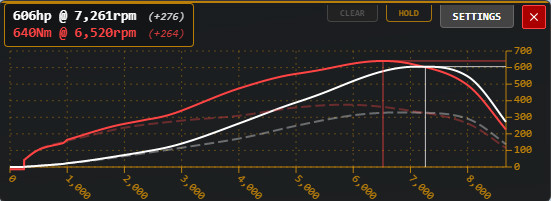
= Advanced Power Curve v2.6

Latest Update
latest
Version
v2.6
· BeamNG.drive
0.39.x
1 month ago
- Fixed a small annoyance when the app is minimised and you exit from paused menu, the app will show as open or a split-second and then go back to normal minimised mode as normal.
- Typo in saved data file fixed; new versions should migrate to new correct file and remove typo file automatically on first launch.
- Typo in saved data file fixed; new versions should migrate to new correct file and remove typo file automatically on first launch.
Advanced Power Curve UI
I wanted a more detailed and informative power curve display, so I created this advanced UI tool. It presents all essential engine performance data in a highly customizable and user-friendly interface, perfect for tuning and comparison.
Core Display Features:
Dual-Curve Graph: Clearly shows both Power and Torque curves. Solid lines represent forced induction/NOS performance, while dashed lines indicate naturally aspirated (N/A) performance.
Peak Data Box: A dedicated readout displays peak power and torque values alongside their corresponding RPM.
Detailed Values: Optional numerical readouts can be displayed directly on the graph for precise data points.
Key Functionality:
Ghost Comparison (Hold Function): Click the HOLD button to capture a snapshot ("ghost") of the current curves. This allows for direct visual comparison against new curves while tuning the vehicle.
Full Customization:
Resizable: The entire window, graph scales, and text can be resized.
Color Control: Change the background opacity, the color of each individual curve (power, torque, ghost), and the overall accent color of the application.
Compact Mode: The window can be minimized to a small, unobtrusive tab when not actively in use.
Units & Settings:
Supports multiple units for power (HP, KW, PS) and torque (NM, LB-FT, KG-M), including optional secondary unit display.
A comprehensive settings menu allows toggling of most features, adjusting opacities, and controlling the launcher/window position.
All user preferences are saved persistently.
I wanted a more detailed and informative power curve display, so I created this advanced UI tool. It presents all essential engine performance data in a highly customizable and user-friendly interface, perfect for tuning and comparison.
Core Display Features:
Dual-Curve Graph: Clearly shows both Power and Torque curves. Solid lines represent forced induction/NOS performance, while dashed lines indicate naturally aspirated (N/A) performance.
Peak Data Box: A dedicated readout displays peak power and torque values alongside their corresponding RPM.
Detailed Values: Optional numerical readouts can be displayed directly on the graph for precise data points.
Key Functionality:
Ghost Comparison (Hold Function): Click the HOLD button to capture a snapshot ("ghost") of the current curves. This allows for direct visual comparison against new curves while tuning the vehicle.
Full Customization:
Resizable: The entire window, graph scales, and text can be resized.
Color Control: Change the background opacity, the color of each individual curve (power, torque, ghost), and the overall accent color of the application.
Compact Mode: The window can be minimized to a small, unobtrusive tab when not actively in use.
Units & Settings:
Supports multiple units for power (HP, KW, PS) and torque (NM, LB-FT, KG-M), including optional secondary unit display.
A comprehensive settings menu allows toggling of most features, adjusting opacities, and controlling the launcher/window position.
All user preferences are saved persistently.
External Download Links:
- Modsfire.com - AdvancedPowerCurvev26.zip [507.75 KB]
About Mod
| Latest Version | v2.6 |
| Game | BeamNG.drive |
| Category | Other |
| Game Version | 0.39.x |
| Tags | UI |
| Downloads | 1319 |
| Forum Thread | Visit forum thread |
| Created | 8 months ago |
| Last Updated | 1 month ago |
You Might Also Like »

![Ford Bronco [PACK]](https://temp2.modland.net/i/6abb8bc6ce51c/0_modland.webp)


0 Comments
There are no comments. Be first to comment!