BeamSwap – Engine Swap Tool for BeamNG.drive | v3.5.0 Beta V3.5.0 (Beta)


Minis Mega Car Pack V2.6 – The Ultimate 100+ Vehicle Collection for BeamNG
954510
636
214
1 week ago
by
zupermini09

5/5,
1
votes
Description
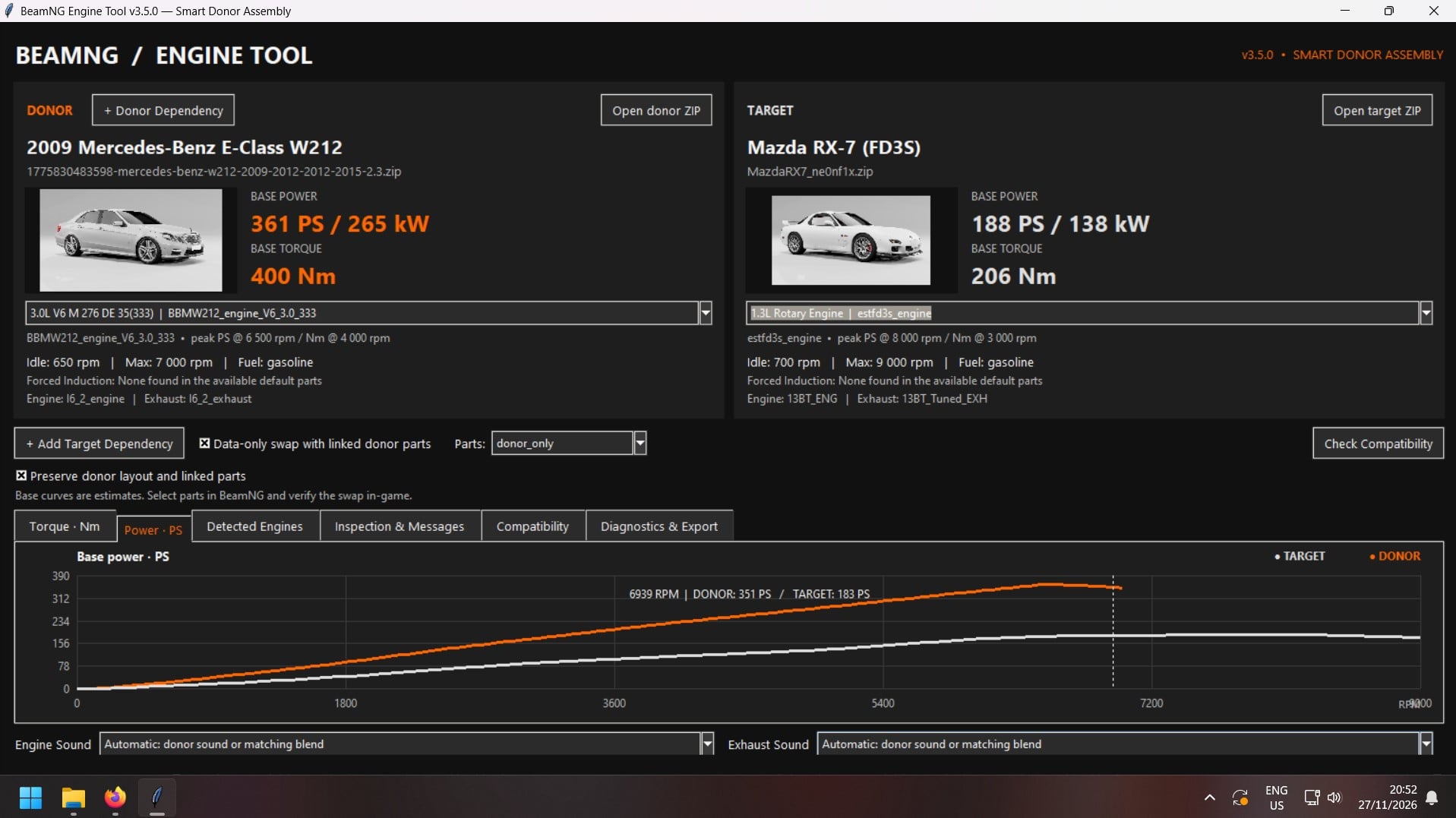
BeamSwap is a standalone Windows tool that lets you compare engines from two BeamNG.drive vehicle or engine pack ZIPs, transfer supported engine data, and export the swap as a separate mod ZIP. The original vehicle files stay intact, and the original engine remains available.
Features
- Compare engines side by side with estimated power and torque curves, RPM limits, and sound information.
- Transfer supported donor parts, including engine and exhaust sounds, ECU tuning, turbos, superchargers, NOS, and transmissions, where the required parts and dependencies are available.
- Check compatibility before exporting to see which options can be transferred, which parts are missing, and what needs testing in BeamNG.
- Export a diagnostic ZIP with the compatibility report and relevant files to help troubleshoot a problem.
Beta compatibility
Results depend on how each vehicle or mod is built. Missing dependencies, custom Lua controllers, and unusual drivetrain setups can limit what transfers. BeamSwap transfers supported engine and part data using the target vehicle’s physical setup. A swap does not automatically convert a rear-wheel-drive car to AWD. A green compatibility result means the file checks passed. Test the vehicle in BeamNG to verify that it starts, shifts, and sounds as expected.
Installation Instructions
- Download the Windows 64-bit EXE and double-click it. Python is included.
- Open the donor ZIP with the engine you want and the target ZIP for the vehicle receiving it.
- Select an engine on each side and click Check Compatibility.
- Click Generate Swap ZIP and place the generated ZIP in your BeamNG mods folder alongside the original target mod.
- Load the target vehicle in BeamNG and select the new engine in the Parts Selector.
Direct Download Links
About Mod
| Latest Version | V3.5.0 (Beta) |
| Game | BeamNG.drive |
| Category | Other |
| Game Version | 0.40.x |
| Tags | Tools Tuning |
| Downloads | 217 |
| Created | 21 hours ago |
You Might Also Like »

0 Comments
There are no comments. Be first to comment!