Horizon Style Tachometer UI 0.4.7

5/5,
3
votes
Latest Update
latest
Version
0.4.7
· BeamNG.drive
0.39.x
2 months ago
This update improves Launch Control / Two-Step detection and fixes the KM/H and MPH unit graphics.
Changes in version 0.4.7:
• Improved behavioral detection of active Two-Step / Launch Control• LC now lights up while the engine is being held on the Two-Step limiter• Added support for throttle values reported as either 0–1 or 0–100• Added a short LC indicator hold time to prevent flickering between limiter pulses• Fixed broken KM/H and MPH graphics• Unit graphics are now embedded directly in the UI file for more reliable loading• Preserved the correct BeamNG mod archive structure with ui/ at the ZIP root
It is recommended to remove the previous version and restart BeamNG.drive after installing the update.
Changes in version 0.4.7:
• Improved behavioral detection of active Two-Step / Launch Control• LC now lights up while the engine is being held on the Two-Step limiter• Added support for throttle values reported as either 0–1 or 0–100• Added a short LC indicator hold time to prevent flickering between limiter pulses• Fixed broken KM/H and MPH graphics• Unit graphics are now embedded directly in the UI file for more reliable loading• Preserved the correct BeamNG mod archive structure with ui/ at the ZIP root
It is recommended to remove the previous version and restart BeamNG.drive after installing the update.
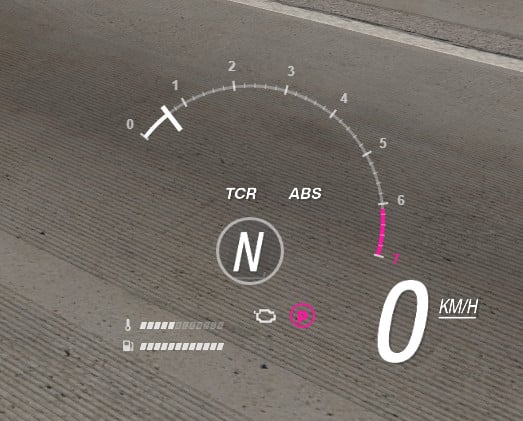
Horizon Style Tachometer is a custom UI app for BeamNG.drive inspired by modern open-world racing game HUDs.
The mod adds a clean, compact and dynamic tachometer designed to remain readable without covering too much of the screen.
Features:
• Dynamic RPM scale adjusted to the current vehicle
• Active RPM arc and high-RPM warning zone
• Digital speed display with KM/H and MPH support
• Current gear indicator
• ABS and traction-control indicators
• Launch Control / Two-Step indicator for supported vehicles
• Engine temperature bar
• Fuel level bar
• Parking brake indicator
• Check-engine status indicator
• Support for engine damage and critical engine failure states
• Automatic scaling with the BeamNG UI app size
• Transparent design suitable for different maps and lighting conditions
Launch Control support depends on the vehicle. Some modded vehicles use custom electrics fields and may not expose their Two-Step or Launch Control state to UI apps.
Installation:
1. Download the ZIP file.
2. Place it in your BeamNG.drive mods folder without extracting it.
3. Start BeamNG.drive.
4. Open Freeroam.
5. Go to UI Apps and select Edit Apps.
6. Add “Horizon Style Tachometer”.
7. Move and resize the app as needed.
After replacing an older version, clearing the BeamNG.drive cache is recommended.
Version 0.4.1 changes:
• Parking-brake indicator now uses the same pink color as the critical RPM zone
• Added a subtle dark background behind the current gear
• Improved Launch Control availability detection
• LC OFF is shown when a supported system is detected
• LC lights up when Launch Control or Two-Step becomes active
Created by ProGraMajster.
The mod adds a clean, compact and dynamic tachometer designed to remain readable without covering too much of the screen.
Features:
• Dynamic RPM scale adjusted to the current vehicle
• Active RPM arc and high-RPM warning zone
• Digital speed display with KM/H and MPH support
• Current gear indicator
• ABS and traction-control indicators
• Launch Control / Two-Step indicator for supported vehicles
• Engine temperature bar
• Fuel level bar
• Parking brake indicator
• Check-engine status indicator
• Support for engine damage and critical engine failure states
• Automatic scaling with the BeamNG UI app size
• Transparent design suitable for different maps and lighting conditions
Launch Control support depends on the vehicle. Some modded vehicles use custom electrics fields and may not expose their Two-Step or Launch Control state to UI apps.
Installation:
1. Download the ZIP file.
2. Place it in your BeamNG.drive mods folder without extracting it.
3. Start BeamNG.drive.
4. Open Freeroam.
5. Go to UI Apps and select Edit Apps.
6. Add “Horizon Style Tachometer”.
7. Move and resize the app as needed.
After replacing an older version, clearing the BeamNG.drive cache is recommended.
Version 0.4.1 changes:
• Parking-brake indicator now uses the same pink color as the critical RPM zone
• Added a subtle dark background behind the current gear
• Improved Launch Control availability detection
• LC OFF is shown when a supported system is detected
• LC lights up when Launch Control or Two-Step becomes active
Created by ProGraMajster.
Direct Download Links
Version: 0.4.7Updated: 2 months ago
Total Size: 262.66 KB
pgm_horizon_style_tachometer_v0.4.7_modland.zip
direct download
· 262.66 KB
· added 2 months ago
This File is Scanned by Antivirus and is Safe.
More Details
About Mod
| Latest Version | 0.4.7 |
| Game | BeamNG.drive |
| Category | Other |
| Game Version | 0.39.x |
| Tags | UI |
| Downloads | 5139 |
| Created | 2 months ago |
| Last Updated | 2 months ago |
| Last Virus Scan |
0/92
More Details |

it works for me but when i put it in manual mode it goes back to neutrual and it works in drive
It still doesn't seem to work, the app does not show in the UI Apps menu...
@hi Please make sure you are using the newest version of the mod.
Older uploads were packed incorrectly and may not appear in the UI Apps menu.
dosent work dosent show up in ui apps or anything and this the first vertion ive ever downloaded
Thanks for the info.I think I know what's wrong.
An update will be posted soon
@god