0/5,
0
votes
Description
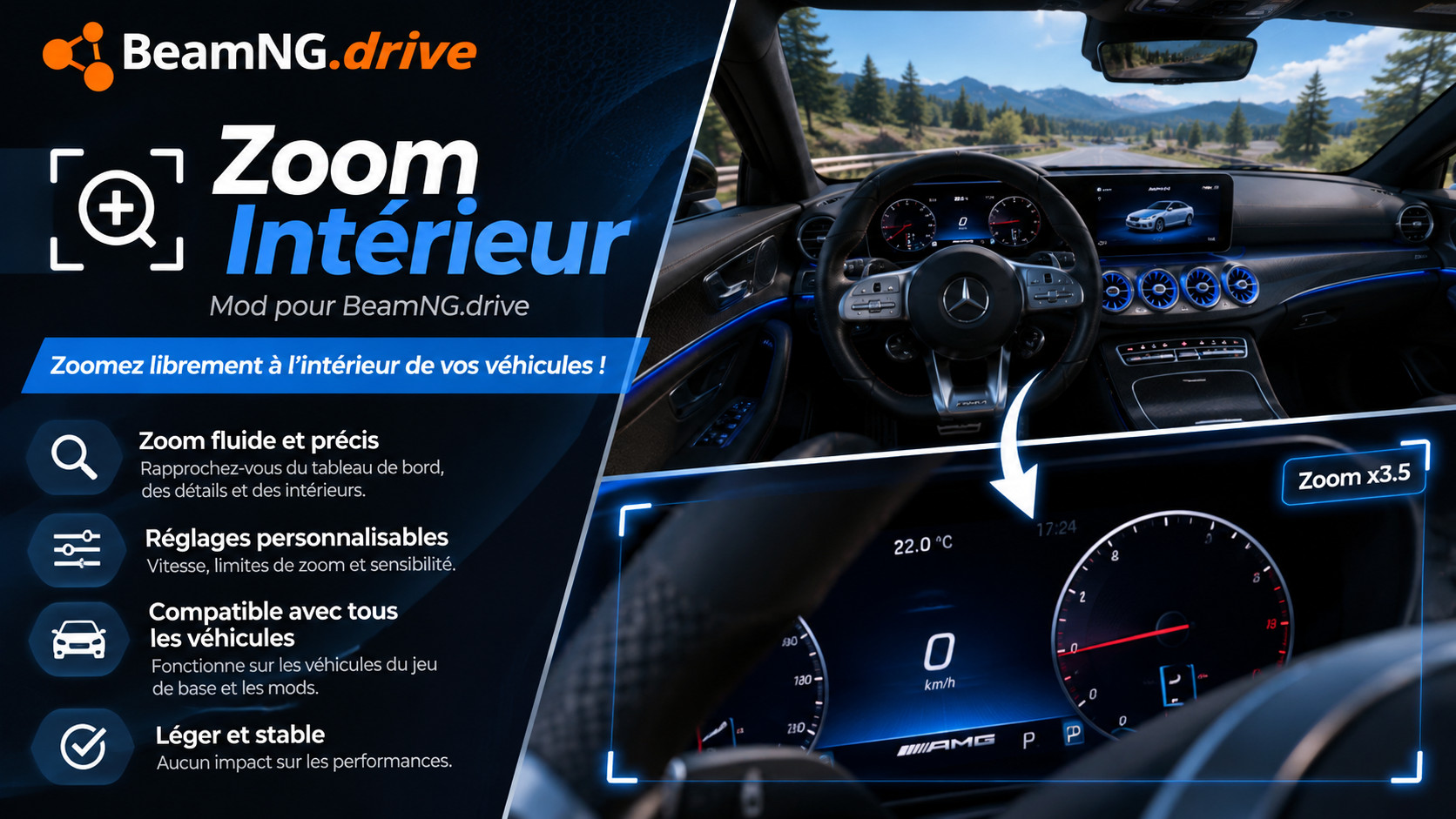
Zoom in and out in the interior (driver / passenger) camera with your mouse wheel, and get back to your default view with a single key. Read a gauge, check a mirror or look at the road far ahead, then press one key and you are back to your normal view.
Features
- Smooth zoom with the mouse wheel (step by step) or with held keys (continuous)
- One key to go back to your default view: restores your default field of view and recenters the camera
- Choose your own default view: zoom to the view you like and save it with one key
- Optional: reset the seat position at the same time (unbound by default)
- Keys only work in the interior view, so they never get in the way in other cameras
- Works with the stock interior camera on every vehicle, including modded cars that use it
- No stock file is replaced
- English and French translations (other languages show the English text)
Default controls (interior view only)
- Mouse wheel: zoom in / zoom out
- Numpad + (hold): zoom in
- Numpad - (hold): zoom out
- Numpad 5: back to the default view (in the other cameras Numpad 5 keeps its normal "Center Camera" function)
- Numpad . (Del): save the current zoom as your new default view
- Default view + seat position: not bound, assign a key if you want it
All controls can be changed in Options > Controls > Camera (actions starting with "Interior Zoom"). Num Lock must be on for the numpad keys.
Advanced settings
File: %LOCALAPPDATA%\BeamNG\BeamNG.drive\current\settings\zoom_interieur.json (created on the first launch)
- baseFov: field of view of the default view, in degrees (the stock game default is 55)
- fovMin / fovMax: zoom limits (10 to 120)
- wheelStep: zoom per mouse wheel notch (0.12 = 12 %)
- holdSpeed: speed of the held-key zoom
- smoothness: animation speed (higher = faster)
Restart the game after editing the file.
Good to know
- Like the stock zoom keys, the game saves the interior field of view for all vehicles. If you quit while zoomed in, just press Numpad 5.
- Only the stock interior camera is supported. Custom camera modes added by other mods are not affected.
- Do not use it together with another mod that also zooms the interior camera with the mouse wheel.
Installation Instructions
1. Install the mod (subscribe, or put the zip in your mods folder).
2. Get in a vehicle and switch to the interior camera.
3. Zoom with the mouse wheel. Press Numpad 5 to get back to the default view.
4. On the first launch, your default view is your current interior field of view. To change it, zoom to the view you want and press Numpad . (Del).
Zoom in and out in the interior (driver / passenger) camera with your mouse wheel, and get back to your default view with a single key. Read a gauge, check a mirror or look at the road far ahead, then press one key and you are back to your normal view.
Features
- Smooth zoom with the mouse wheel (step by step) or with held keys (continuous)
- One key to go back to your default view: restores your default field of view and recenters the camera
- Choose your own default view: zoom to the view you like and save it with one key
- Optional: reset the seat position at the same time (unbound by default)
- Keys only work in the interior view, so they never get in the way in other cameras
- Works with the stock interior camera on every vehicle, including modded cars that use it
- No stock file is replaced
- English and French translations (other languages show the English text)
Default controls (interior view only)
- Mouse wheel: zoom in / zoom out
- Numpad + (hold): zoom in
- Numpad - (hold): zoom out
- Numpad 5: back to the default view (in the other cameras Numpad 5 keeps its normal "Center Camera" function)
- Numpad . (Del): save the current zoom as your new default view
- Default view + seat position: not bound, assign a key if you want it
All controls can be changed in Options > Controls > Camera (actions starting with "Interior Zoom"). Num Lock must be on for the numpad keys.
Advanced settings
File: %LOCALAPPDATA%\BeamNG\BeamNG.drive\current\settings\zoom_interieur.json (created on the first launch)
- baseFov: field of view of the default view, in degrees (the stock game default is 55)
- fovMin / fovMax: zoom limits (10 to 120)
- wheelStep: zoom per mouse wheel notch (0.12 = 12 %)
- holdSpeed: speed of the held-key zoom
- smoothness: animation speed (higher = faster)
Restart the game after editing the file.
Good to know
- Like the stock zoom keys, the game saves the interior field of view for all vehicles. If you quit while zoomed in, just press Numpad 5.
- Only the stock interior camera is supported. Custom camera modes added by other mods are not affected.
- Do not use it together with another mod that also zooms the interior camera with the mouse wheel.
Installation Instructions
1. Install the mod (subscribe, or put the zip in your mods folder).
2. Get in a vehicle and switch to the interior camera.
3. Zoom with the mouse wheel. Press Numpad 5 to get back to the default view.
4. On the first launch, your default view is your current interior field of view. To change it, zoom to the view you want and press Numpad . (Del).
Direct Download Links
About Mod
| Latest Version | 1 |
| Game | BeamNG.drive |
| Category | Other |
| Game Version | 0.40.x |
| Tags | Gameplay |
| Downloads | 14 |
| Created | 20 minutes ago |
You Might Also Like »

0 Comments
There are no comments. Be first to comment!