
![Ford Mustang Mach-E [PACK]](https://temp2.modland.net/i/6aa50a7184eaa/0_modland.webp)
![BMW X6 G06/F96 [PACK]](https://temp2.modland.net/i/6a8ff76445a04/0_modland.webp)

3/5,
2
votes
Changelog
Version 1.0 introduces automatic, EV and manual-mode remapping for H-pattern shifters in BeamNG.drive.
Description
Smart H-Shifter is a background H-pattern input helper. No transmission part selection is required. Smart H-Shifter intentionally remaps only recognized vanilla BeamNG shift logic, while unknown or custom transmission systems are left unchanged and receive their original H-pattern input.
Features
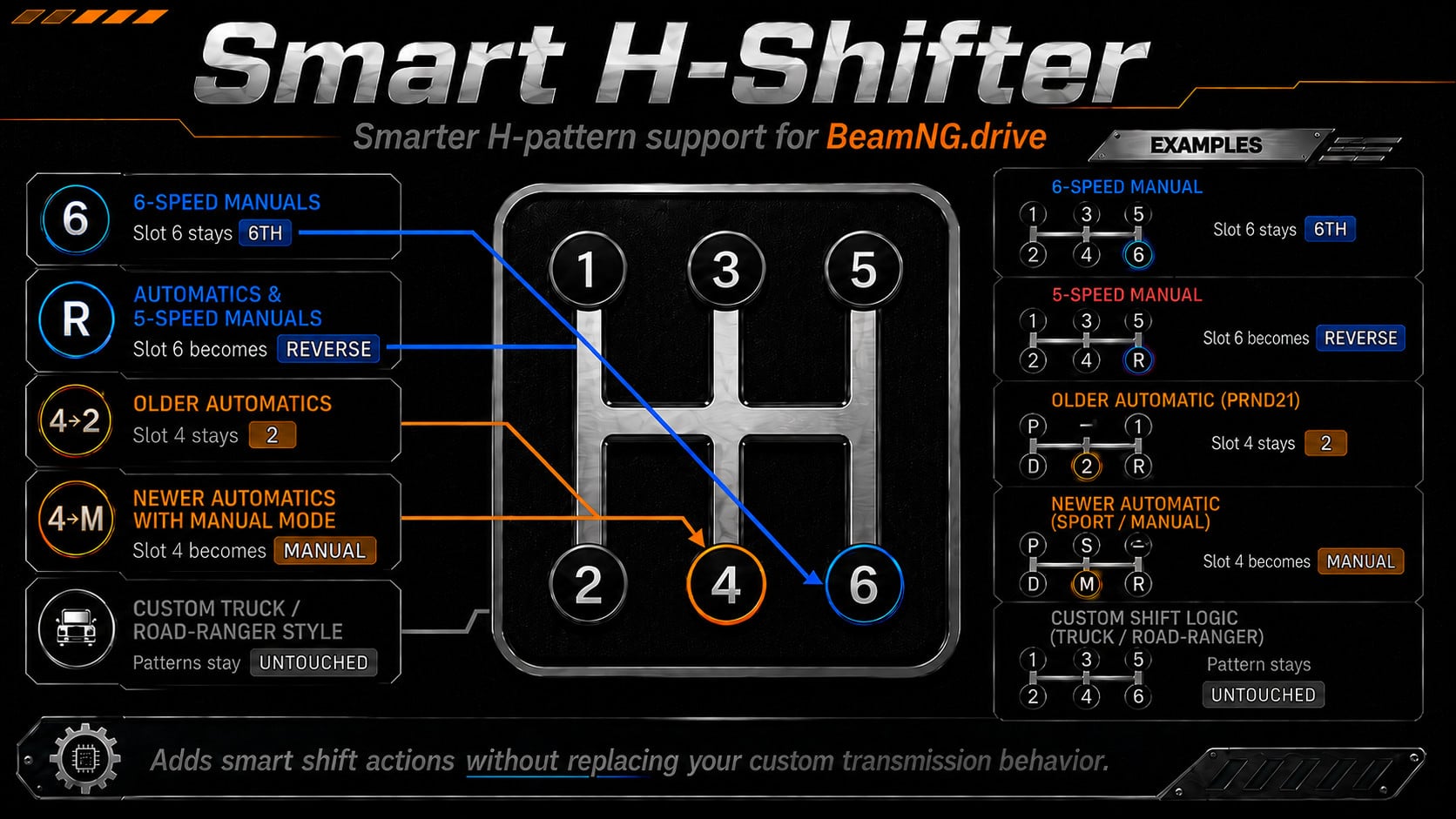
- Older PRND21-Style Automatics: Position 1: Park, Position 2: Drive, Position 3: Sport request (behaves like stock), Position 4: 2nd gear, Position 5: 1st gear, Position 6: Reverse.
- Automatics and DCTs With Manual Mode: Supports PRNDSM, PRNDM, PRNSM and similar layouts. Position 1: Park, Position 2: Drive, Position 3: Sport (where supported), Position 4: Manual, Position 5: Unchanged stock position-5 request, Position 6: Reverse.
- Manual Behavior: For standard 4-speed and 5-speed manual transmissions, Position 4 maps to 4th gear and Position 6 maps to Reverse. 6-speed manuals and sequential transmissions retain normal behavior.
- Custom Transmissions: Unknown or custom shift logic receives the original H-pattern index without modification, preserving compatibility with systems such as EFC, Eaton Fuller, Road-Ranger and other mods.
Installation Instructions
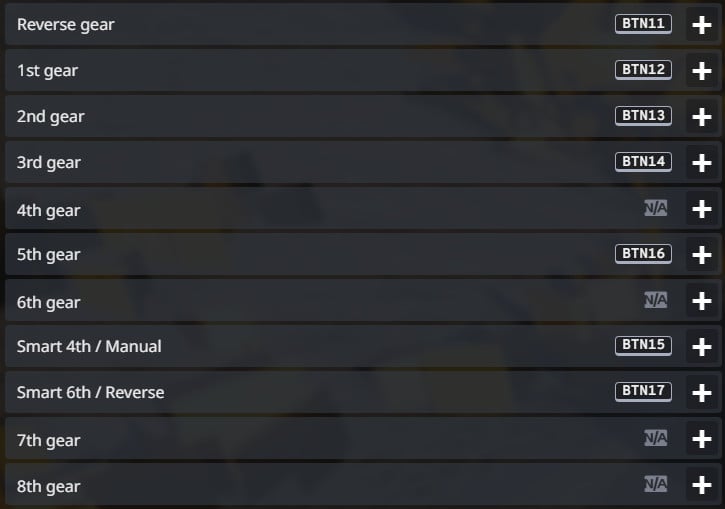
Go to Options > Controls and configure the following:
- Bind physical H-shifter position 4 to "Smart 4th / Manual"
- Remove the same physical button from the standard "4th gear" action
- Bind physical H-shifter position 6 to "Smart 6th / Reverse"
- Remove the same physical button from the standard "6th gear" action
- Positions 1, 2, 3 and 5 can remain assigned to BeamNG's standard gear actions
- Leave any dedicated Reverse binding unchanged
For troubleshooting compatibility with custom transmissions, open lua/vehicle/extensions/smart6thReverse.lua, find local DEBUG = false and change it to local DEBUG = true.
Version 1.0 introduces automatic, EV and manual-mode remapping for H-pattern shifters in BeamNG.drive.
Description
Smart H-Shifter is a background H-pattern input helper. No transmission part selection is required. Smart H-Shifter intentionally remaps only recognized vanilla BeamNG shift logic, while unknown or custom transmission systems are left unchanged and receive their original H-pattern input.
Features
- Older PRND21-Style Automatics: Position 1: Park, Position 2: Drive, Position 3: Sport request (behaves like stock), Position 4: 2nd gear, Position 5: 1st gear, Position 6: Reverse.
- Automatics and DCTs With Manual Mode: Supports PRNDSM, PRNDM, PRNSM and similar layouts. Position 1: Park, Position 2: Drive, Position 3: Sport (where supported), Position 4: Manual, Position 5: Unchanged stock position-5 request, Position 6: Reverse.
- Manual Behavior: For standard 4-speed and 5-speed manual transmissions, Position 4 maps to 4th gear and Position 6 maps to Reverse. 6-speed manuals and sequential transmissions retain normal behavior.
- Custom Transmissions: Unknown or custom shift logic receives the original H-pattern index without modification, preserving compatibility with systems such as EFC, Eaton Fuller, Road-Ranger and other mods.
Installation Instructions
Go to Options > Controls and configure the following:
- Bind physical H-shifter position 4 to "Smart 4th / Manual"
- Remove the same physical button from the standard "4th gear" action
- Bind physical H-shifter position 6 to "Smart 6th / Reverse"
- Remove the same physical button from the standard "6th gear" action
- Positions 1, 2, 3 and 5 can remain assigned to BeamNG's standard gear actions
- Leave any dedicated Reverse binding unchanged
For troubleshooting compatibility with custom transmissions, open lua/vehicle/extensions/smart6thReverse.lua, find local DEBUG = false and change it to local DEBUG = true.
External Download Links:
- Modsfire.com - Smart_H_Shifter_v10.zip [1.91 MB]
About Mod
| Latest Version | v1.0 |
| Game | BeamNG.drive |
| Category | Other |
| Game Version | 0.39.x |
| Downloads | 169 |
| Created | 1 month ago |
You Might Also Like »
![Ford Mustang Mach-E [PACK]](https://temp2.modland.net/i/6aa50a7184eaa/0_modland.jpg)
![BMW X6 G06/F96 [PACK]](https://temp2.modland.net/i/6a8ff76445a04/0_modland.jpg)



0 Comments
There are no comments. Be first to comment!