Universal Transbrake Light Indicator 1.3

![Ford Mustang Mach-E [PACK]](https://temp2.modland.net/i/6aa50a7184eaa/0_modland.webp)
![BMW X6 G06/F96 [PACK]](https://temp2.modland.net/i/6a8ff76445a04/0_modland.webp)



0/5,
0
votes
Universal Transbrake Light Indicator
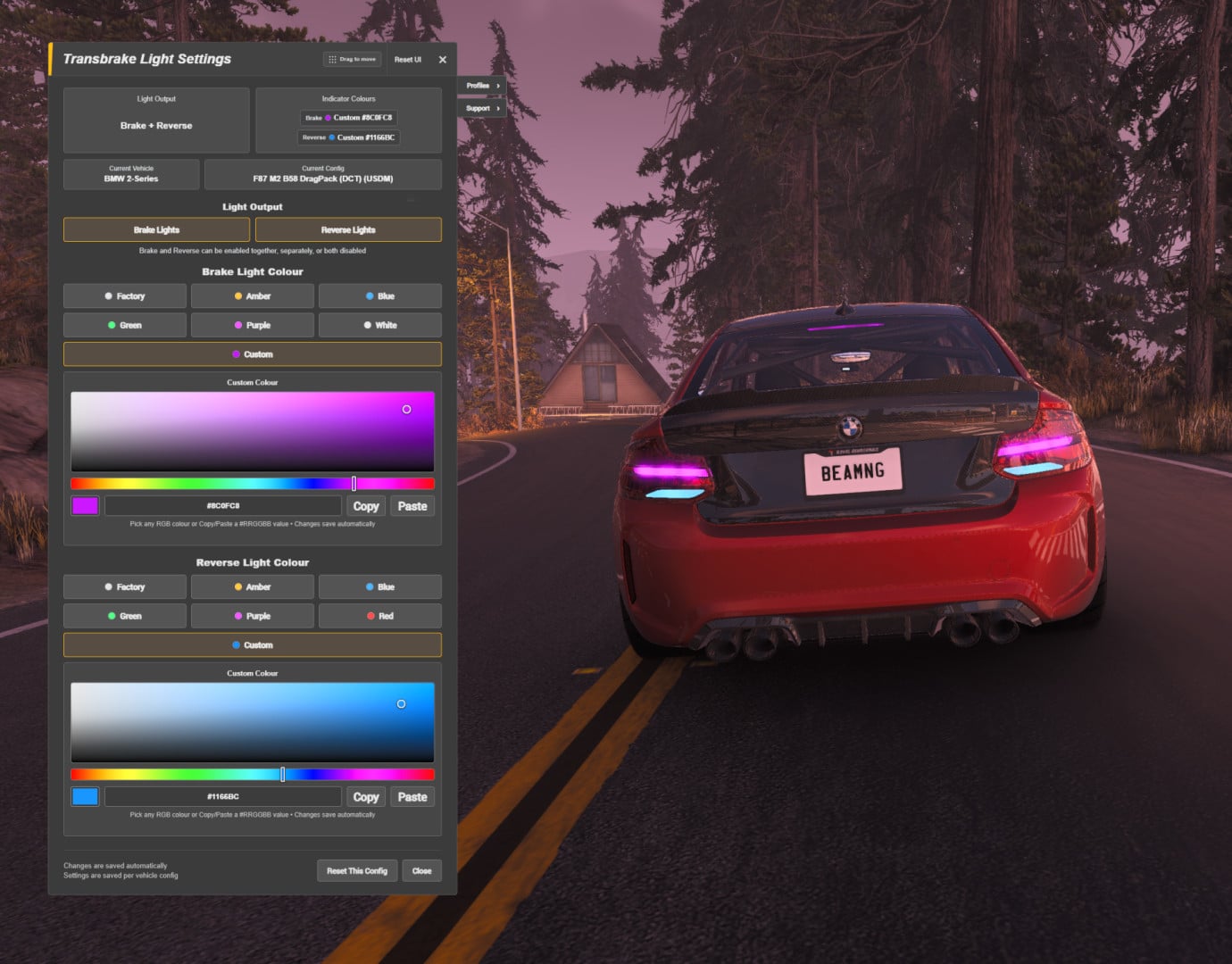
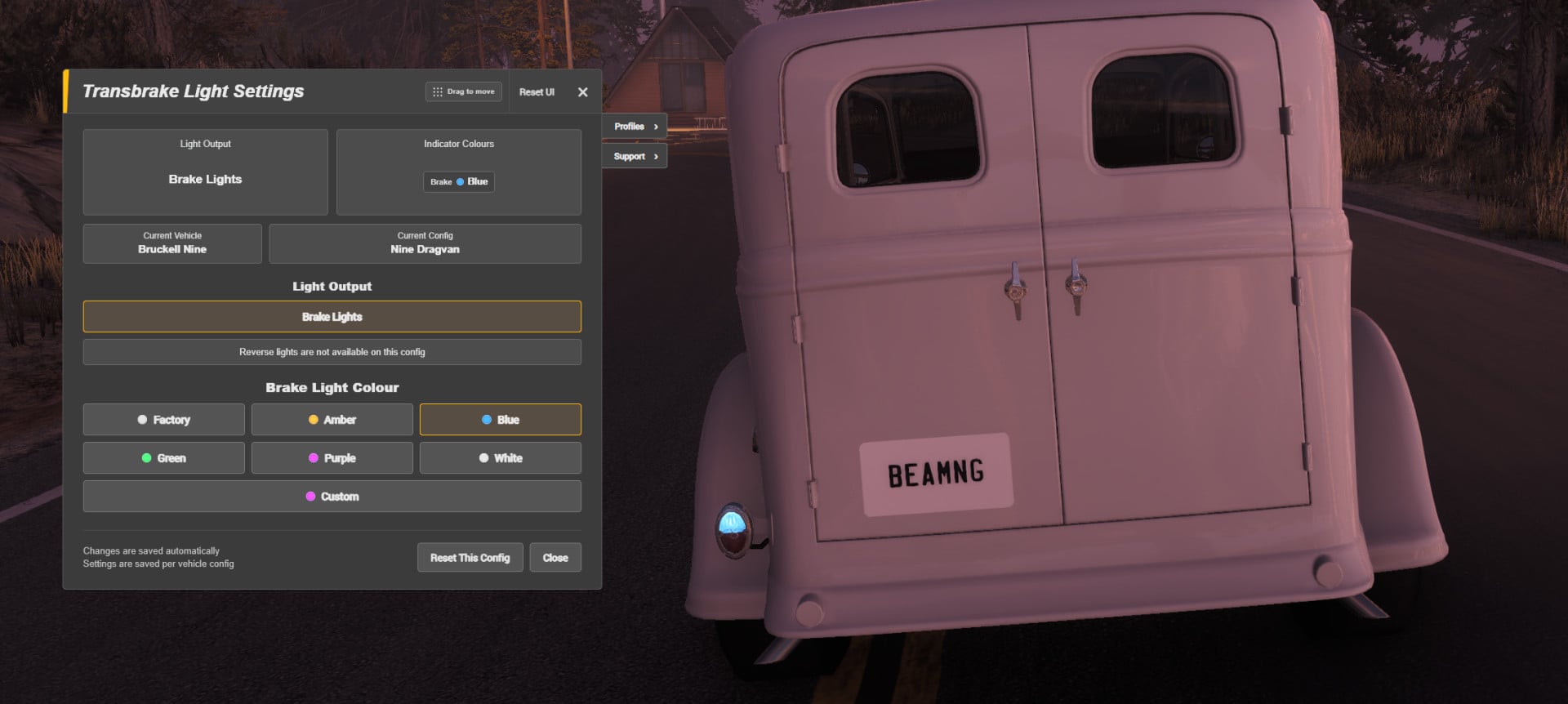
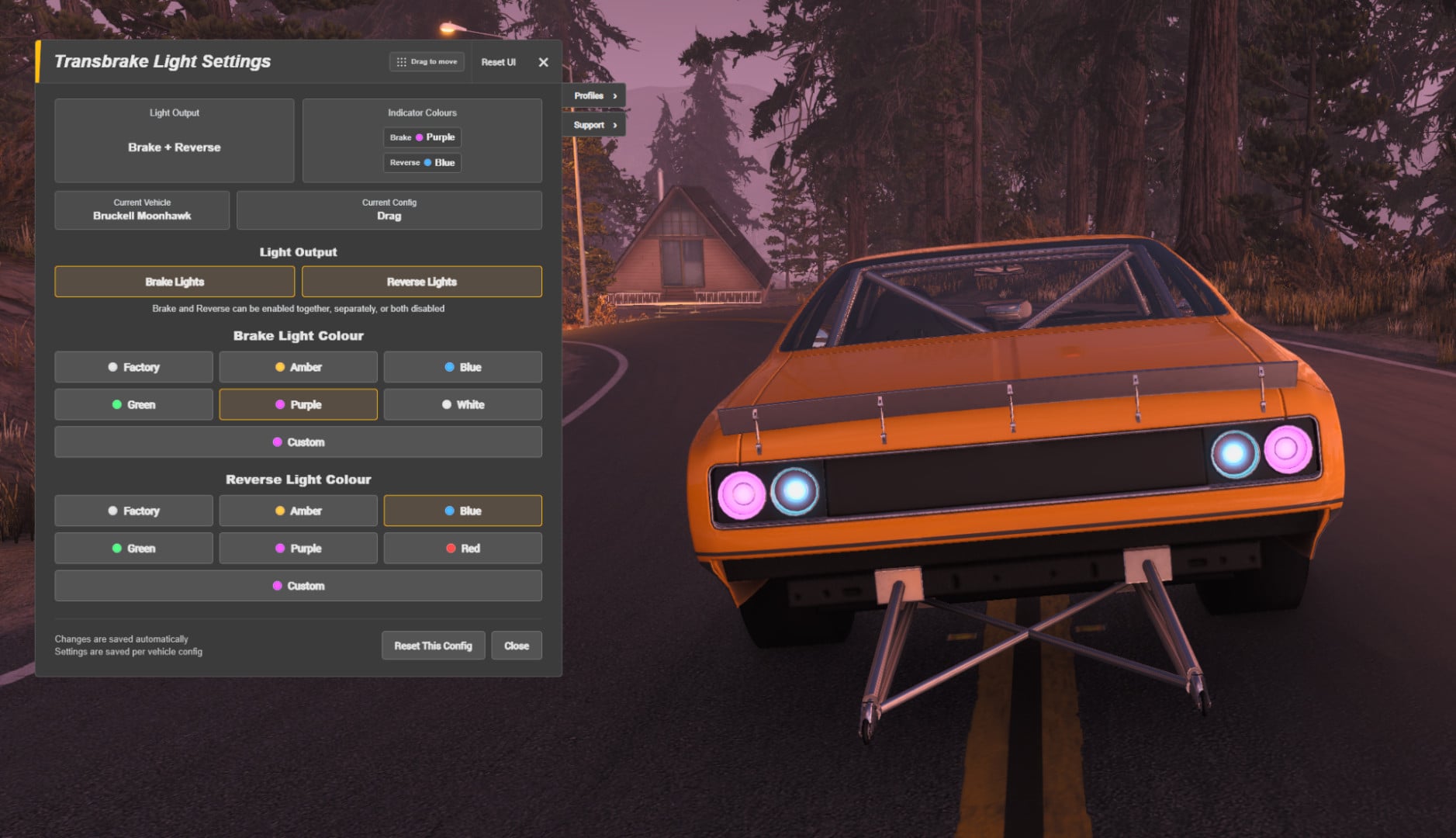
UTLI lets compatible vehicles use their existing brake lights, reverse lights, or both as a visual transbrake indicator — with independent colours, presets and full custom RGB support.
It uses BeamNG's actual transbrake signal and automatically detects compatible light outputs from the currently assembled vehicle configuration.
UTLI does not add a transbrake. The vehicle/configuration must already have one.
Features
- Brake lights, reverse lights, or both
- Independent Brake and Reverse colours
- Factory colours and multiple presets
- Full custom RGB colour picker
- Live colour changes while adjusting custom colours
- Hex colour readout with Copy / Paste support
- Settings saved per vehicle configuration
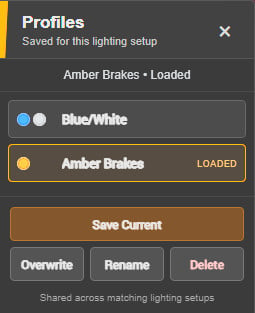
- Profiles for saving custom light settings
- Automatic detection of available outputs
- Unavailable outputs are hidden automatically
- Movable settings panel with persistent position
- Native lamp smoothing where supported
- Support for both textured and textureless emissive lamps
- Built-in Support tab
- UTLI log exporter
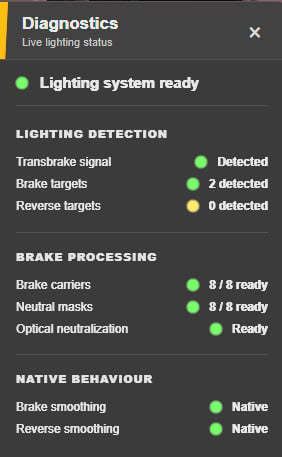
- Built-in diagnostics panel
Custom Colours
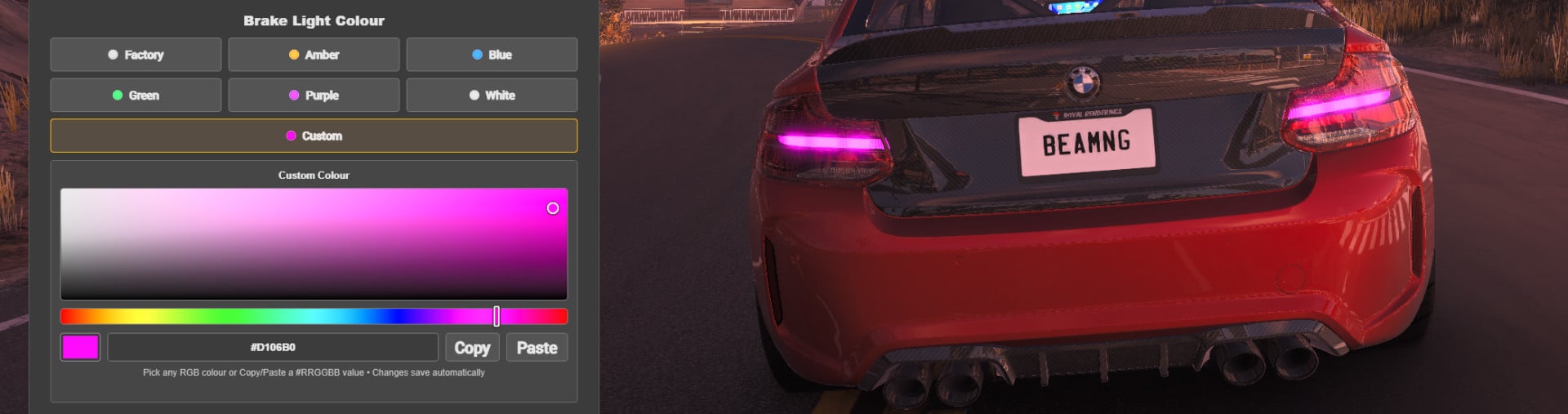
Selecting Custom opens the visual RGB editor, allowing any colour to be chosen independently for Brake and Reverse. Each output remembers its own custom colour even after switching back to a preset.
Profiles
The Profiles tab allows custom light settings to be saved and loaded for different lighting configurations. This makes it easy to keep multiple Brake and Reverse colour setups and switch between them without having to recreate the settings each time.
Compatibility
UTLI does not use a hardcoded vehicle whitelist. It dynamically checks the current vehicle/configuration for compatible Brake and Reverse outputs and hides unavailable sections automatically.
Compatibility ultimately depends on how the individual vehicle is built. An output may be unavailable if the vehicle does not expose a transbrake, physically lacks that lamp, or uses an unsupported or broken material setup.
UTLI supports both normal textured emissive lamps and vehicles using solid/textureless emissive materials.
Technical Details
UTLI uses BeamNG's real transbrake signal rather than applying fake brake or reverse inputs. While the indicator is active, UTLI temporarily controls compatible lamp materials. Normal vehicle lighting behaviour is restored when control is released.
Where a compatible native lamp smoother exists, UTLI follows it. For supported textured brake-light materials, UTLI can generate and cache a neutral compatibility mask under: /temp/utli/generated/
UTLI does not permanently modify the installed vehicle's material or JBeam files.
Known Limitation
UTLI primarily recolours the visible lamp materials. Some vehicles also use separate projected/dynamic lights to cast light onto roads and walls. Those projections may retain their original colour even when the visible lamp uses a custom UTLI colour.
Troubleshooting
If an output does not work correctly:
- Confirm the vehicle/configuration has a working transbrake
- Confirm its normal brake/reverse lights work
- Respawn or reload the vehicle
- Check whether UTLI detects the affected output
- If a generated brake texture looks incorrect, remove /temp/utli/ and allow it to rebuild
Support & Diagnostics
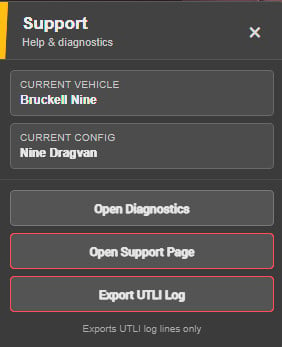
UTLI includes a dedicated Support tab inside the settings panel where you can open the support page, export a UTLI log, and view the Diagnostics panel to check the current status of UTLI systems.
Privacy / Stored Data
UTLI stores only the information needed for its settings: Brake / Reverse enabled states, selected colours, remembered custom colours, and UI panel position. UTLI does not send gameplay data, vehicle information or settings to any external service.
Installation Instructions
1. Subscribe to UTLI through the BeamNG Repository.
2. The default UTLI settings keybind is - (minus).
3. Press - to open or close the UTLI panel.
4. The keybind can be changed at any time through the Controls menu.
Important: The current vehicle configuration must already have a working transbrake.
For a manual installation, place UTLI.zip in the normal BeamNG.drive mods folder and leave it zipped.
Credits
Alleyne
UTLI contains adapted BC7 texture-decoder logic from tex-decoder by hearhellacopters, licensed under the MIT License.
UTLI lets compatible vehicles use their existing brake lights, reverse lights, or both as a visual transbrake indicator — with independent colours, presets and full custom RGB support.
It uses BeamNG's actual transbrake signal and automatically detects compatible light outputs from the currently assembled vehicle configuration.
UTLI does not add a transbrake. The vehicle/configuration must already have one.
Features
- Brake lights, reverse lights, or both
- Independent Brake and Reverse colours
- Factory colours and multiple presets
- Full custom RGB colour picker
- Live colour changes while adjusting custom colours
- Hex colour readout with Copy / Paste support
- Settings saved per vehicle configuration
- Profiles for saving custom light settings
- Automatic detection of available outputs
- Unavailable outputs are hidden automatically
- Movable settings panel with persistent position
- Native lamp smoothing where supported
- Support for both textured and textureless emissive lamps
- Built-in Support tab
- UTLI log exporter
- Built-in diagnostics panel
Custom Colours
Selecting Custom opens the visual RGB editor, allowing any colour to be chosen independently for Brake and Reverse. Each output remembers its own custom colour even after switching back to a preset.
Profiles
The Profiles tab allows custom light settings to be saved and loaded for different lighting configurations. This makes it easy to keep multiple Brake and Reverse colour setups and switch between them without having to recreate the settings each time.
Compatibility
UTLI does not use a hardcoded vehicle whitelist. It dynamically checks the current vehicle/configuration for compatible Brake and Reverse outputs and hides unavailable sections automatically.
Compatibility ultimately depends on how the individual vehicle is built. An output may be unavailable if the vehicle does not expose a transbrake, physically lacks that lamp, or uses an unsupported or broken material setup.
UTLI supports both normal textured emissive lamps and vehicles using solid/textureless emissive materials.
Technical Details
UTLI uses BeamNG's real transbrake signal rather than applying fake brake or reverse inputs. While the indicator is active, UTLI temporarily controls compatible lamp materials. Normal vehicle lighting behaviour is restored when control is released.
Where a compatible native lamp smoother exists, UTLI follows it. For supported textured brake-light materials, UTLI can generate and cache a neutral compatibility mask under: /temp/utli/generated/
UTLI does not permanently modify the installed vehicle's material or JBeam files.
Known Limitation
UTLI primarily recolours the visible lamp materials. Some vehicles also use separate projected/dynamic lights to cast light onto roads and walls. Those projections may retain their original colour even when the visible lamp uses a custom UTLI colour.
Troubleshooting
If an output does not work correctly:
- Confirm the vehicle/configuration has a working transbrake
- Confirm its normal brake/reverse lights work
- Respawn or reload the vehicle
- Check whether UTLI detects the affected output
- If a generated brake texture looks incorrect, remove /temp/utli/ and allow it to rebuild
Support & Diagnostics
UTLI includes a dedicated Support tab inside the settings panel where you can open the support page, export a UTLI log, and view the Diagnostics panel to check the current status of UTLI systems.
Privacy / Stored Data
UTLI stores only the information needed for its settings: Brake / Reverse enabled states, selected colours, remembered custom colours, and UI panel position. UTLI does not send gameplay data, vehicle information or settings to any external service.
Installation Instructions
1. Subscribe to UTLI through the BeamNG Repository.
2. The default UTLI settings keybind is - (minus).
3. Press - to open or close the UTLI panel.
4. The keybind can be changed at any time through the Controls menu.
Important: The current vehicle configuration must already have a working transbrake.
For a manual installation, place UTLI.zip in the normal BeamNG.drive mods folder and leave it zipped.
Credits
Alleyne
UTLI contains adapted BC7 texture-decoder logic from tex-decoder by hearhellacopters, licensed under the MIT License.
Direct Download Links
About Mod
| Latest Version | 1.3 |
| Game | BeamNG.drive |
| Category | Other |
| Game Version | 0.39.x |
| Tags | UI |
| Downloads | 320 |
| Created | 5 days ago |
You Might Also Like »
![Mack Anthem / Pinnacle [PACK]](https://temp2.modland.net/i/6aa50a7184eaa/6ab9344368d3b/0_modland.webp)
0 Comments
There are no comments. Be first to comment!