Auto Leveler - Landscaping Terraformer, Slopes & Roads 1.1.0

0/5,
0
Stimmen
Changelog
- Added 3D Dirt Road Builder mode: create smooth curved dirt roads following the terrain with adjustable width (3m to 8m) and automatic clearing of grass, crops, and stones.
- Fixed overlapping key binding for actions: separated [Y] for adding points and [R] for moving marked points.
Description
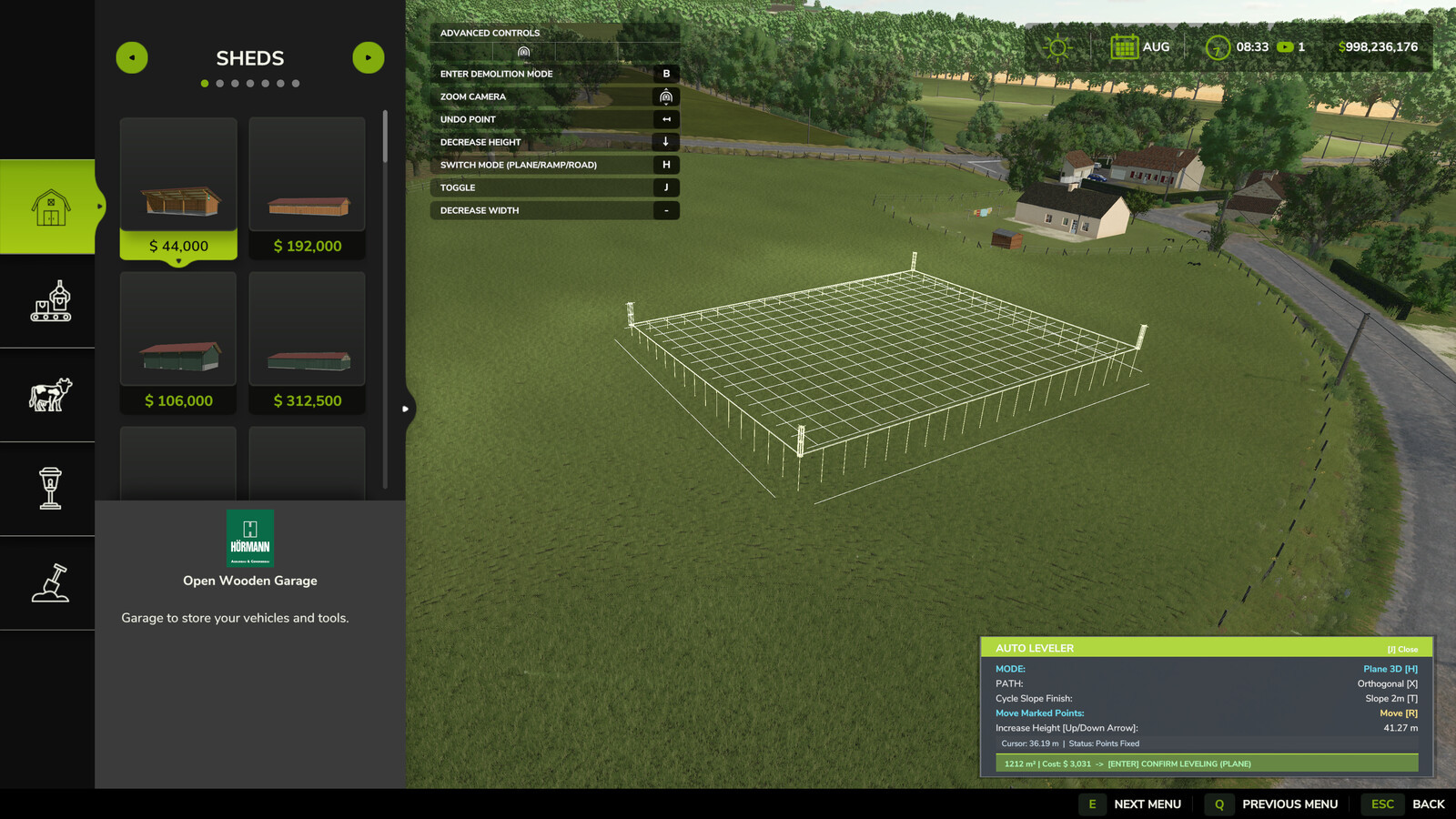
The Auto Leveler completely transforms terraforming in Farming Simulator 25! Instead of manually dragging brushes for hours, simply mark the boundary corners of the desired zone, preview the elevation plane in real time, and press [Enter] to flatten the entire area in seconds with mathematical perfection.
Features:
- Save Countless Hours: Create large construction pads, yard expansions, and flat building sites in seconds.
- 100% Flat & Level: No uneven bumps, glitches, or holes under your sheds, silos, and factories.
- Smooth Transition Slopes: Automatic edge blending (Talude) of 2m, 4m, or 6m to avoid vertical jagged terrain cuts.
- Perfect 3D Ramp Builder: Connect elevated yards and roads with precise slope percentage readouts and adjustable width.
- 3D Dirt Road Builder: Trace natural curved roads following the terrain contours with adjustable width (3m to 8m) and auto clearing of grass, rocks, and field foliage.
- Financial Control: Real-time area (m²) and estimated cost preview.
- 3D Holographic Plane: Real-time elevation preview with volumetric posts showing the exact target height.
- Auto Alignment: Smart magnetic snap and Neon Green guide line (90°/45°) for flawless rectangles and squares.
- Dynamic Height Control: Raise or lower the entire flat plane or individual ramp/road points using Up/Down Arrow keys.
- Easy Polygon Closing: Click directly on Point 1 or double-click anywhere to lock and close the area.
Controls:
- [J]: Activate / Deactivate Auto Leveler (inside Construction Mode).
- [H]: Switch Mode (3D Flat Plane vs. 3D Ramp vs. 3D Road).
- [X]: Toggle Alignment (Free Drawing vs. 90°/45° Orthogonal Snap).
- [Y]: Add Points Mode.
- [R]: Move / Drag Marked Points.
- [T]: Cycle Edge Finish (Vertical Cut, 2m Slope, 4m Slope, 6m Slope).
- [Up Arrow] / [Down Arrow]: Increase / Decrease Height.
- [+] / [-]: Increase / Decrease Width (Ramp & Road).
- [Left Click]: Place point on terrain / Click Point 1 to close polygon.
- [Double Click]: Quick lock and fix polygon points.
- [Backspace] / [Right Click]: Undo last placed point.
- [Enter]: Apply terraforming to the terrain.
Installation Instructions
To activate the Auto Leveler, enter the Construction Menu and ensure you are on the main overview/selection screen (without any active building or specific landscaping brush selected). Press [J] to open the mod interface. If you have a building or landscaping tool currently selected, press [ESC] to return to the main construction menu screen, and then press [J] to activate the mod.
Credits
JogaDim
- Added 3D Dirt Road Builder mode: create smooth curved dirt roads following the terrain with adjustable width (3m to 8m) and automatic clearing of grass, crops, and stones.
- Fixed overlapping key binding for actions: separated [Y] for adding points and [R] for moving marked points.
Description
The Auto Leveler completely transforms terraforming in Farming Simulator 25! Instead of manually dragging brushes for hours, simply mark the boundary corners of the desired zone, preview the elevation plane in real time, and press [Enter] to flatten the entire area in seconds with mathematical perfection.
Features:
- Save Countless Hours: Create large construction pads, yard expansions, and flat building sites in seconds.
- 100% Flat & Level: No uneven bumps, glitches, or holes under your sheds, silos, and factories.
- Smooth Transition Slopes: Automatic edge blending (Talude) of 2m, 4m, or 6m to avoid vertical jagged terrain cuts.
- Perfect 3D Ramp Builder: Connect elevated yards and roads with precise slope percentage readouts and adjustable width.
- 3D Dirt Road Builder: Trace natural curved roads following the terrain contours with adjustable width (3m to 8m) and auto clearing of grass, rocks, and field foliage.
- Financial Control: Real-time area (m²) and estimated cost preview.
- 3D Holographic Plane: Real-time elevation preview with volumetric posts showing the exact target height.
- Auto Alignment: Smart magnetic snap and Neon Green guide line (90°/45°) for flawless rectangles and squares.
- Dynamic Height Control: Raise or lower the entire flat plane or individual ramp/road points using Up/Down Arrow keys.
- Easy Polygon Closing: Click directly on Point 1 or double-click anywhere to lock and close the area.
Controls:
- [J]: Activate / Deactivate Auto Leveler (inside Construction Mode).
- [H]: Switch Mode (3D Flat Plane vs. 3D Ramp vs. 3D Road).
- [X]: Toggle Alignment (Free Drawing vs. 90°/45° Orthogonal Snap).
- [Y]: Add Points Mode.
- [R]: Move / Drag Marked Points.
- [T]: Cycle Edge Finish (Vertical Cut, 2m Slope, 4m Slope, 6m Slope).
- [Up Arrow] / [Down Arrow]: Increase / Decrease Height.
- [+] / [-]: Increase / Decrease Width (Ramp & Road).
- [Left Click]: Place point on terrain / Click Point 1 to close polygon.
- [Double Click]: Quick lock and fix polygon points.
- [Backspace] / [Right Click]: Undo last placed point.
- [Enter]: Apply terraforming to the terrain.
Installation Instructions
To activate the Auto Leveler, enter the Construction Menu and ensure you are on the main overview/selection screen (without any active building or specific landscaping brush selected). Press [J] to open the mod interface. If you have a building or landscaping tool currently selected, press [ESC] to return to the main construction menu screen, and then press [J] to activate the mod.
Credits
JogaDim
Direct Download Links
Version: 1.1.0Aktualisiert: vor 1 Tag
Gesamtgröße: 119.56 KB FS25_AutoLeveler_modland.zip direct herunterladen · 119.56 KB · hinzugefügt vor 1 Tag
Über Mod
| Neueste Version | 1.1.0 |
| Spiel | FS25 |
| Kategorie | Spielverlauf |
| Herunterladen | 24 |
| Erstellt | vor 1 Tag |
Das könnte Sie auch interessieren »





0 Kommentare
Es sind noch keine Kommentare vorhanden. Seien Sie der Erste, der kommentiert!