Money Manager v 1.0

0/5,
0
Stimmen
Description:
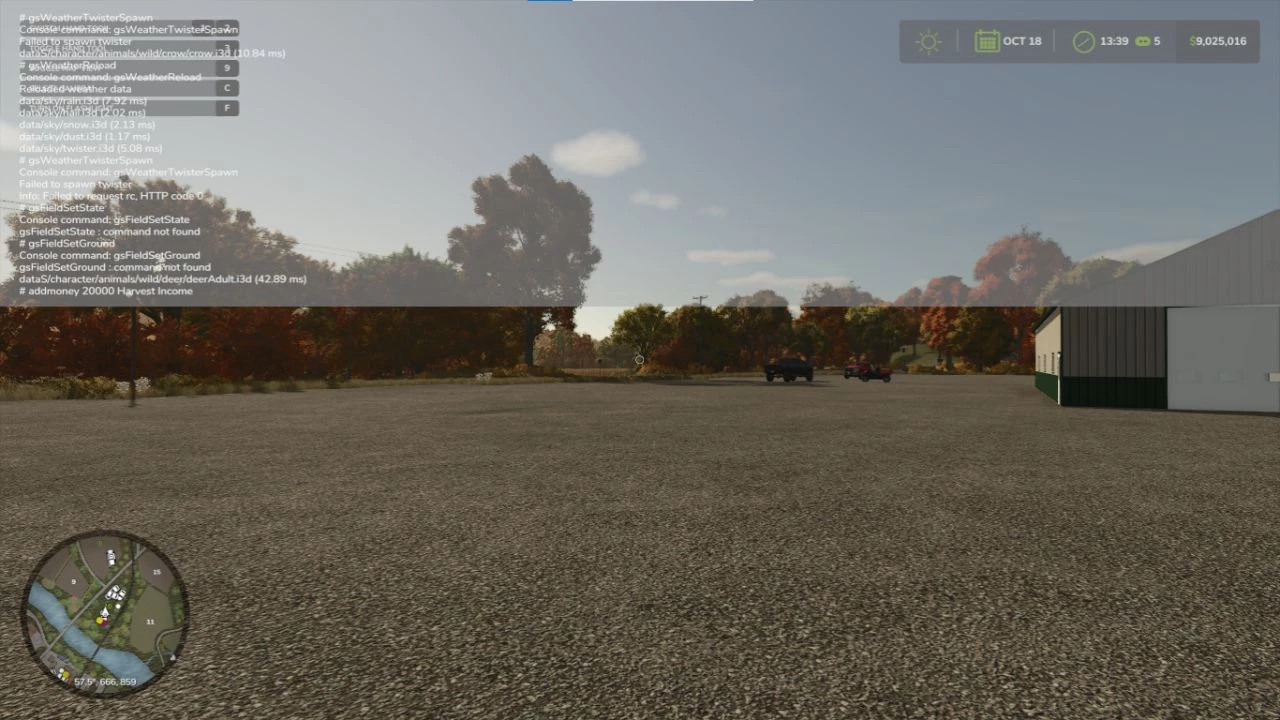
The user can utilize the in-game notifications system thanks to the Money Manager script. This enables the user to note a reason, such as "Added 20,000 to the farm balance, Reason: Snow Removal," in addition to adding funds to the farm account. The user will receive a notification from this script that will show up beneath the HUD in the top right corner of the screen. When entering the terminal command, you must type addmoney first, followed by the amount and an explanation. An example of addmoney 10,000 Harvest Income may be found here.
Credits:
Thatguy27
Direct Download Links
Version: v 1.0Aktualisiert: vor 1 Jahr
Gesamtgröße: 12.06 KB
FS25_MoneyManager_modland.zip
direct herunterladen
· 12.06 KB
· hinzugefügt vor 1 Jahr
Diese Datei wurde von Antivirus gescannt und ist sicher.
Mehr Details
Über Mod
| Neueste Version | v 1.0 |
| Spiel | FS25 |
| Kategorie | Spielverlauf |
| Herunterladen | 583 |
| Erstellt | vor 1 Jahr |
| Letzter Virenscan |
0/93
Mehr Details |








Tut mir leid, ich habe vergessen, es in den Notizblock zu schreiben.
im sorry i forgot to put it in notepad
Ich kann weder "true" noch "false" bearbeiten.
this doesnt let me edit the true or the false
kann mir jemand helfen? ich bin zum ersten Mal auf dem PC und kann nicht herausfinden, wie ich das Menü zum Erscheinen bringe
can somebody help me? this is my first time on pc and i cant figure out how to get the menu to appear
nvm habe es, aber was, wenn ich Geld für rp verlieren möchte? was tue ich dann?
nvm got it, but what if i wanna lose money for rp? what do i do then?
@Low richtig, aber es erscheint nur noch das Menü, keine Notiz mehr
@Low right but it only plls up the menu now, no note anything
@trent Schritt 1: Zugriff auf die Spieldateien
Navigieren Sie zu Ihrem Dokumentenordner.
Suchen Sie den Ordner "Meine Spiele" und öffnen Sie ihn.
Suchen und öffnen Sie den Ordner "FarmingSimulator2025".
Greifen Sie innerhalb dieses Ordners auf das Verzeichnis "game" zu.
Schritt 2: Bearbeiten der Konfigurationsdatei
Öffnen Sie den Ordner "game" mit einem Texteditor wie Notepad.
Verwenden Sie die Suchfunktion (Strg + F), um die Zeile mit dem Text "controls []" zu finden.
Ändern Sie den Wert von false auf true.
Schritt 3: Aktivieren der Konsole
Nachdem Sie die Änderungen gespeichert haben, starten Sie den Landwirtschafts-Simulator 25.
Um die Konsole während des Spiels zu öffnen, drücken Sie die "`"-Taste, die sich oberhalb der TAB-Taste und unterhalb der ESC-Taste befindet.
@trent Step 1: Accessing Game Files
Navigate to your Documents folder.
Locate and enter the “My Games” folder.
Find and open the “FarmingSimulator2025” folder.
Within this folder, access the “game” directory.
Step 2: Editing Configuration File
Open the “game” folder using a text editor like Notepad.
Use the search function (Ctrl + F) to find the line that reads "controls []".
Change the value from false to true.
Step 3: Enabling the Console
After saving the changes, launch Farming Simulator 25.
To open the console during gameplay, press the “`” key, which is located above the TAB key and below the ESC key.
@Official_Byrd Schritt 1: Zugriff auf die Spieldateien
Navigieren Sie zu Ihrem Dokumente-Ordner.
Suchen Sie den Ordner "Meine Spiele" und öffnen Sie ihn.
Suchen und öffnen Sie den Ordner "FarmingSimulator2025".
Greifen Sie innerhalb dieses Ordners auf das Verzeichnis "game" zu.
Schritt 2: Bearbeiten der Konfigurationsdatei
Öffnen Sie den Ordner "game" mit einem Texteditor wie Notepad.
Verwenden Sie die Suchfunktion (Strg + F), um die Zeile mit dem Text "controls []" zu finden.
Ändern Sie den Wert von false auf true.
Schritt 3: Aktivieren der Konsole
Nachdem Sie die Änderungen gespeichert haben, starten Sie den Landwirtschafts-Simulator 25.
Um die Konsole während des Spiels zu öffnen, drücken Sie die "`"-Taste, die sich oberhalb der TAB-Taste und unterhalb der ESC-Taste befindet.
@Official_Byrd Step 1: Accessing Game Files
Navigate to your Documents folder.
Locate and enter the “My Games” folder.
Find and open the “FarmingSimulator2025” folder.
Within this folder, access the “game” directory.
Step 2: Editing Configuration File
Open the “game” folder using a text editor like Notepad.
Use the search function (Ctrl + F) to find the line that reads "controls []".
Change the value from false to true.
Step 3: Enabling the Console
After saving the changes, launch Farming Simulator 25.
To open the console during gameplay, press the “`” key, which is located above the TAB key and below the ESC key.
@Official_Byrd hast du es auch schon herausgefunden?
@Official_Byrd same figured it out yet?