Texture Eyedropper 1.0.0.0

0/5,
0
Stimmen
Description
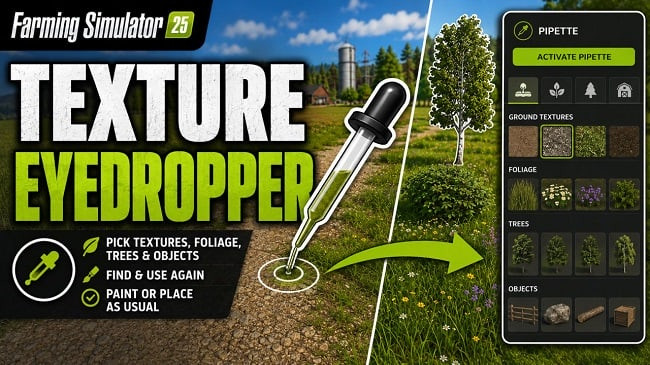
The "Pipette" feature expands the construction menu by adding the ability to select ground textures, foliage, placed trees, and supported objects. This feature allows you to directly select previously used paint textures, visible foliage such as grass, flowers, and bushes, placed trees, and supported objects from the map and find them again in the construction menu.
Features
- Direct selection of ground textures, foliage, trees, and supported objects from the map.
- Automatic filtering of available ground textures and suitable foliage for the corresponding map.
- Vegetation integration, making map vegetation available as coloring elements in the construction menu where possible.
- Debug mode for troubleshooting (disabled by default).
Usage:
1. In the construction menu, open the "Pipette" tab.
2. Click the "Activate the eyedropper" button.
3. Click on the ground texture, foliage, tree, or supported object.
4. Confirm the desired result in the construction menu.
5. Paint or build as usual.
After painting, you can cancel the process by pressing ESC to prevent unintentional further painting. If necessary, you can re-activate the eyedropper.
Credits
Author: Nalathan
The "Pipette" feature expands the construction menu by adding the ability to select ground textures, foliage, placed trees, and supported objects. This feature allows you to directly select previously used paint textures, visible foliage such as grass, flowers, and bushes, placed trees, and supported objects from the map and find them again in the construction menu.
Features
- Direct selection of ground textures, foliage, trees, and supported objects from the map.
- Automatic filtering of available ground textures and suitable foliage for the corresponding map.
- Vegetation integration, making map vegetation available as coloring elements in the construction menu where possible.
- Debug mode for troubleshooting (disabled by default).
Usage:
1. In the construction menu, open the "Pipette" tab.
2. Click the "Activate the eyedropper" button.
3. Click on the ground texture, foliage, tree, or supported object.
4. Confirm the desired result in the construction menu.
5. Paint or build as usual.
After painting, you can cancel the process by pressing ESC to prevent unintentional further painting. If necessary, you can re-activate the eyedropper.
Credits
Author: Nalathan
External Download Links:
- Modsfire.com - FS25_TexturePipette_1300.zip [131.19 KB]
Das könnte Sie auch interessieren »





0 Kommentare
Es sind noch keine Kommentare vorhanden. Seien Sie der Erste, der kommentiert!