Toyota Hilux Invincible 2026 — Facelift & Upgrades v 1.0.5.6

5/5,
2
Stimmen
Description
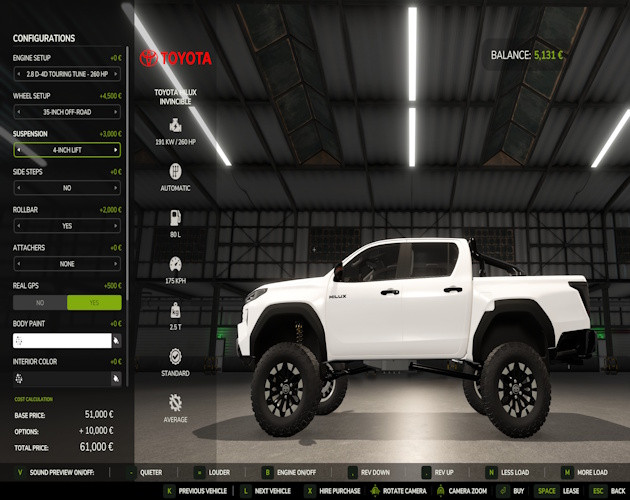
Pick your stance, roll the windows down, and put the upgraded Hilux to work! This update brings more power, selectable suspension and wheels, interactive cab controls, and camera/GPS options to the original Hilux. Choose a lower leveling setup or a taller lift, then finish it with your preferred tires and colors.
Features:
- 260 HP Touring and 300 HP Performance engines (Performance upgrade costs $5,000).
- Leveling, 2-inch and 4-inch suspension choices, selected independently of the wheels.
- 32-inch Road, 33-inch All-Terrain and 35-inch Off-Road tires.
- IC ignition, cruise control and headlights — ignition beside the start button, cruise on the shifter, and headlights above the rearview mirror.
- Four opening doors, with interior and exterior IC controls.
- Four independent power windows, with saved positions and compact switch markers.
- Rear dashboard camera, with automatic reverse activation and a manual IC toggle.
- Optional realGPS dashboard map display.
- Body, interior and rim colors, side-step and rollbar options, a fixed trailer hitch, and bed tension belts with fastening/release sounds.
Required extras and setup:
- Install Interactive Control for the clickable controls.
- The Mercedes-Benz Trucks Pack is required for live camera video.
- Install realGPS for the optional dashboard map.
- Turn Automatic Engine Start off to use the IC ignition. Activate IC with your assigned binding to display the markers.
Installation Instructions
- Close Farming Simulator 25.
- Download FS25_Toyota_Hilux_2026.zip. Leave it zipped.
- Place it in your active mods folder. The default Windows location is: Documents\My Games\FarmingSimulator2025\mods
- Replace any older Hilux ZIP and remove duplicate copies or extracted Hilux folders. Keep the filename exactly FS25_Toyota_Hilux_2026.zip, without a (1) suffix.
- Install Interactive Control for the clickable controls. realGPS is optional for the dashboard map. The Mercedes-Benz Trucks Pack is required for live camera video.
- Start FS25 and enable the Hilux and its required/optional dependencies when selecting mods for your savegame.
- Confirm version 1.0.5.6. Turn Automatic Engine Start off to use the ignition button, then activate IC using its assigned binding in the controls menu.
Credits
- Original Hilux: DMCMODDING / MC Mods.
- Modifications: SecondChanceGaming3709.
- Interactive Control: Vertex Dezign.
- Tool Camera prefab: AlexL353_modding.
- Camera Screen prefab: PXLR.
- Matrix430 GPS prefab: JMZ.
- realGPS: BayernGamers and [LSFM] RepiGaming.
- Original bundled scripts: Ifko[nator].
Pick your stance, roll the windows down, and put the upgraded Hilux to work! This update brings more power, selectable suspension and wheels, interactive cab controls, and camera/GPS options to the original Hilux. Choose a lower leveling setup or a taller lift, then finish it with your preferred tires and colors.
Features:
- 260 HP Touring and 300 HP Performance engines (Performance upgrade costs $5,000).
- Leveling, 2-inch and 4-inch suspension choices, selected independently of the wheels.
- 32-inch Road, 33-inch All-Terrain and 35-inch Off-Road tires.
- IC ignition, cruise control and headlights — ignition beside the start button, cruise on the shifter, and headlights above the rearview mirror.
- Four opening doors, with interior and exterior IC controls.
- Four independent power windows, with saved positions and compact switch markers.
- Rear dashboard camera, with automatic reverse activation and a manual IC toggle.
- Optional realGPS dashboard map display.
- Body, interior and rim colors, side-step and rollbar options, a fixed trailer hitch, and bed tension belts with fastening/release sounds.
Required extras and setup:
- Install Interactive Control for the clickable controls.
- The Mercedes-Benz Trucks Pack is required for live camera video.
- Install realGPS for the optional dashboard map.
- Turn Automatic Engine Start off to use the IC ignition. Activate IC with your assigned binding to display the markers.
Installation Instructions
- Close Farming Simulator 25.
- Download FS25_Toyota_Hilux_2026.zip. Leave it zipped.
- Place it in your active mods folder. The default Windows location is: Documents\My Games\FarmingSimulator2025\mods
- Replace any older Hilux ZIP and remove duplicate copies or extracted Hilux folders. Keep the filename exactly FS25_Toyota_Hilux_2026.zip, without a (1) suffix.
- Install Interactive Control for the clickable controls. realGPS is optional for the dashboard map. The Mercedes-Benz Trucks Pack is required for live camera video.
- Start FS25 and enable the Hilux and its required/optional dependencies when selecting mods for your savegame.
- Confirm version 1.0.5.6. Turn Automatic Engine Start off to use the ignition button, then activate IC using its assigned binding in the controls menu.
Credits
- Original Hilux: DMCMODDING / MC Mods.
- Modifications: SecondChanceGaming3709.
- Interactive Control: Vertex Dezign.
- Tool Camera prefab: AlexL353_modding.
- Camera Screen prefab: PXLR.
- Matrix430 GPS prefab: JMZ.
- realGPS: BayernGamers and [LSFM] RepiGaming.
- Original bundled scripts: Ifko[nator].
Direct Download Links
Version: v 1.0.5.6Aktualisiert: vor 1 Monat
Gesamtgröße: 74.14 MB FS25_Toyota_Hilux_2026_1_modland.zip direct herunterladen · 74.14 MB · hinzugefügt vor 1 Monat
Das könnte Sie auch interessieren »

0 Kommentare
Es sind noch keine Kommentare vorhanden. Seien Sie der Erste, der kommentiert!