BUS G-FORCE COMFORT v1.1 - ETS2 (Coaches DLC) 1.1



0/5,
0
votes
BUS G-FORCE COMFORT v1.1 - ETS2 (Coaches DLC)
====================================================================
WHAT'S NEW IN v1.1
====================================================================
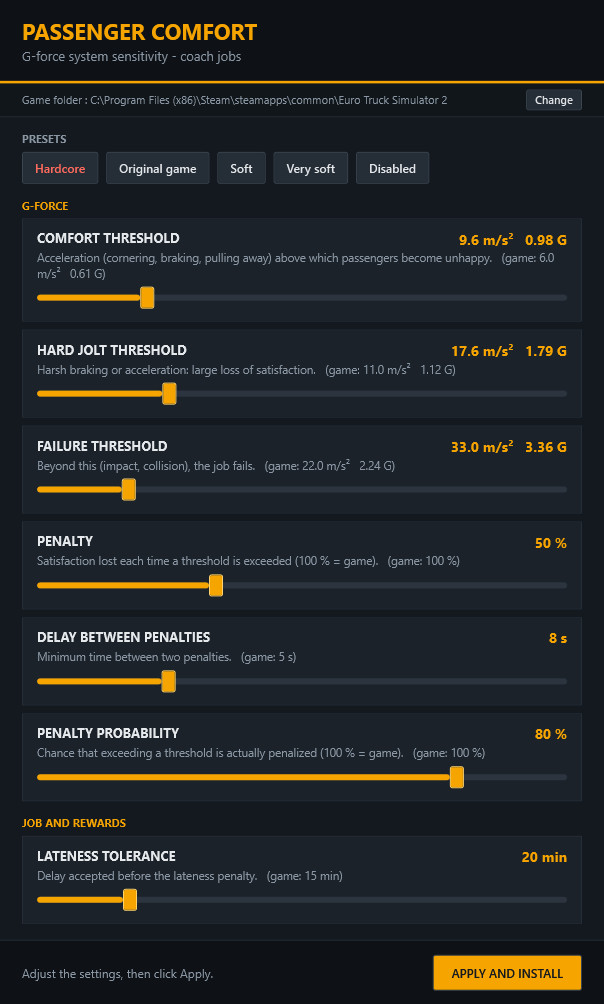
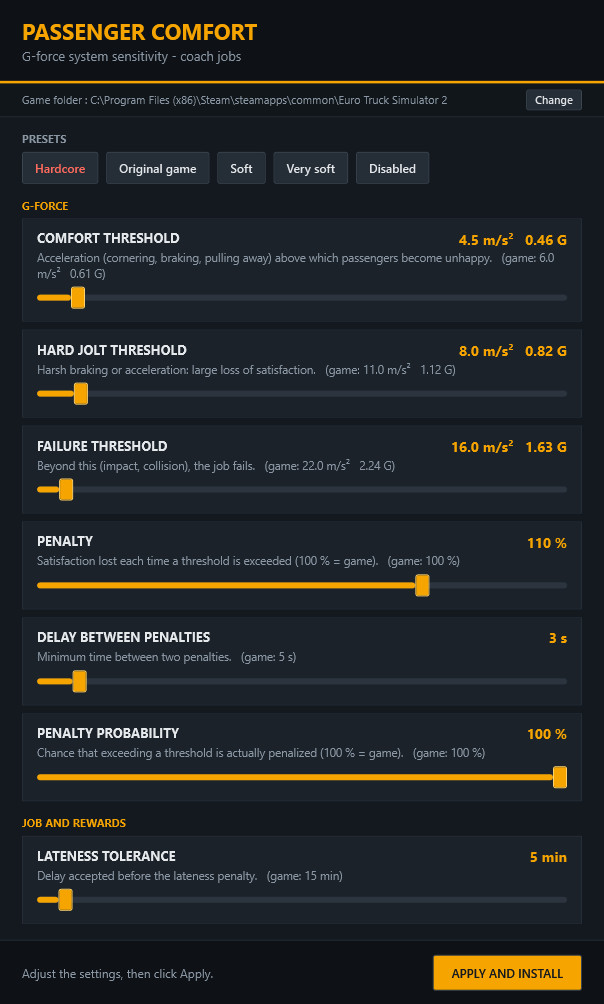
- New "Hardcore" preset (first button, in red) for players who want a real challenge. Harder than the original game, but still doable with smooth driving:
Comfort threshold 4.5 m/s² (0.46 G) - Hard jolt threshold 8 m/s² - Failure threshold 16 m/s²
Penalty 110 % - Delay between penalties 3 s - Penalty probability 100 % - Late tolerance 5 min
- New setting "Penalty probability": chance that exceeding a G-force threshold is actually penalized (original game: 100 %). Lower it to make the passengers more forgiving.
- New setting "Late tolerance": how many minutes late you can arrive before the lateness penalty (original game: 15 min).
- Built-in automatic updates: when a new version is released, a banner appears at the top of the tool. One click on "Update" downloads the new version, which replaces the old one and restarts. No need to come back to a mod site.
The tool only contacts github.com (github.com/antifake13/bus-gforce-comfort) and sends no personal data.
To turn the check off, add the line CheckUpdates=0 to %APPDATA%\BusGForce\settings.txt.
- The settings are now grouped into "G-force" and "Job and rewards", and the version number is shown in the window title.
- All 11 languages updated.
Upgrading from v1.0:
1. Replace the old "Bus G-Force Comfort.exe" with the new one (your settings are kept).
2. Run it and click "Apply and install" so the mod is rebuilt with the new options.
3. Restart the game if it was running.
This is the last manual download: future versions will be offered directly in the tool.
====================================================================
v1.0 DESCRIPTION
====================================================================
WHAT THE MOD DOES
With the Coaches DLC, every coach job monitors the G-forces felt by your passengers: a slightly fast corner, braking, pulling away... and satisfaction drops. In the original game the threshold is very low (6 m/s², i.e. 0.6 G), so even normal driving often gets you penalised.
Bus G-Force Comfort makes this system adjustable. A small tool styled like the ETS2 interface lets you set:
- Comfort threshold: acceleration above which passengers become unhappy (original game: 6 m/s², 0.61 G)
- Hard jolt threshold: harsh braking or acceleration, large loss of satisfaction (original game: 11 m/s², 1.12 G)
- Failure threshold: beyond this (impact, collision), the job fails (original game: 22 m/s², 2.24 G)
- Penalty: satisfaction lost each time a threshold is exceeded (original game: 100 %)
- Delay between penalties: minimum time between two penalties (original game: 5 s)
Four presets: Original game, Soft (default), Very soft, Disabled.
Highlights:
- the tool reads the values straight from the game files, so the mod stays up to date after patches;
- it changes a single file (/def/bus_economy_data.sii), nothing else in the game is touched;
- it automatically finds the game (all Steam libraries);
- one single small .exe, nothing to install.
INSTALLATION
1. Download "Bus G-Force Comfort.exe" and put it anywhere (Desktop, Documents...).
2. Run it. The game folder is detected automatically; otherwise the tool asks you for it (the folder containing def.scs).
3. Pick a preset or move the sliders, then click "Apply and install".
4. In ETS2, open the Mod Manager, enable "Bus G-Force Comfort" and confirm.
The mod is created in Documents\Euro Truck Simulator 2\mod\bus_gforce_soft.scs
USAGE
- To change the settings: run the tool again, adjust, click "Apply and install", then restart the game (values are only read at startup).
- If the game is running during installation, the tool tells you. Quit ETS2 if the file is locked.
- Your last settings are remembered.
- "Change" button (top): change the game folder.
UNINSTALL
Disable the mod in the Mod Manager or delete bus_gforce_soft.scs from the mod folder. Safe for your saves.
COMPATIBILITY
- Tested with ETS2 1.62, Windows 10/11 (.NET Framework 4, included in Windows).
- Not compatible with another mod that also changes bus_economy_data.sii (the one higher in the list wins).
- Windows SmartScreen may show a warning on first launch (unsigned exe): "More info" -> "Run anyway".
LANGUAGES
The tool automatically uses your Windows language (English if it isn't available):
English, Français, Deutsch, Español, Italiano, Polski, Português, Русский, Nederlands, Čeština, Türkçe.
Want to add a language? Create a "lang" folder next to the exe, copy translation_template_en.json into it, rename it with the language code (e.g. ja.json) and translate the texts.
====================================================================
WHAT'S NEW IN v1.1
====================================================================
- New "Hardcore" preset (first button, in red) for players who want a real challenge. Harder than the original game, but still doable with smooth driving:
Comfort threshold 4.5 m/s² (0.46 G) - Hard jolt threshold 8 m/s² - Failure threshold 16 m/s²
Penalty 110 % - Delay between penalties 3 s - Penalty probability 100 % - Late tolerance 5 min
- New setting "Penalty probability": chance that exceeding a G-force threshold is actually penalized (original game: 100 %). Lower it to make the passengers more forgiving.
- New setting "Late tolerance": how many minutes late you can arrive before the lateness penalty (original game: 15 min).
- Built-in automatic updates: when a new version is released, a banner appears at the top of the tool. One click on "Update" downloads the new version, which replaces the old one and restarts. No need to come back to a mod site.
The tool only contacts github.com (github.com/antifake13/bus-gforce-comfort) and sends no personal data.
To turn the check off, add the line CheckUpdates=0 to %APPDATA%\BusGForce\settings.txt.
- The settings are now grouped into "G-force" and "Job and rewards", and the version number is shown in the window title.
- All 11 languages updated.
Upgrading from v1.0:
1. Replace the old "Bus G-Force Comfort.exe" with the new one (your settings are kept).
2. Run it and click "Apply and install" so the mod is rebuilt with the new options.
3. Restart the game if it was running.
This is the last manual download: future versions will be offered directly in the tool.
====================================================================
v1.0 DESCRIPTION
====================================================================
WHAT THE MOD DOES
With the Coaches DLC, every coach job monitors the G-forces felt by your passengers: a slightly fast corner, braking, pulling away... and satisfaction drops. In the original game the threshold is very low (6 m/s², i.e. 0.6 G), so even normal driving often gets you penalised.
Bus G-Force Comfort makes this system adjustable. A small tool styled like the ETS2 interface lets you set:
- Comfort threshold: acceleration above which passengers become unhappy (original game: 6 m/s², 0.61 G)
- Hard jolt threshold: harsh braking or acceleration, large loss of satisfaction (original game: 11 m/s², 1.12 G)
- Failure threshold: beyond this (impact, collision), the job fails (original game: 22 m/s², 2.24 G)
- Penalty: satisfaction lost each time a threshold is exceeded (original game: 100 %)
- Delay between penalties: minimum time between two penalties (original game: 5 s)
Four presets: Original game, Soft (default), Very soft, Disabled.
Highlights:
- the tool reads the values straight from the game files, so the mod stays up to date after patches;
- it changes a single file (/def/bus_economy_data.sii), nothing else in the game is touched;
- it automatically finds the game (all Steam libraries);
- one single small .exe, nothing to install.
INSTALLATION
1. Download "Bus G-Force Comfort.exe" and put it anywhere (Desktop, Documents...).
2. Run it. The game folder is detected automatically; otherwise the tool asks you for it (the folder containing def.scs).
3. Pick a preset or move the sliders, then click "Apply and install".
4. In ETS2, open the Mod Manager, enable "Bus G-Force Comfort" and confirm.
The mod is created in Documents\Euro Truck Simulator 2\mod\bus_gforce_soft.scs
USAGE
- To change the settings: run the tool again, adjust, click "Apply and install", then restart the game (values are only read at startup).
- If the game is running during installation, the tool tells you. Quit ETS2 if the file is locked.
- Your last settings are remembered.
- "Change" button (top): change the game folder.
UNINSTALL
Disable the mod in the Mod Manager or delete bus_gforce_soft.scs from the mod folder. Safe for your saves.
COMPATIBILITY
- Tested with ETS2 1.62, Windows 10/11 (.NET Framework 4, included in Windows).
- Not compatible with another mod that also changes bus_economy_data.sii (the one higher in the list wins).
- Windows SmartScreen may show a warning on first launch (unsigned exe): "More info" -> "Run anyway".
LANGUAGES
The tool automatically uses your Windows language (English if it isn't available):
English, Français, Deutsch, Español, Italiano, Polski, Português, Русский, Nederlands, Čeština, Türkçe.
Want to add a language? Create a "lang" folder next to the exe, copy translation_template_en.json into it, rename it with the language code (e.g. ja.json) and translate the texts.
Direct Download Links
About Mod
| Latest Version | 1.1 |
| Game | ETS 2 |
| Category | Cars & Bus |
| Game Version | 1.62.x |
| Downloads | 6 |
| Created | 19 minutes ago |
You Might Also Like »




0 Comments
There are no comments. Be first to comment!