BUS G-FORCE COMFORT v1.2 - ETS2 (Coaches DLC) + Bug fix Convoi 1.2




0/5,
0
votes
BUS G-FORCE COMFORT v1.2 - ETS2 (Coaches DLC)
====================================================================
WHAT'S NEW IN v1.2
====================================================================
- Convoy mode compatible: the mod no longer shows as "incompatible" in Convoy. It is now flagged as an optional multiplayer mod, so every player keeps their own G-force settings, and players who don't have the mod can still join.
The mod file now has a name unique to each player (bus_gforce_xxxxxx.scs), so Convoy no longer compares your settings with the host's ("Wrong version" error fixed).
IMPORTANT - to play in Convoy with this mod:
1. The convoy host MUST enable "Optional mods" when creating the session. Without it, the session refuses every mod, even optional ones, and you will get "Incompatible mods".
You can check it in the session browser: the session details must show "Optional mods: Yes".
Dedicated server: set mods_optioning: true in server_config.sii.
2. Players: allow servers with optional mods in the session browser filters ("Advanced filters").
3. Everyone using the mod must have v1.2 (older versions are not optional and block the session).
- New "What's new" window: after each update, the tool shows what changed in the new version.
- All 11 languages updated.
Upgrading from v1.1:
- Or manually: replace the old "Bus G-Force Comfort.exe" with the new one (your settings are kept).
Then click "Apply and install" so the mod is rebuilt with this version, and restart the game if it was running.
Important: the mod file has a new name, so enable "Bus G-Force Comfort" again in the Mod Manager (once). The old file is removed automatically.
====================================================================
v1.1 CHANGES
====================================================================
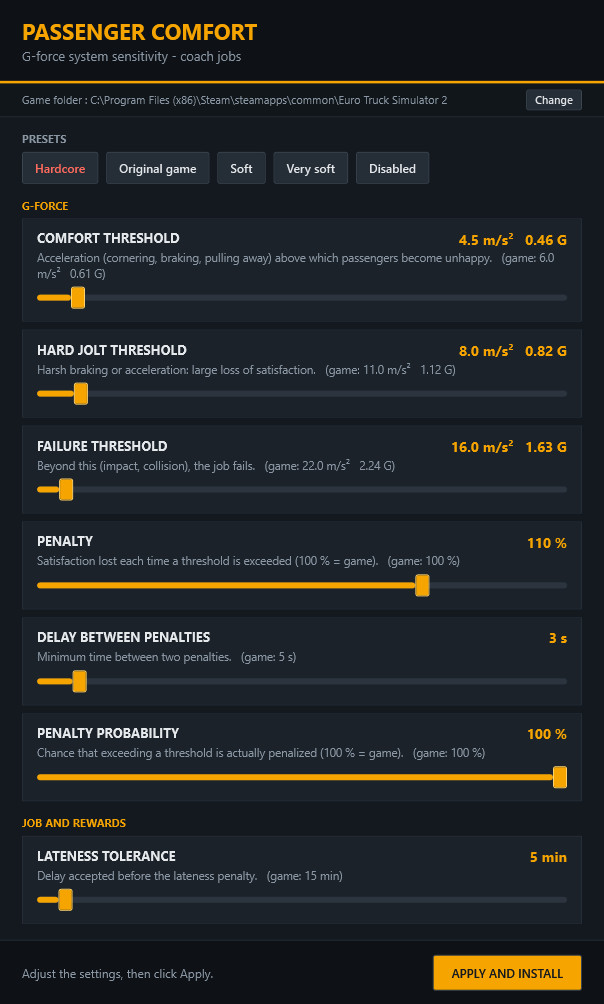
- New "Hardcore" preset (first button, in red) for players who want a real challenge. Harder than the original game, but still doable with smooth driving:
Comfort threshold 4.5 m/s² (0.46 G) - Hard jolt threshold 8 m/s² - Failure threshold 16 m/s²
Penalty 110 % - Delay between penalties 3 s - Penalty probability 100 % - Late tolerance 5 min
- New setting "Penalty probability": chance that exceeding a G-force threshold is actually penalized (original game: 100 %). Lower it to make the passengers more forgiving.
- New setting "Late tolerance": how many minutes late you can arrive before the lateness penalty (original game: 15 min).
- Built-in automatic updates: when a new version is released, a banner appears at the top of the tool. One click on "Update" downloads the new version, which replaces the old one and restarts. No need to come back to a mod site.
The tool only contacts github.com (github.com/antifake13/bus-gforce-comfort) and sends no personal data.
To turn the check off, add the line CheckUpdates=0 to %APPDATA%\BusGForce\settings.txt.
- The settings are now grouped into "G-force" and "Job and rewards", and the version number is shown in the window title.
- All 11 languages updated.
====================================================================
v1.0 DESCRIPTION
====================================================================
WHAT THE MOD DOES
With the Coaches DLC, every coach job monitors the G-forces felt by your passengers: a slightly fast corner, braking, pulling away... and satisfaction drops. In the original game the threshold is very low (6 m/s², i.e. 0.6 G), so even normal driving often gets you penalised.
Bus G-Force Comfort makes this system adjustable. A small tool styled like the ETS2 interface lets you set:
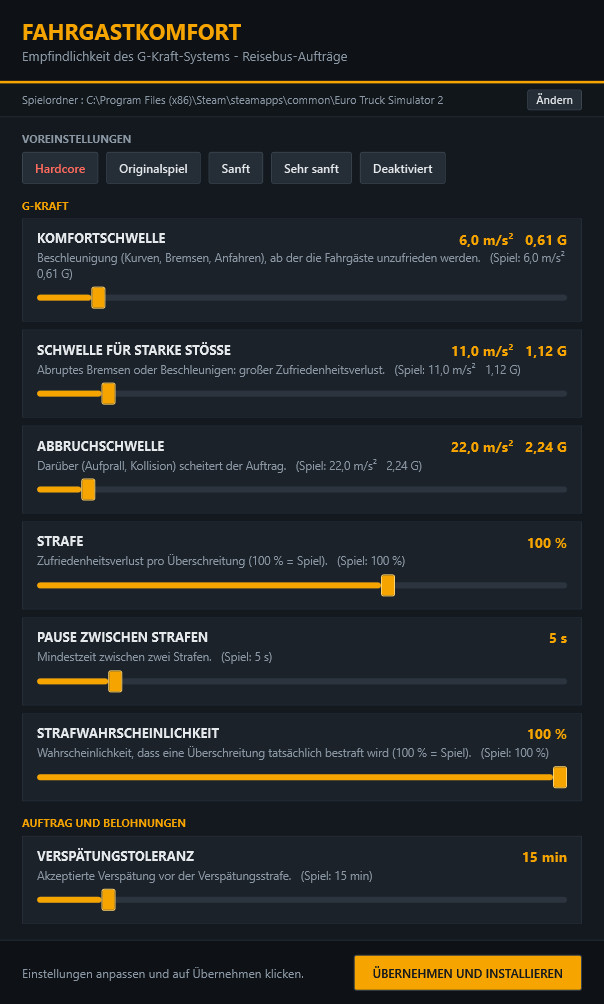
- Comfort threshold: acceleration above which passengers become unhappy (original game: 6 m/s², 0.61 G)
- Hard jolt threshold: harsh braking or acceleration, large loss of satisfaction (original game: 11 m/s², 1.12 G)
- Failure threshold: beyond this (impact, collision), the job fails (original game: 22 m/s², 2.24 G)
- Penalty: satisfaction lost each time a threshold is exceeded (original game: 100 %)
- Delay between penalties: minimum time between two penalties (original game: 5 s)
Four presets: Original game, Soft (default), Very soft, Disabled.
Highlights:
- the tool reads the values straight from the game files, so the mod stays up to date after patches;
- it changes a single file (/def/bus_economy_data.sii), nothing else in the game is touched;
- it automatically finds the game (all Steam libraries);
- one single small .exe, nothing to install.
INSTALLATION
1. Download "Bus G-Force Comfort.exe" and put it anywhere (Desktop, Documents...).
2. Run it. The game folder is detected automatically; otherwise the tool asks you for it (the folder containing def.scs).
3. Pick a preset or move the sliders, then click "Apply and install".
4. In ETS2, open the Mod Manager, enable "Bus G-Force Comfort" and confirm.
The mod is created in Documents\Euro Truck Simulator 2\mod\bus_gforce_xxxxxx.scs (xxxxxx = your own ID)
USAGE
- To change the settings: run the tool again, adjust, click "Apply and install", then restart the game (values are only read at startup).
- If the game is running during installation, the tool tells you. Quit ETS2 if the file is locked.
- Your last settings are remembered.
- "Change" button (top): change the game folder.
UNINSTALL
Disable the mod in the Mod Manager or delete bus_gforce_xxxxxx.scs from the mod folder. Safe for your saves.
COMPATIBILITY
- Tested with ETS2 1.62, Windows 10/11 (.NET Framework 4, included in Windows).
- Convoy (multiplayer): optional mod. The convoy host must enable "Optional mods" when creating the session (see v1.2 notes above).
- Not compatible with another mod that also changes bus_economy_data.sii (the one higher in the list wins).
- Windows SmartScreen may show a warning on first launch (unsigned exe): "More info" -> "Run anyway".
LANGUAGES
The tool automatically uses your Windows language (English if it isn't available):
English, Français, Deutsch, Español, Italiano, Polski, Português, Русский, Nederlands, Čeština, Türkçe.
Want to add a language? Create a "lang" folder next to the exe, copy translation_template_en.json into it, rename it with the language code (e.g. ja.json) and translate the texts.
Direct Download Links
About Mod
| Latest Version | 1.2 |
| Game | ETS 2 |
| Category | Cars & Bus |
| Game Version | 1.62.x |
| Downloads | 286 |
| Created | 1 week ago |
You Might Also Like »



0 Comments
There are no comments. Be first to comment!