Price Fixing v 1.1




Updates
Changelog 1.1.0.0:
- You can now change the price of configurations (like the cost of engine upgrades) (see Example #5)
- You can now delete map elements off your map if you know the node-path (see Example #6)
- You can now change the capacity of trailer, silos, and other objects (see Example #7)
The examples below show how different XML can be added to the file to change item properties:
Adding <change> elements to the PriceFixing.xml file can
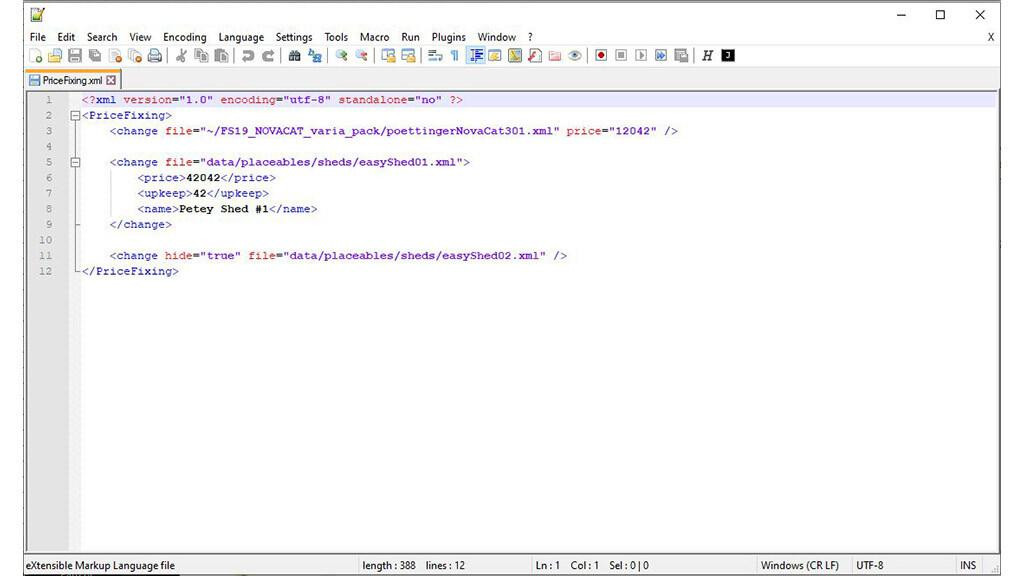
EXAMPLE #1: Change the price of another mod's item (the "~" is replaced with the path to your mod directory)
<change file="~/FS19_NOVACAT_varia_pack/poettingerNovaCat301.xml" price="12042" />
EXAMPLE #2: hide a standard item from the store (base-game items use the full path to their XML file)
<change hide="true" file="data/placeables/sheds/easyShed02.xml" />
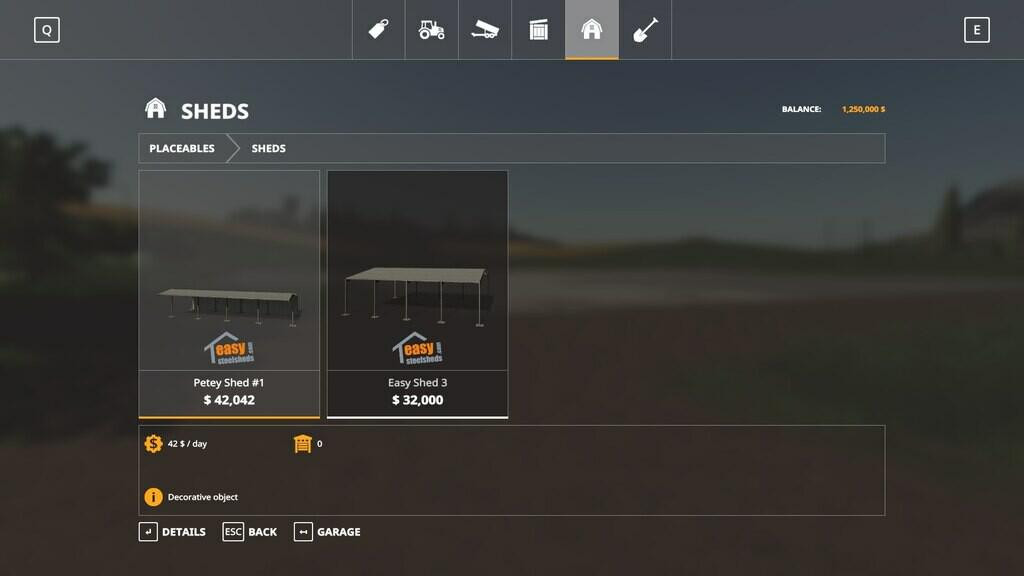
EXAMPLE #3: Change the price, daily upkeep and name
<change file="data/placeables/sheds/easyShed01.xml">
<price>42042</price>
<upkeep>42</upkeep>
<name>Petey Shed #1</name>
</change>
EXAMPLE #4: Change the base price of wheat (per liter)
<change_filltype id="WHEAT" price="0.347000"/>
Example #5: Change the cost of the Guidance Steering mod's configuration item to $3500
(configuration ids use the form config_name + "-" + index and are found in the mod's XML file or in the mod source)
<change_config id="buyableGPS-2" price="3500"/>
Example #6: Delete the trash-area in the starting farm on the Ravenport map
(The node path can be found using the Giants' Editor)
<delete map="data/maps/mapUS.i3d" node="17|0|23|4|1"/>
Example #7: Change the capacity and price of the hay loft:
<change file="data/placeables/hayLoft/hayLoft.xml" price="50000" capacity="1500000" /
Description:
Change shop item prices. Improve Game Balance.
This script allows you to change the price of shop items, settings or fill types. You can use a single configuration file to hide an item from the store. It is designed for people who want to modify/hide items for balance reasons while still updating mods. It is also very useful for map makers.
When the mod starts for the first time, a PriceFixing is created. xml file in the directory "modsSettings" in the same place as your "mods" directory.
All modifications are indexed by the item's XML definition file. In order to help you locate the correct file name for a change, the "PriceList" console command will display all prices in log.txt.
The following examples show how to add various XMLs to the file to alter the item properties:.
Adding PriceFixing elements. xml file can
EXAMPLE #1: Change price of another mod item (the path to your mod directory is replaced by the "~").
EXAMPLE #2: hide the store standard item (base game elements use the full XML file path).
EXAMPLE #3: Pricing, daily maintenance and name change.
42042
42
Petey Shed #1
EXAMPLE #4: Change the base price of wheat (per liter)
Credits:
ClubPetey
Direct Download Links
About Mod
| Latest Version | v 1.1 |
| Game | FS 19 |
| Category | Implements & Tools |
| Game Version | 1.5.1 |
| Downloads | 476 |
| Created | 5 years ago |
| Last Updated | 5 years ago |
Download Latest Version
Version: v 1.1Updated: 5 years ago
Total Size: 13.47 KB FS19_PriceFixing_modland.zip direct download · 13.47 KB · added 5 years ago