Custom Farm Logo 1.0

0/5,
0
votes
Description:
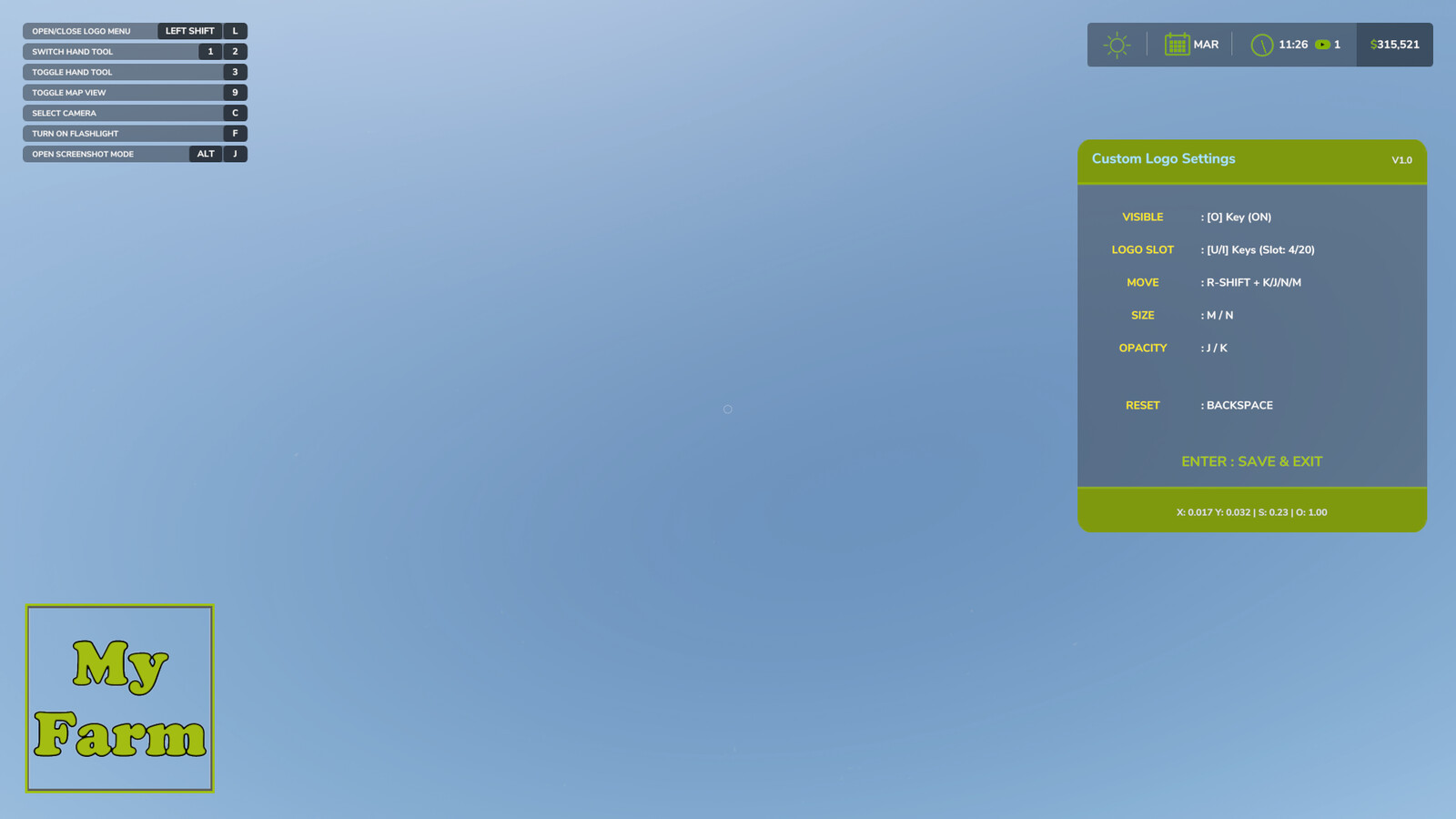
Enhance your farm's identity with the Custom Farm Logo mod. This tool allows players and contractors to integrate their specific virtual farm company or team branding directly into the interface, creating a more professional and immersive roleplay experience.
Features:
- Support for up to 20 unique logos.
- Compatible with PNG and DDS formats.
- Customizable position, size, and opacity via an in-game Edit Mode.
- Remappable menu keys in game control settings.
- Automatic HUD integration (logo disappears when HUD is toggled off).
Installation Instructions:
- On the first launch, the mod creates a configuration folder: Documents/My Games/FarmingSimulator2025/modSettings/FS25_CustomFarmLogo/
- Place your custom farm's logo files inside that folder.
- Rename your files to "logo1" through "logo20" (must be all lowercase with no spaces or symbols).
File Requirements:
- Formats: PNG or DDS (DDS is recommended for better visual clarity and texture streaming performance).
- Resolution: Supports any resolution, but "power of 2" dimensions are recommended. 512x512 is highly recommended for performance optimization and VRAM savings.
- Backgrounds: Must be transparent.
Controls (Edit Mode - On Foot Only):
- Toggle Edit Menu: LEFT SHIFT + L (Visible in the F1 Menu)
- Toggle Visibility ON/OFF: Key O
- Logo Slots (1-20): Key I (Forward) / Key U (Backward)
- Move Logo: Hold RIGHT SHIFT + K/J/N/M
- Size/Opacity: M/N and K/J
- Reset to Default: BACKSPACE
- Save and Close: Press ENTER
- Discard and Close: Press [LEFT SHIFT + L] to exit the menu without saving.
Credits:
Sunil [Sarmy Farm]
Enhance your farm's identity with the Custom Farm Logo mod. This tool allows players and contractors to integrate their specific virtual farm company or team branding directly into the interface, creating a more professional and immersive roleplay experience.
Features:
- Support for up to 20 unique logos.
- Compatible with PNG and DDS formats.
- Customizable position, size, and opacity via an in-game Edit Mode.
- Remappable menu keys in game control settings.
- Automatic HUD integration (logo disappears when HUD is toggled off).
Installation Instructions:
- On the first launch, the mod creates a configuration folder: Documents/My Games/FarmingSimulator2025/modSettings/FS25_CustomFarmLogo/
- Place your custom farm's logo files inside that folder.
- Rename your files to "logo1" through "logo20" (must be all lowercase with no spaces or symbols).
File Requirements:
- Formats: PNG or DDS (DDS is recommended for better visual clarity and texture streaming performance).
- Resolution: Supports any resolution, but "power of 2" dimensions are recommended. 512x512 is highly recommended for performance optimization and VRAM savings.
- Backgrounds: Must be transparent.
Controls (Edit Mode - On Foot Only):
- Toggle Edit Menu: LEFT SHIFT + L (Visible in the F1 Menu)
- Toggle Visibility ON/OFF: Key O
- Logo Slots (1-20): Key I (Forward) / Key U (Backward)
- Move Logo: Hold RIGHT SHIFT + K/J/N/M
- Size/Opacity: M/N and K/J
- Reset to Default: BACKSPACE
- Save and Close: Press ENTER
- Discard and Close: Press [LEFT SHIFT + L] to exit the menu without saving.
Credits:
Sunil [Sarmy Farm]
Direct Download Links
Version: 1.0Updated: 4 months ago
Total Size: 115.47 KB FS25_CustomFarmLogo_modland.zip direct download · 115.47 KB · added 4 months ago
You Might Also Like »





0 Comments
There are no comments. Be first to comment!