ModMixer 1.4.2.1

0/5,
0
votes
Description:
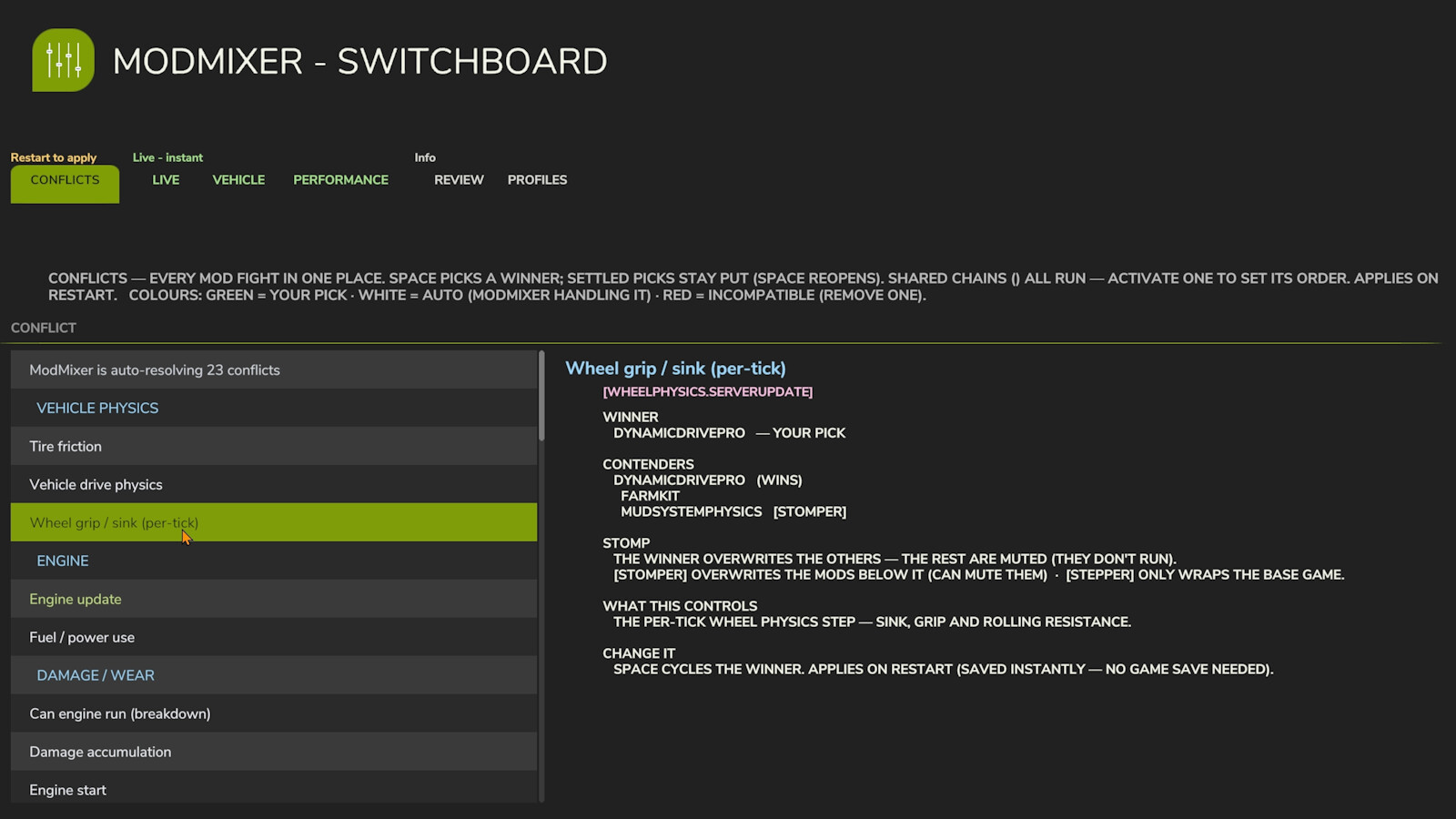
Mods silently break each other. When two mods change the same game function, the one that loads last usually wins — the other mod's work just vanishes: no error, no crash, no explanation. ModMixer finds these conflicts, explains them in plain English, and gives you a control panel to settle them.
Features:
- The Switchboard: A full control panel in the in-game menu with six tabs: Conflicts (resolve mod fights, set run-orders, and view hook chains), Live (instant mod settings), Vehicle (live diagnostics like damage, wear, and grip), Performance (live per-mod cost in ms per frame), Review (detects duplicate mods and incompatible pairs), and Profiles (save and load ModMixer setups).
- Plain-English Explanations: Every row in the interface is easy to understand, complemented by a classic boot conflict report (ModMixer.log) and on-screen warnings for incompatible mods.
- Built Safe: Structural changes apply on restart to prevent mid-game rewiring, and load-critical functions are locked.
- Recovery Systems: Automatic safe mode if a launch fails, a manual kill switch via an empty file (MODMIXER_SAFE_MODE.txt), and abnormal-load protection to prevent broken states from overwriting savegames.
- Privacy and Footprint: Stores only its own settings and profiles under modSettings/FS25_ModMixer/ with no network connections.
IMPORTANT: Keep the zip named FS25_0_ModMixer.zip — the 0 makes it load before your other mods, which is how it sees every hook they install.
Multiplayer: Loads and reports per client; the Switchboard's levers are designed for singleplayer.
GitHub: https://github.com/AvolationIndustries/FS25_ModMixer
Credits:
Avolation Industries
Mods silently break each other. When two mods change the same game function, the one that loads last usually wins — the other mod's work just vanishes: no error, no crash, no explanation. ModMixer finds these conflicts, explains them in plain English, and gives you a control panel to settle them.
Features:
- The Switchboard: A full control panel in the in-game menu with six tabs: Conflicts (resolve mod fights, set run-orders, and view hook chains), Live (instant mod settings), Vehicle (live diagnostics like damage, wear, and grip), Performance (live per-mod cost in ms per frame), Review (detects duplicate mods and incompatible pairs), and Profiles (save and load ModMixer setups).
- Plain-English Explanations: Every row in the interface is easy to understand, complemented by a classic boot conflict report (ModMixer.log) and on-screen warnings for incompatible mods.
- Built Safe: Structural changes apply on restart to prevent mid-game rewiring, and load-critical functions are locked.
- Recovery Systems: Automatic safe mode if a launch fails, a manual kill switch via an empty file (MODMIXER_SAFE_MODE.txt), and abnormal-load protection to prevent broken states from overwriting savegames.
- Privacy and Footprint: Stores only its own settings and profiles under modSettings/FS25_ModMixer/ with no network connections.
IMPORTANT: Keep the zip named FS25_0_ModMixer.zip — the 0 makes it load before your other mods, which is how it sees every hook they install.
Multiplayer: Loads and reports per client; the Switchboard's levers are designed for singleplayer.
GitHub: https://github.com/AvolationIndustries/FS25_ModMixer
Credits:
Avolation Industries
Direct Download Links
Version: 1.4.2.1Updated: 2 months ago
Total Size: 226.99 KB FS25_0_ModMixer_modland.zip direct download · 226.99 KB · added 2 months ago
You Might Also Like »







0 Comments
There are no comments. Be first to comment!