Save Unit Profiles 1.2.0.2

0/5,
0
votes
Changelog:
Version 1.2.0.2
- Added optional compatibility handling for external time-format settings.
- Prevented unsupported use24HourTime GameSetting calls when the optional provider is not available.
- Added localisation keys for the Unit Profile settings row and related UI text.
Description:
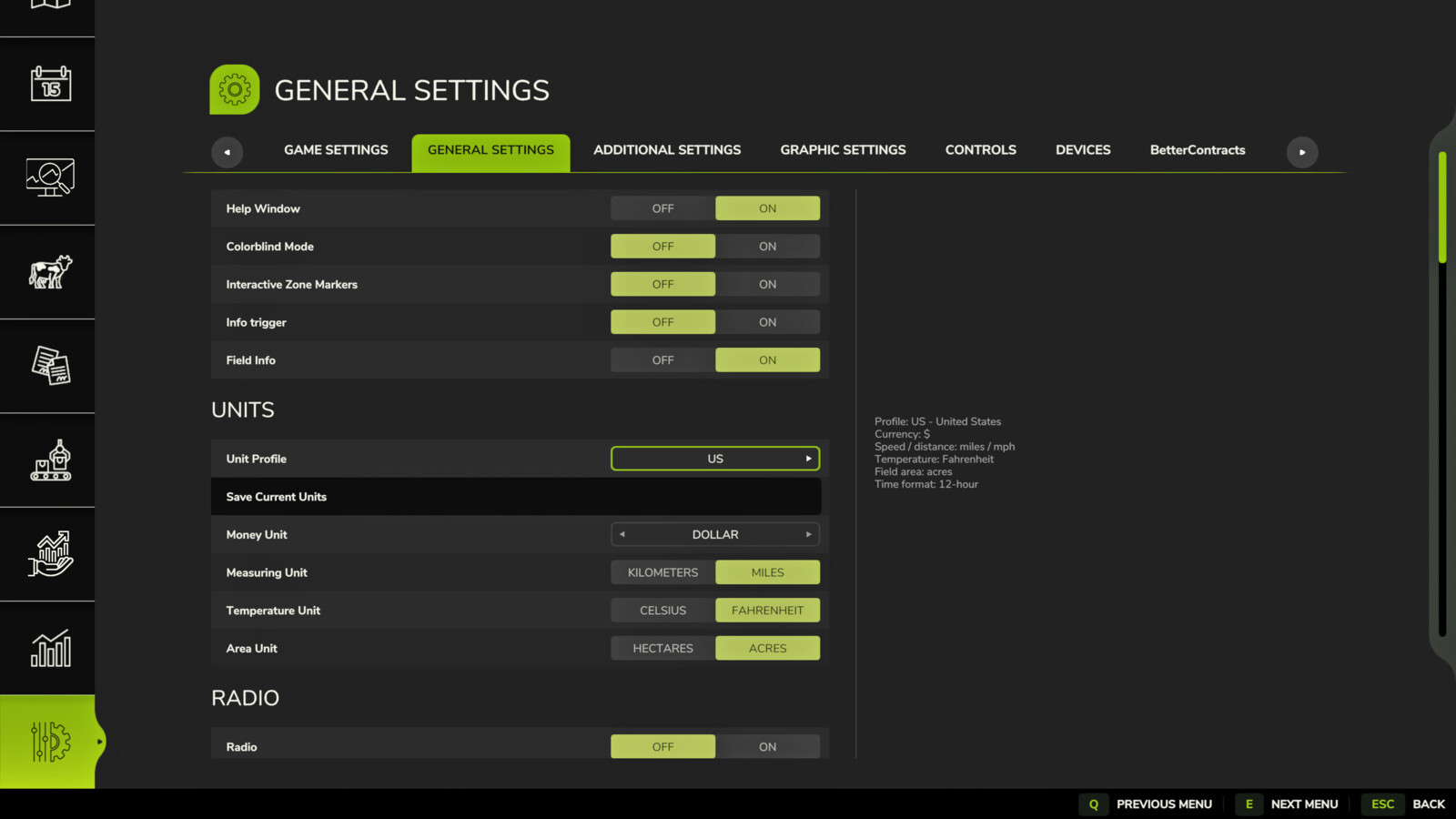
Save Unit Profiles lets each savegame use its own currency and unit settings. The mod adds a native Unit Profile selector to the Farming Simulator 25 Settings menu under: General Settings > Units.
Changing the Unit Profile selector assigns the selected profile to the currently loaded savegame and applies the active in-game unit settings when the Settings UI is closed. This is useful when switching between maps from different regions. For example, a North American savegame can use dollars, miles, Fahrenheit and acres, while a UK savegame can use pounds, miles, Celsius and acres, and a European savegame can use euros, kilometres, Celsius and hectares.
Features:
- Per-savegame currency and unit profiles.
- Native Unit Profile selector in General Settings > Units.
- Profile selection applies immediately to the current savegame.
- Built-in regional profiles for multiple map locations and play styles.
- Integrated currency support directly within Save Unit Profiles.
- Save Current Units option for creating a custom profile from the current in-game settings.
- Existing XML mappings remain supported for advanced/manual configuration.
Configuration:
For normal use, open General Settings > Units and select the desired Unit Profile. The mod also stores its configuration here:
modSettings/FS25_SaveUnitProfiles/saveUnitProfiles.xml
This file can still be edited manually by advanced users.
Console commands:
suStatus - Show current status and loaded settings.
suReload - Reload the XML configuration file.
suApply - Apply the configured profile for the current savegame.
suApply UK / suApply US / suApply EU - Manually apply a specific profile.
suProfile UK / suProfile US / suProfile EU / suProfile CA - Assign and apply a specific profile to the current savegame.
suSaveCurrent - Save the current unit settings for the loaded savegame.
suDebug on / suDebug off - Enable or disable debug logging.
Credits:
SimGamerJen
Version 1.2.0.2
- Added optional compatibility handling for external time-format settings.
- Prevented unsupported use24HourTime GameSetting calls when the optional provider is not available.
- Added localisation keys for the Unit Profile settings row and related UI text.
Description:
Save Unit Profiles lets each savegame use its own currency and unit settings. The mod adds a native Unit Profile selector to the Farming Simulator 25 Settings menu under: General Settings > Units.
Changing the Unit Profile selector assigns the selected profile to the currently loaded savegame and applies the active in-game unit settings when the Settings UI is closed. This is useful when switching between maps from different regions. For example, a North American savegame can use dollars, miles, Fahrenheit and acres, while a UK savegame can use pounds, miles, Celsius and acres, and a European savegame can use euros, kilometres, Celsius and hectares.
Features:
- Per-savegame currency and unit profiles.
- Native Unit Profile selector in General Settings > Units.
- Profile selection applies immediately to the current savegame.
- Built-in regional profiles for multiple map locations and play styles.
- Integrated currency support directly within Save Unit Profiles.
- Save Current Units option for creating a custom profile from the current in-game settings.
- Existing XML mappings remain supported for advanced/manual configuration.
Configuration:
For normal use, open General Settings > Units and select the desired Unit Profile. The mod also stores its configuration here:
modSettings/FS25_SaveUnitProfiles/saveUnitProfiles.xml
This file can still be edited manually by advanced users.
Console commands:
suStatus - Show current status and loaded settings.
suReload - Reload the XML configuration file.
suApply - Apply the configured profile for the current savegame.
suApply UK / suApply US / suApply EU - Manually apply a specific profile.
suProfile UK / suProfile US / suProfile EU / suProfile CA - Assign and apply a specific profile to the current savegame.
suSaveCurrent - Save the current unit settings for the loaded savegame.
suDebug on / suDebug off - Enable or disable debug logging.
Credits:
SimGamerJen
Direct Download Links
Version: 1.2.0.2Updated: 3 months ago
Total Size: 71.51 KB FS25_SaveUnitProfiles_modland.zip direct download · 71.51 KB · added 3 months ago
You Might Also Like »









0 Comments
There are no comments. Be first to comment!