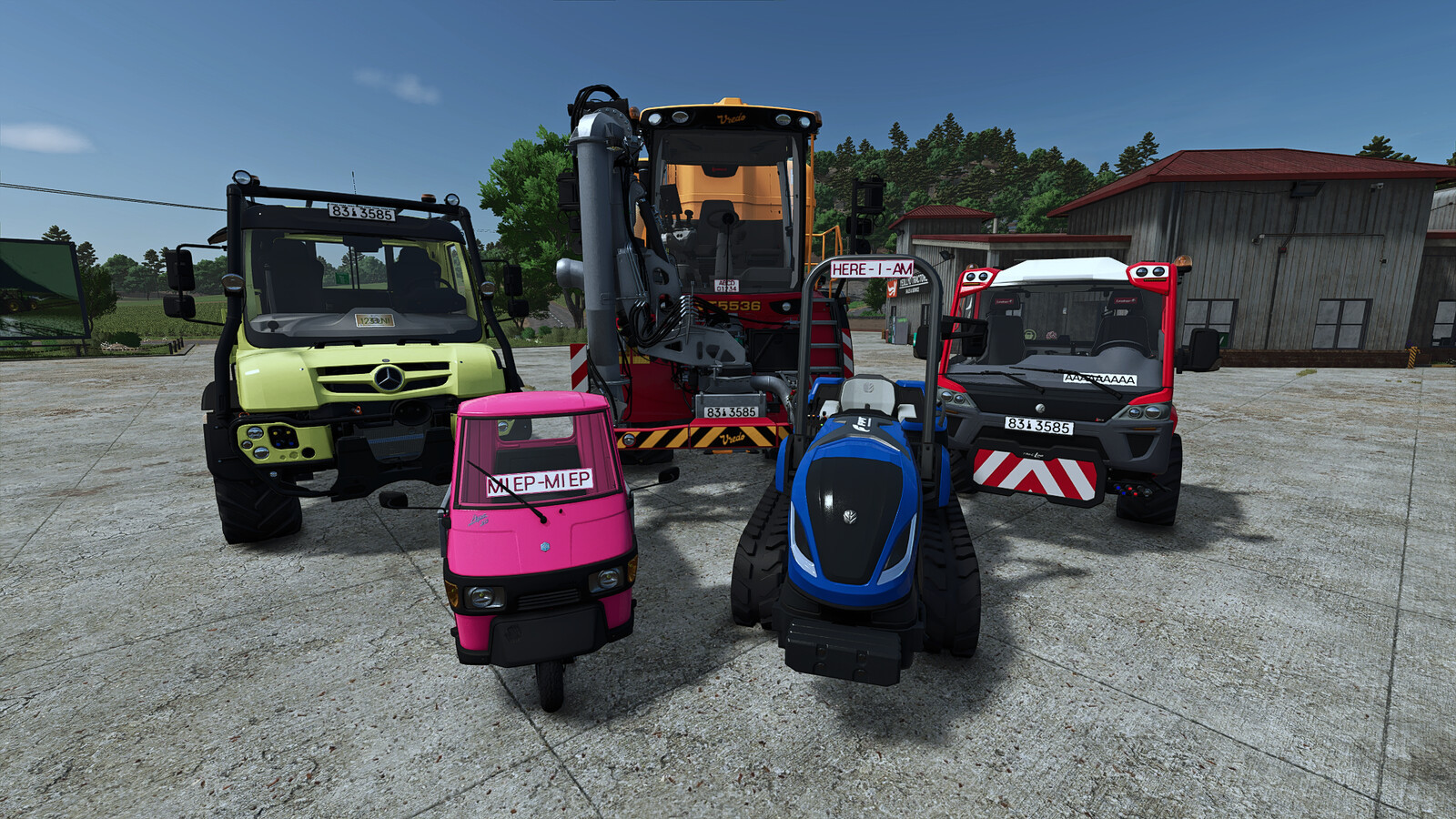
Windshield Fun/Name Plates 1.0

0/5,
0
votes
Description:
"Fun Plates" Custom Deco Plates for FS25! Give your fleet the personality it truly deserves. Whether it's "Crop King", "Hectare Sheriff", or simply your own name — with the Deco License Plates (Fun Plates), you can bring that authentic trucker vibe straight to your windshield!
Features:
- Limitless Creativity: Use any and all official license plate types and designs from the base game with completely customizable text.
- Perfect Positioning: Pre-configured positions for all base game vehicles, official DLCs, and official ModHub vehicles to ensure no clipping or blocked vision.
- Dynamic Integration: Plug-and-play compatibility with all other mod vehicles without requiring additional modifications.
- 3D Precision Tool: Built-in editor to adjust the plate live in-game, including X, Y, Z axis movement, rotation on all axes, and scaling.
- Individual Auto-Save: The game remembers your exact settings for each individual vehicle.
Installation Instructions:
- Equip the vehicle in the shop with a decorative license plate
- If the decorative license plate is not visible, enter the vehicle
- Press the F9 key to activate adjustment mode
- Use the following keys to position the decorative license plate:
- Ctrl + Cursor/Arrow keys (left, right, up, down) => Move on X/Y axis
- Page Up/Down => Move forward/backward
- Ctrl + Shift + Cursor/Arrow keys => Turn/rotate the license plate
- Ctrl + Shift + Page Up/Down => Tilt the license plate
- Shift + 1 => Reset position
- Shift + 2 => Reset rotation
- Enter => Save position
Credits:
Helfer B.
"Fun Plates" Custom Deco Plates for FS25! Give your fleet the personality it truly deserves. Whether it's "Crop King", "Hectare Sheriff", or simply your own name — with the Deco License Plates (Fun Plates), you can bring that authentic trucker vibe straight to your windshield!
Features:
- Limitless Creativity: Use any and all official license plate types and designs from the base game with completely customizable text.
- Perfect Positioning: Pre-configured positions for all base game vehicles, official DLCs, and official ModHub vehicles to ensure no clipping or blocked vision.
- Dynamic Integration: Plug-and-play compatibility with all other mod vehicles without requiring additional modifications.
- 3D Precision Tool: Built-in editor to adjust the plate live in-game, including X, Y, Z axis movement, rotation on all axes, and scaling.
- Individual Auto-Save: The game remembers your exact settings for each individual vehicle.
Installation Instructions:
- Equip the vehicle in the shop with a decorative license plate
- If the decorative license plate is not visible, enter the vehicle
- Press the F9 key to activate adjustment mode
- Use the following keys to position the decorative license plate:
- Ctrl + Cursor/Arrow keys (left, right, up, down) => Move on X/Y axis
- Page Up/Down => Move forward/backward
- Ctrl + Shift + Cursor/Arrow keys => Turn/rotate the license plate
- Ctrl + Shift + Page Up/Down => Tilt the license plate
- Shift + 1 => Reset position
- Shift + 2 => Reset rotation
- Enter => Save position
Credits:
Helfer B.
Direct Download Links
Version: 1.0Updated: 2 months ago
Total Size: 254.66 KB FS25_WindshieldFunPlates_modland.zip direct download · 254.66 KB · added 2 months ago
You Might Also Like »



0 Comments
There are no comments. Be first to comment!