Vehicle configuration presets v 1.0.2

0/5,
0
votes
Changelog:
V1.0.2.0
- Added a new multiplayer feature and button. You can now select a player on the server and view their presets.
Description:
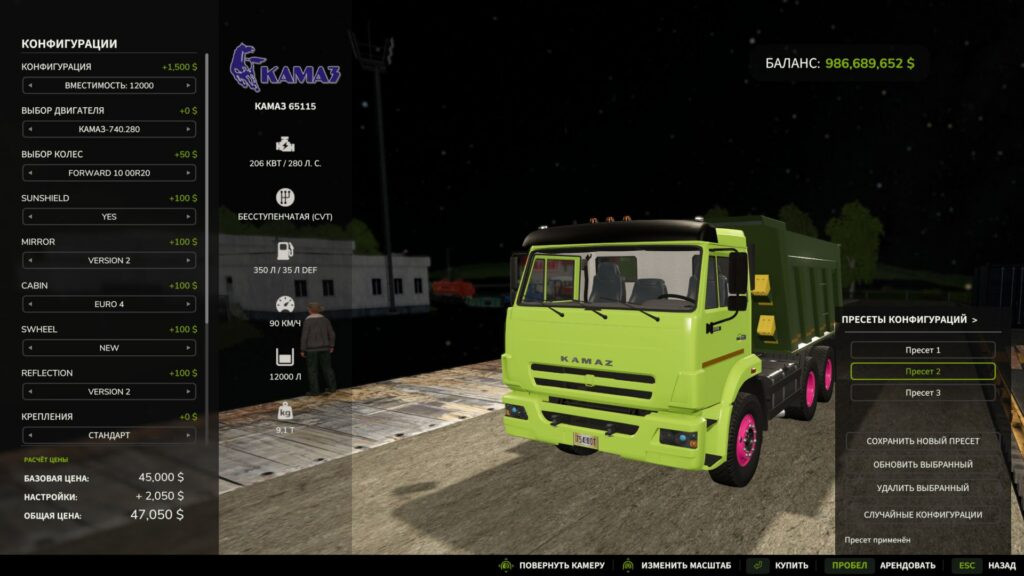
Tired of choosing the wheels, engine, colors and dozens of additional options all over again every time? This mod allows you to save ready-made equipment configurations and apply them in the shop with a single click.
Features:
- Save multiple named presets separately for each equipment model.
- Save selected colors, including custom shades and materials.
- Quickly apply a preset from a convenient scrollable list.
- Update and delete saved presets.
- Random configuration button — try a new variant and save the result you like.
- Automatically update the equipment price and preview after applying the settings.
- Presets are saved between game sessions and are available on different maps within the same profile.
- Works with new equipment in the shop, including modded equipment using the standard configuration system.
How to use:
Configure the equipment in the shop, open the presets panel, click “Save new preset” and enter a name. The next time you buy this model, simply select the saved variant from the list.
Note: License plates are not saved in presets. After updating third-party equipment, its presets may need to be updated if the author has changed the configuration options.
Credits:
BMProd
V1.0.2.0
- Added a new multiplayer feature and button. You can now select a player on the server and view their presets.
Description:
Tired of choosing the wheels, engine, colors and dozens of additional options all over again every time? This mod allows you to save ready-made equipment configurations and apply them in the shop with a single click.
Features:
- Save multiple named presets separately for each equipment model.
- Save selected colors, including custom shades and materials.
- Quickly apply a preset from a convenient scrollable list.
- Update and delete saved presets.
- Random configuration button — try a new variant and save the result you like.
- Automatically update the equipment price and preview after applying the settings.
- Presets are saved between game sessions and are available on different maps within the same profile.
- Works with new equipment in the shop, including modded equipment using the standard configuration system.
How to use:
Configure the equipment in the shop, open the presets panel, click “Save new preset” and enter a name. The next time you buy this model, simply select the saved variant from the list.
Note: License plates are not saved in presets. After updating third-party equipment, its presets may need to be updated if the author has changed the configuration options.
Credits:
BMProd
Direct Download Links
Version: v 1.0.2Updated: 38 minutes ago
Total Size: 137.27 KB FS25_technology_configuration_presets_modland.zip direct download · 137.27 KB · added 38 minutes ago
You Might Also Like »
0 Comments
There are no comments. Be first to comment!