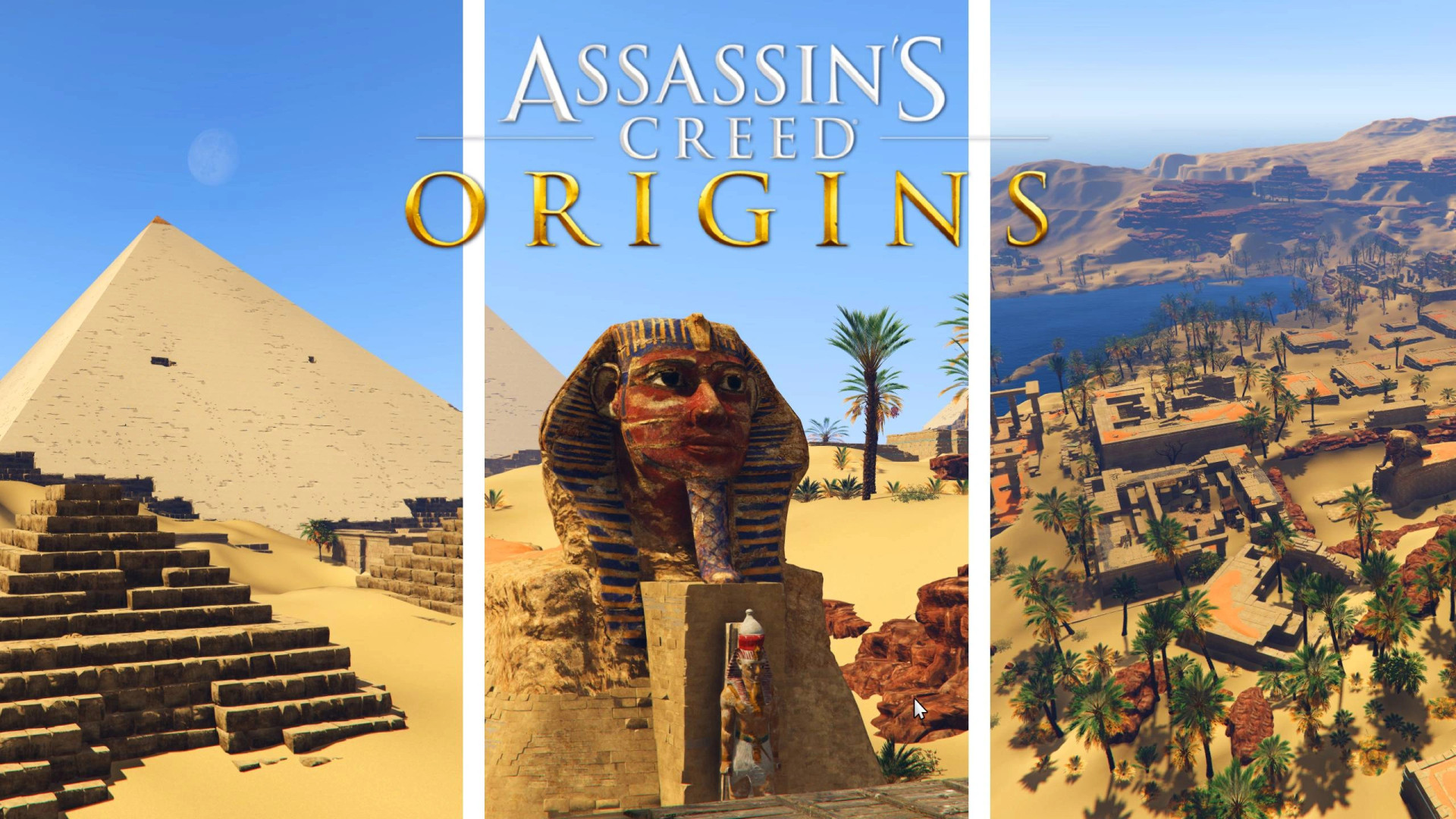
AC Origins Giza Pyramids Map v1.0

0/5,
0
votes
Description
AC Origins Giza Pyramids Map
This add-on brings the Giza area from Assassin's Creed Origins into GTA V Legacy, converted directly from the original game files.
Due to the 400 MB upload limit on 5mods, the downloaded archive contains a TXT file with the link to the full map download.
Features
- Giza area from Assassin's Creed Origins converted for GTA V Legacy
- Optional teleport menu for easy access
- Ability to save current locations as teleport points
Requirements
- GTA V Legacy
- OpenIV with a working mods folder
- ASI Loader and OpenIV.ASI
For the optional teleport menu:
- ScriptHookV
- ScriptHookVDotNet 3
Installation Instructions
Close GTA V before installing the map.
1. Copy dlc.rpf to:
GTA\mods\update\x64\dlcpacks\acgiza\dlc.rpf
2. Open OpenIV in Edit Mode and navigate to:
mods\update\update.rpf\common\data\dlclist.xml
3. Add the following entry before the closing Paths tag:
dlcpacks:/acgiza/
Optional Teleport Menu
Copy TeleportMenu.cs to:
GTA\scripts\
To manually add the Giza location to the saved locations file inside the scripts folder, use:
- Name – Giza (Sphinx)
- X – 8510
- Y – -2074
- Z – 14
- Heading – 90
Use the pipe character as the separator between each value.
How to Use
- Press F11 to open the teleport menu
- Select Giza (Sphinx) – Teleport
- Navigate with the arrow keys, Enter and Backspace
- "Save current location" can be used to create additional teleport points
- Saved locations are automatically stored in a TXT file inside the GTA scripts folder
Without the teleport menu, travel directly to:
X: 8510, Y: -2074, Z: 14
After a GTA V Update
If an update replaces update.rpf, add the acgiza entry to dlclist.xml again.
Uninstallation
- Delete the acgiza folder
- Remove the acgiza entry from dlclist.xml
- Delete TeleportMenu.cs if you no longer want the teleport menu
AC Origins Giza Pyramids Map
This add-on brings the Giza area from Assassin's Creed Origins into GTA V Legacy, converted directly from the original game files.
Due to the 400 MB upload limit on 5mods, the downloaded archive contains a TXT file with the link to the full map download.
Features
- Giza area from Assassin's Creed Origins converted for GTA V Legacy
- Optional teleport menu for easy access
- Ability to save current locations as teleport points
Requirements
- GTA V Legacy
- OpenIV with a working mods folder
- ASI Loader and OpenIV.ASI
For the optional teleport menu:
- ScriptHookV
- ScriptHookVDotNet 3
Installation Instructions
Close GTA V before installing the map.
1. Copy dlc.rpf to:
GTA\mods\update\x64\dlcpacks\acgiza\dlc.rpf
2. Open OpenIV in Edit Mode and navigate to:
mods\update\update.rpf\common\data\dlclist.xml
3. Add the following entry before the closing Paths tag:
dlcpacks:/acgiza/
Optional Teleport Menu
Copy TeleportMenu.cs to:
GTA\scripts\
To manually add the Giza location to the saved locations file inside the scripts folder, use:
- Name – Giza (Sphinx)
- X – 8510
- Y – -2074
- Z – 14
- Heading – 90
Use the pipe character as the separator between each value.
How to Use
- Press F11 to open the teleport menu
- Select Giza (Sphinx) – Teleport
- Navigate with the arrow keys, Enter and Backspace
- "Save current location" can be used to create additional teleport points
- Saved locations are automatically stored in a TXT file inside the GTA scripts folder
Without the teleport menu, travel directly to:
X: 8510, Y: -2074, Z: 14
After a GTA V Update
If an update replaces update.rpf, add the acgiza entry to dlclist.xml again.
Uninstallation
- Delete the acgiza folder
- Remove the acgiza entry from dlclist.xml
- Delete TeleportMenu.cs if you no longer want the teleport menu
External Download Links:
Direct Download Links
Version: v1.0Updated: 1 week ago
Total Size: 547.7 MB Giza_GTA5_Addon_modland.zip direct download · 547.7 MB · added 1 week ago
You Might Also Like »






0 Comments
There are no comments. Be first to comment!