Cars 1: Radiator Springs HD Reworked [Add-On Map] 1.0

0/5,
0
votes
Description
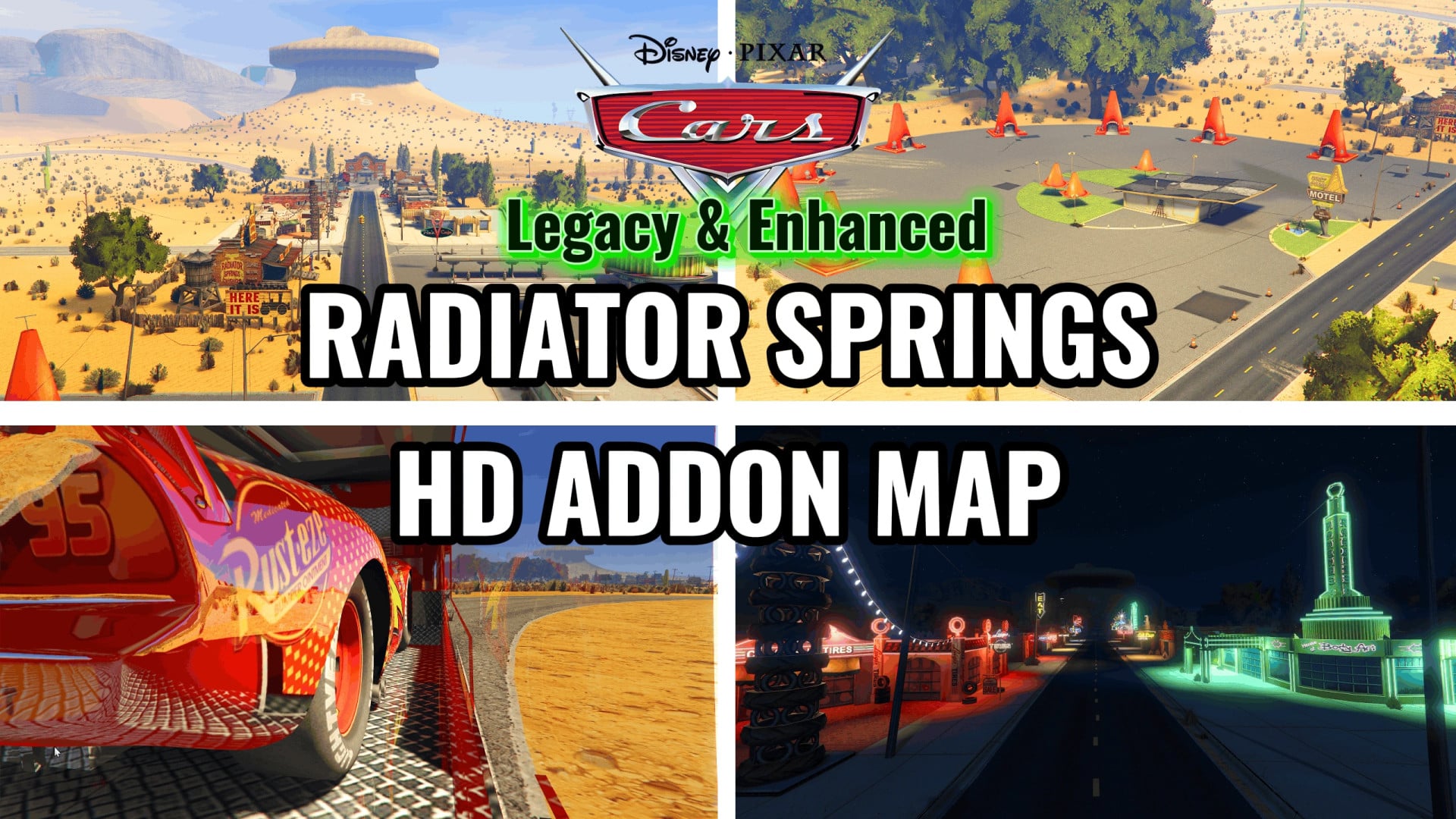
CarsWorld Addon Map - GTA V
Radiator Springs, Ornament Valley, Tailfin Pass and the Piston Cup Speedway from Cars (2006), reworked as an add-on map connected to Paleto Bay by a highway.
Features
- Radiator Springs: includes the town, Flo's V8 Cafe, Cozy Cone Motel, and Sarge's Bootcamp.
- Ornament Valley: featuring desert roads and Rustbucket Arena.
- Tailfin Pass: mountain pass north of Radiator Springs, connected by a mountain road.
- Piston Cup Speedway: located west of Ornament Valley with stadium entrance behind the north stand.
- Teleport Menu: optional menu (F11) to quickly reach all map locations.
- Map and Minimap: optional files to show the Cars world on the pause map and radar.
Known Bugs
- No GPS routes on the custom map.
- No AI traffic or pedestrians.
- Pause map cannot be scrolled all the way to the custom map area due to game limitations.
- Radar displays the custom map as an image only.
- Vehicles may freeze or become impossible to steer without the corresponding NoBoundaryLimits version.
- Loading the map area for the first time may take a few seconds due to large textures.
Installation Instructions
Requirements (Enhanced)
- GTA V Enhanced (story mode).
- Tested on game version 1.0.1158.16.
- ScriptHookV
- OpenRPF
- OpenIV with GTA V Enhanced support
- NoBoundaryLimitsEnhanced
- PackfileLimitAdjusterEnhanced
- HeapAdjuster
- ScriptHookVDotNet 3 (for Teleport Menu)
- BattlEye disabled using -nobattleye in args.txt
Requirements (Legacy)
- GTA V Legacy (story mode).
- Tested on game version 1.0.3889.0.
- ScriptHookV
- OpenIV with OpenIV.asi and ASI Loader
- NoBoundaryLimits
- HeapAdjuster
- ScriptHookVDotNet 3 (for Teleport Menu)
- Offline story mode only (BattlEye disabled)
Main Installation (Enhanced)
1. Back up your mods folder.
2. Copy the contents of "1 - Main Files" into your GTA V Enhanced folder.
3. In OpenIV (Edit mode), open mods/update/update.rpf/common/data/dlclist.xml and add a new Item entry with the value dlcpacks:/carsworld/ before the closing Paths tag.
4. Start the game.
Optional: Teleport Menu
- Copy the scripts folder into your GTA V folder.
- F11: Open/close menu | Up/Down: Navigate | Enter: Select | Backspace: Back.
Optional: Map and Minimap (Enhanced)
1. Enable Edit mode in OpenIV.
2. Open mods/update/update.rpf
3. Copy minimap.ymt into x64/data/tune/
4. Copy all 40 .ytd files into the scaleform generic archive located in x64/data/cdimages/
Uninstall
- Delete the folder mods/update/x64/dlcpacks/carsworld
- Remove the dlcpacks:/carsworld/ entry from dlclist.xml
- Restore backup of mods/update/update.rpf if map/minimap were installed.
- Delete TeleportMenu.cs and the locations text file from the scripts folder.
CarsWorld Addon Map - GTA V
Radiator Springs, Ornament Valley, Tailfin Pass and the Piston Cup Speedway from Cars (2006), reworked as an add-on map connected to Paleto Bay by a highway.
Features
- Radiator Springs: includes the town, Flo's V8 Cafe, Cozy Cone Motel, and Sarge's Bootcamp.
- Ornament Valley: featuring desert roads and Rustbucket Arena.
- Tailfin Pass: mountain pass north of Radiator Springs, connected by a mountain road.
- Piston Cup Speedway: located west of Ornament Valley with stadium entrance behind the north stand.
- Teleport Menu: optional menu (F11) to quickly reach all map locations.
- Map and Minimap: optional files to show the Cars world on the pause map and radar.
Known Bugs
- No GPS routes on the custom map.
- No AI traffic or pedestrians.
- Pause map cannot be scrolled all the way to the custom map area due to game limitations.
- Radar displays the custom map as an image only.
- Vehicles may freeze or become impossible to steer without the corresponding NoBoundaryLimits version.
- Loading the map area for the first time may take a few seconds due to large textures.
Installation Instructions
Requirements (Enhanced)
- GTA V Enhanced (story mode).
- Tested on game version 1.0.1158.16.
- ScriptHookV
- OpenRPF
- OpenIV with GTA V Enhanced support
- NoBoundaryLimitsEnhanced
- PackfileLimitAdjusterEnhanced
- HeapAdjuster
- ScriptHookVDotNet 3 (for Teleport Menu)
- BattlEye disabled using -nobattleye in args.txt
Requirements (Legacy)
- GTA V Legacy (story mode).
- Tested on game version 1.0.3889.0.
- ScriptHookV
- OpenIV with OpenIV.asi and ASI Loader
- NoBoundaryLimits
- HeapAdjuster
- ScriptHookVDotNet 3 (for Teleport Menu)
- Offline story mode only (BattlEye disabled)
Main Installation (Enhanced)
1. Back up your mods folder.
2. Copy the contents of "1 - Main Files" into your GTA V Enhanced folder.
3. In OpenIV (Edit mode), open mods/update/update.rpf/common/data/dlclist.xml and add a new Item entry with the value dlcpacks:/carsworld/ before the closing Paths tag.
4. Start the game.
Optional: Teleport Menu
- Copy the scripts folder into your GTA V folder.
- F11: Open/close menu | Up/Down: Navigate | Enter: Select | Backspace: Back.
Optional: Map and Minimap (Enhanced)
1. Enable Edit mode in OpenIV.
2. Open mods/update/update.rpf
3. Copy minimap.ymt into x64/data/tune/
4. Copy all 40 .ytd files into the scaleform generic archive located in x64/data/cdimages/
Uninstall
- Delete the folder mods/update/x64/dlcpacks/carsworld
- Remove the dlcpacks:/carsworld/ entry from dlclist.xml
- Restore backup of mods/update/update.rpf if map/minimap were installed.
- Delete TeleportMenu.cs and the locations text file from the scripts folder.
External Download Links:
You Might Also Like »


0 Comments
There are no comments. Be first to comment!