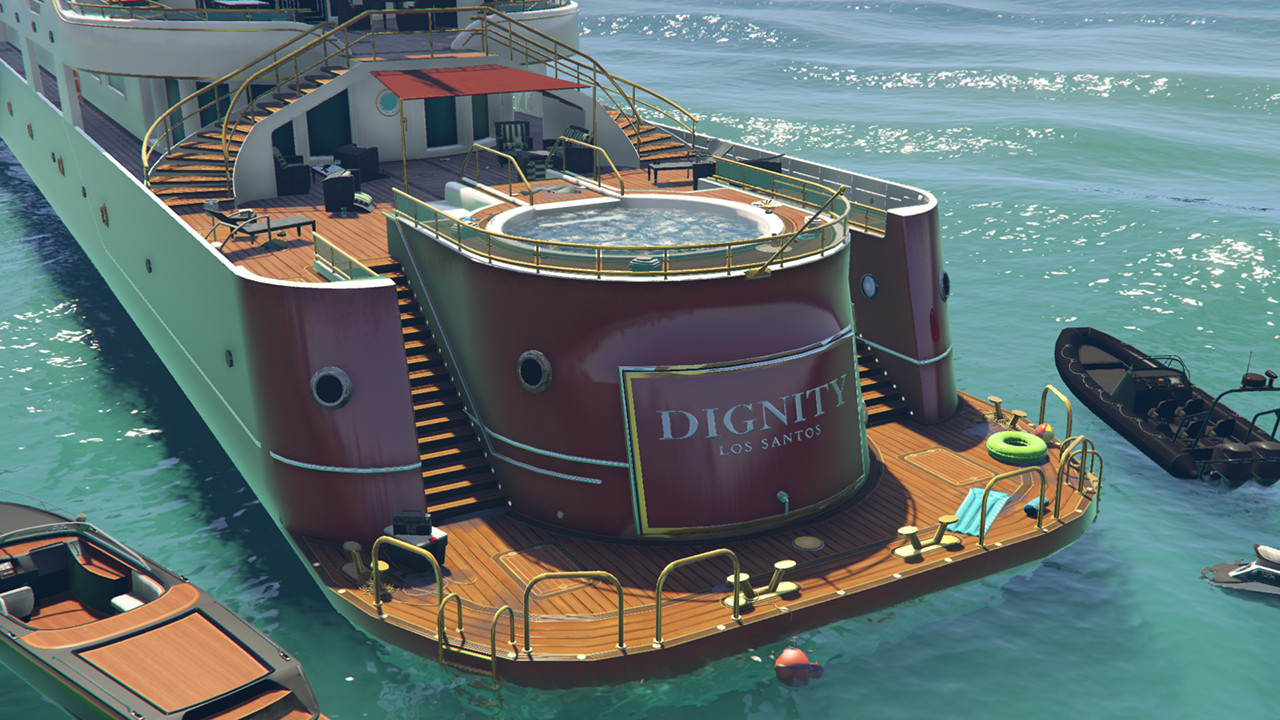
Customizable Party Yacht

5/5,
1
votes
Requires Menyoo PC [SP]
How To Use:
1. Copy the enclosed.xml files to the Spooner folder inside the MenyooStuff directory.
2. Start the game, open Menyoo, and go to Object Spooner > Manage Saved Files.
3. Choose the desired location (e.g., "Party Yacht (Trashed) - Pacific Bluffs 1") and Load Placements.
4. Navigate to Teleports > Yachts and create a custom boat in that location (e.g., Pacific Bluffs, Position 1).
You will be transferred to your personalized boat, along with all of the exciting extras.
(You may load the map after teleporting, but it will reset your boat to its default paint job.)
Credits:
abstractmode
How To Use:
1. Copy the enclosed.xml files to the Spooner folder inside the MenyooStuff directory.
2. Start the game, open Menyoo, and go to Object Spooner > Manage Saved Files.
3. Choose the desired location (e.g., "Party Yacht (Trashed) - Pacific Bluffs 1") and Load Placements.
4. Navigate to Teleports > Yachts and create a custom boat in that location (e.g., Pacific Bluffs, Position 1).
You will be transferred to your personalized boat, along with all of the exciting extras.
(You may load the map after teleporting, but it will reset your boat to its default paint job.)
Credits:
abstractmode
Direct Download Links
Version:Updated: 1 year ago
Total Size: 193.6 KB PartyYacht_modland.rar direct download · 193.6 KB · added 1 year ago
You Might Also Like »









0 Comments
There are no comments. Be first to comment!