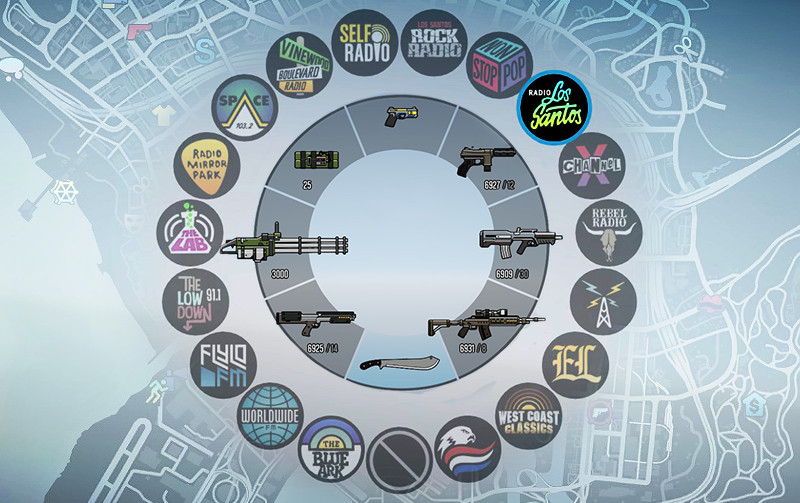
Colorful HUD (Weapons, Radio & Map Blips)

0/5,
0
votes
The Colorful HUD (Weapons, Radio & Map Blips) mod for GTA 5 is a comprehensive modification aiming to bring more vibrancy and clarity to the game interface. This mod modifies the HUD (Heads-Up Display) elements such as weapons, radio, and map blips, making them more colorful and easier to distinguish.
INSTALLATION:
1. Download OpenIV
2. Go to mods/update/update.rpf/x64/patch/data/cdimages/scaleform_generic.rpf
3. Click on the "Edit Mode" button on the top bar.
4. Then click on the green plus icon that says "Add new file" and import the 'hud.ytd' and 'mp_big_message_freemode.ytd' provided by this mod (you can find these files inside the 'Modded YTD' folder).
5. Go to mods/update/update.rpf/x64/patch/data/cdimages/scaleform_minimap.rpf
6. Click on "Add new file" and import the 'minimap.ytd' file provided by this mod.
7. Close OpenIV and start the game!
NOTE:
Make sure you have the latest version of ScriptHookV, otherwise the game will crash when you try to run it. Also, make sure to enable the ASI Loader and OpenIV.asi through OpenIV in order to enable the game to read modified .rpf files. To do so, run OpenIV and go to Tools > ASI Manager and install ASI Loader and OpenIV.asi
WARNING:
Even though these are just texture mods, you can still get banned for playing online with them, so avoid going into Online mode while using this mod or any other mod.
Credits:
Polopai
INSTALLATION:
1. Download OpenIV
2. Go to mods/update/update.rpf/x64/patch/data/cdimages/scaleform_generic.rpf
3. Click on the "Edit Mode" button on the top bar.
4. Then click on the green plus icon that says "Add new file" and import the 'hud.ytd' and 'mp_big_message_freemode.ytd' provided by this mod (you can find these files inside the 'Modded YTD' folder).
5. Go to mods/update/update.rpf/x64/patch/data/cdimages/scaleform_minimap.rpf
6. Click on "Add new file" and import the 'minimap.ytd' file provided by this mod.
7. Close OpenIV and start the game!
NOTE:
Make sure you have the latest version of ScriptHookV, otherwise the game will crash when you try to run it. Also, make sure to enable the ASI Loader and OpenIV.asi through OpenIV in order to enable the game to read modified .rpf files. To do so, run OpenIV and go to Tools > ASI Manager and install ASI Loader and OpenIV.asi
WARNING:
Even though these are just texture mods, you can still get banned for playing online with them, so avoid going into Online mode while using this mod or any other mod.
Credits:
Polopai
Videos


Direct Download Links
Version:Updated: 2 years ago
Total Size: 2.31 MB Colorful_HUD_10_modland.zip direct download · 2.31 MB · added 2 years ago
You Might Also Like »










0 Comments
There are no comments. Be first to comment!