Enhanced Camera v2.0

5/5,
1
votes
Changelog
Version 2.0.0
- Fixed keyboard menu spam and glitching for Up, Down, Enter, Back
- Kept Left and Right fast for slider tuning
- Added CAMERAS ON/OFF submenu
- Added per-camera toggles for 1P, 3P, vehicle, aim, and scene camera
- Added global mod toggle on F3
- Added camera switch popups ON/OFF toggle
- Added INI support for new toggles
- Fixed 3P horizontal X sliders so shoulder side no longer blocks them
- Added 3P on-foot wall and object collision stop
- Added 3P on-foot ceiling avoidance
- Added 3P vehicle wall and object collision stop
- Added 3P vehicle ceiling avoidance
- Vehicle collision ignores player vehicle
Description
Enhanced Camera
Compatibility:
- Dynamic Vehicle First Person Camera (Turn off first person vehicle and vehicle aiming in the camera toggle menu)
Features:
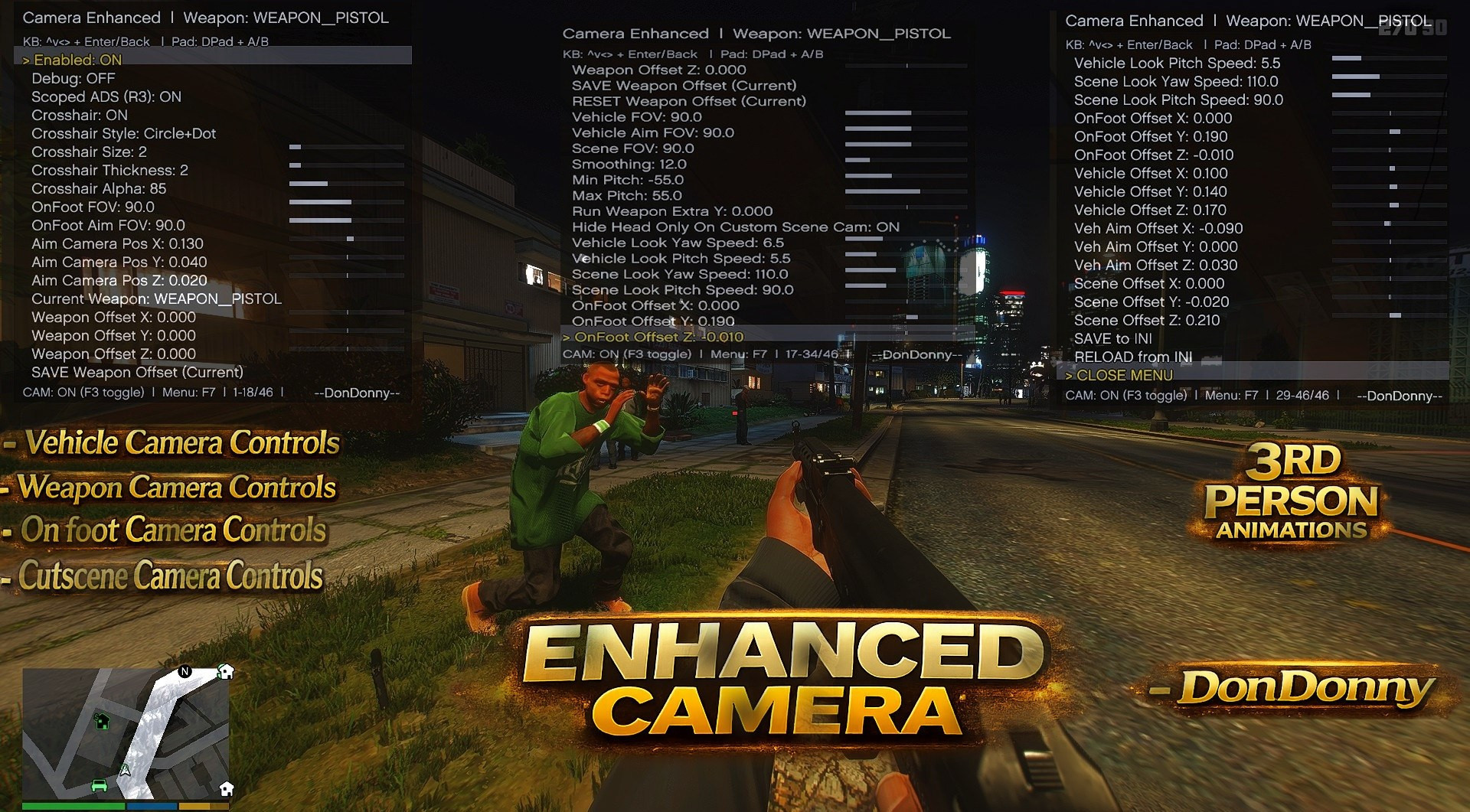
- Menu and controls: Open menu with F7 in game, real-time camera position and FOV adjustment, crosshair size, thickness and transparency tuning, scope view toggle and camera modes, smoothing, offsets and vehicle settings, settings apply live without restart, config saved to INI
- Weapon camera: Custom aim positioning, adjustable crosshair settings, scope toggle system, dynamic red-on-target detection, clean reticle behavior in vehicles and on foot
- Vehicle camera: Custom vehicle FOV, smooth rotation tuning, adjustable camera offsets, free orbit tuning, smooth transitions between states
- On-foot camera: Adjustable head position, arm positioning tuning, FOV control, rotation smoothing for cinematic movement, reduced zoom effect
- Cutscene camera: Support for scripted scenes, consistent camera behavior, smooth transitions without snapping
Requirements:
- ScriptHookV installed for your GTA V version
- ScriptHookVDotNet Enhanced required
Installation Instructions
- Go to GTA V root folder
- Open or create scripts folder
- Place mod DLL file inside scripts folder
- Launch GTA V in Story Mode
- INI file is generated automatically
- Delete INI file to reset settings
Version 2.0.0
- Fixed keyboard menu spam and glitching for Up, Down, Enter, Back
- Kept Left and Right fast for slider tuning
- Added CAMERAS ON/OFF submenu
- Added per-camera toggles for 1P, 3P, vehicle, aim, and scene camera
- Added global mod toggle on F3
- Added camera switch popups ON/OFF toggle
- Added INI support for new toggles
- Fixed 3P horizontal X sliders so shoulder side no longer blocks them
- Added 3P on-foot wall and object collision stop
- Added 3P on-foot ceiling avoidance
- Added 3P vehicle wall and object collision stop
- Added 3P vehicle ceiling avoidance
- Vehicle collision ignores player vehicle
Description
Enhanced Camera
Compatibility:
- Dynamic Vehicle First Person Camera (Turn off first person vehicle and vehicle aiming in the camera toggle menu)
Features:
- Menu and controls: Open menu with F7 in game, real-time camera position and FOV adjustment, crosshair size, thickness and transparency tuning, scope view toggle and camera modes, smoothing, offsets and vehicle settings, settings apply live without restart, config saved to INI
- Weapon camera: Custom aim positioning, adjustable crosshair settings, scope toggle system, dynamic red-on-target detection, clean reticle behavior in vehicles and on foot
- Vehicle camera: Custom vehicle FOV, smooth rotation tuning, adjustable camera offsets, free orbit tuning, smooth transitions between states
- On-foot camera: Adjustable head position, arm positioning tuning, FOV control, rotation smoothing for cinematic movement, reduced zoom effect
- Cutscene camera: Support for scripted scenes, consistent camera behavior, smooth transitions without snapping
Requirements:
- ScriptHookV installed for your GTA V version
- ScriptHookVDotNet Enhanced required
Installation Instructions
- Go to GTA V root folder
- Open or create scripts folder
- Place mod DLL file inside scripts folder
- Launch GTA V in Story Mode
- INI file is generated automatically
- Delete INI file to reset settings
External Download Links:
Direct Download Links
Version: v2.0Updated: 3 months ago
Total Size: 502 KB ab119d-ENHANCED_CAMERAV2_modland.7z direct download · 251 KB · added 3 months ago
You Might Also Like »









0 Comments
There are no comments. Be first to comment!