NEW Colorful HUD (Weapons, Radio & Map Blips) 1.0.2944.0a

0/5,
0
votes
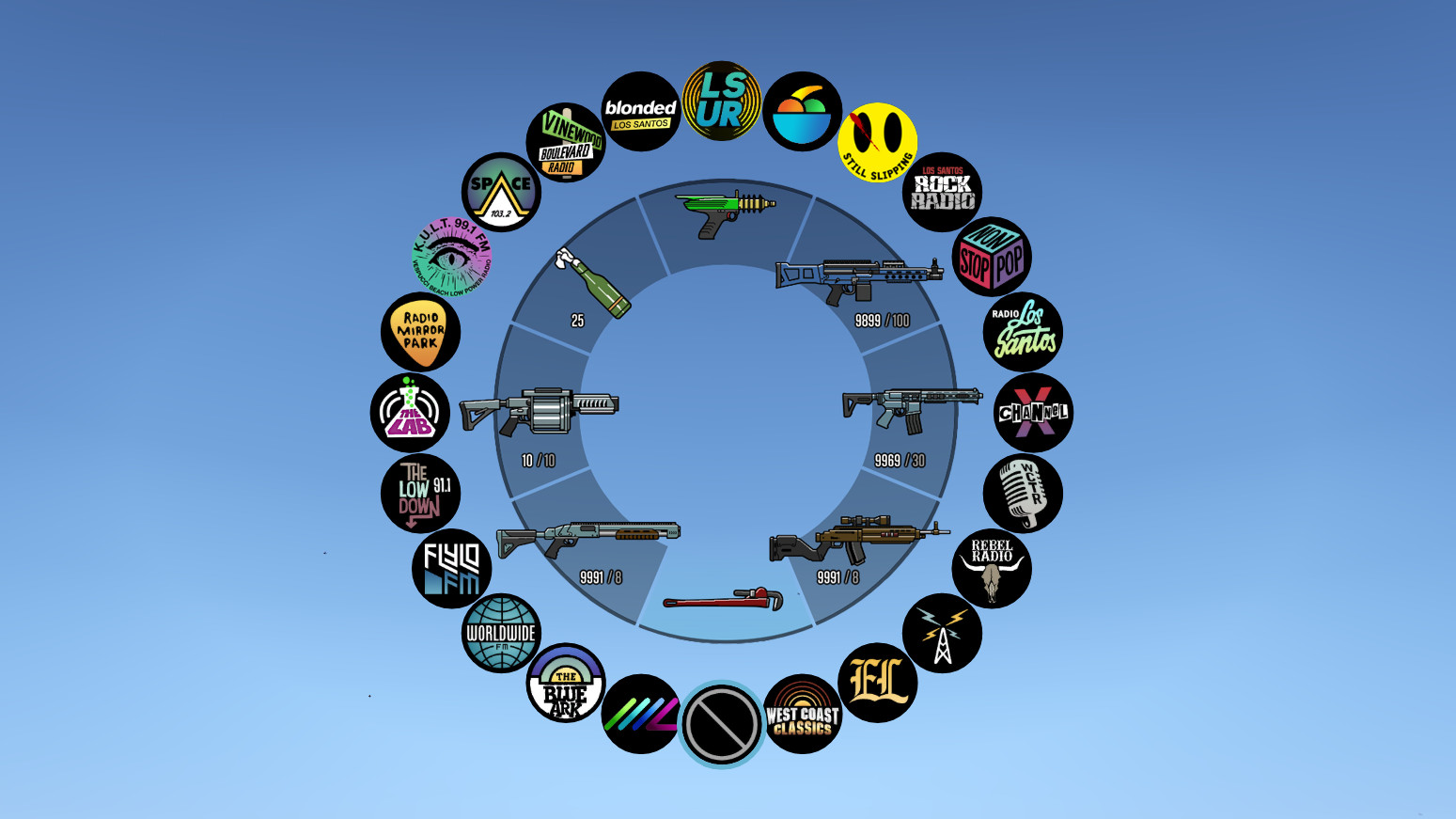
The NEW Colorful HUD (Weapons, Radio & Map Blips) is a modification (mod) for Grand Theft Auto 5 that enhances the overall visual interface of the game. With this mod, the Head-Up Display (HUD) is redesigned with vibrant and diverse colors, to make it easier for players to quickly identify icons and understand in-game information.
This mod handles the coloring and redesign of various HUD elements, such as weapons, radio, and map blips. For the weapons icons, each type of weapon is assigned a specific color. This allows players to easily distinguish between their available arsenal of tools.
The radio portion of the HUD also receives a facelift, with radio stations receiving distinct color coding, hence making it easier for players to switch to their favorite in-game music.
Lastly, the map blips are also modified to receive unique colors. Now, it's feasible to easily differentiate between map landmarks, mission locations, character markers, and other points of interest with just a glance.
This mod thus aims at enhancing the gaming experience by providing a clear, color-coordinated display system, making the navigation within the world of Grand Theft Auto 5 much more intuitive and enjoyable.
INSTALLATION:
1. Create "mods" folder in the main directory of GTA5, copy and paste your "update" folder inside the one you just created. If you have done this already, you are good to go. You can now continue to the next step.
2. Download OpenIV
3. Click on "Tools" button in the upper ribbon, and select "Package Installer".
4. Navigate to the folder where you saved the mod and select "NEW Colorful HUD.oiv". Use "NEW Colorful HUD [uninstall].oiv" if you want to go back to original.
5. Click on the "Install" button. Select the install location. [remember to back-up your "update" folder inside the "mods" folder before installing the mod, just in case].
6. Close OpenIV and start the game!
(same installation steps apply to other packages included in this mod)
NOTE: Also, make sure to enable the ASI Loader and OpenIV.asi through OpenIV in order to enable the game to read modified .rpf files. To do so, run OpenIV and go to Tools > ASI Manager and install ASI Loader and OpenIV.asi
WARNING: Even though these are just texture mods, you can still get banned for playing online with them, so avoid going into Online mode while using this mod or any other mod.
Please ask permission if you want to use weapon textures from v1.0.791.2 update and beyond.
Credits:
useruser111 & Polopai
This mod handles the coloring and redesign of various HUD elements, such as weapons, radio, and map blips. For the weapons icons, each type of weapon is assigned a specific color. This allows players to easily distinguish between their available arsenal of tools.
The radio portion of the HUD also receives a facelift, with radio stations receiving distinct color coding, hence making it easier for players to switch to their favorite in-game music.
Lastly, the map blips are also modified to receive unique colors. Now, it's feasible to easily differentiate between map landmarks, mission locations, character markers, and other points of interest with just a glance.
This mod thus aims at enhancing the gaming experience by providing a clear, color-coordinated display system, making the navigation within the world of Grand Theft Auto 5 much more intuitive and enjoyable.
INSTALLATION:
1. Create "mods" folder in the main directory of GTA5, copy and paste your "update" folder inside the one you just created. If you have done this already, you are good to go. You can now continue to the next step.
2. Download OpenIV
3. Click on "Tools" button in the upper ribbon, and select "Package Installer".
4. Navigate to the folder where you saved the mod and select "NEW Colorful HUD.oiv". Use "NEW Colorful HUD [uninstall].oiv" if you want to go back to original.
5. Click on the "Install" button. Select the install location. [remember to back-up your "update" folder inside the "mods" folder before installing the mod, just in case].
6. Close OpenIV and start the game!
(same installation steps apply to other packages included in this mod)
NOTE: Also, make sure to enable the ASI Loader and OpenIV.asi through OpenIV in order to enable the game to read modified .rpf files. To do so, run OpenIV and go to Tools > ASI Manager and install ASI Loader and OpenIV.asi
WARNING: Even though these are just texture mods, you can still get banned for playing online with them, so avoid going into Online mode while using this mod or any other mod.
Please ask permission if you want to use weapon textures from v1.0.791.2 update and beyond.
Credits:
useruser111 & Polopai
Direct Download Links
Version: 1.0.2944.0aUpdated: 2 years ago
Total Size: 4.42 MB Colorful_HUD_1029440a_modland.zip direct download · 4.42 MB · added 2 years ago
You Might Also Like »










0 Comments
There are no comments. Be first to comment!