[RESHADE] V-Enhanced Photorealism & Cinematic Atmosphere Preset v1.0

0/5,
0
votes
Preset for V-Enhanced Photorealism and Cinematic Atmosphere
About:
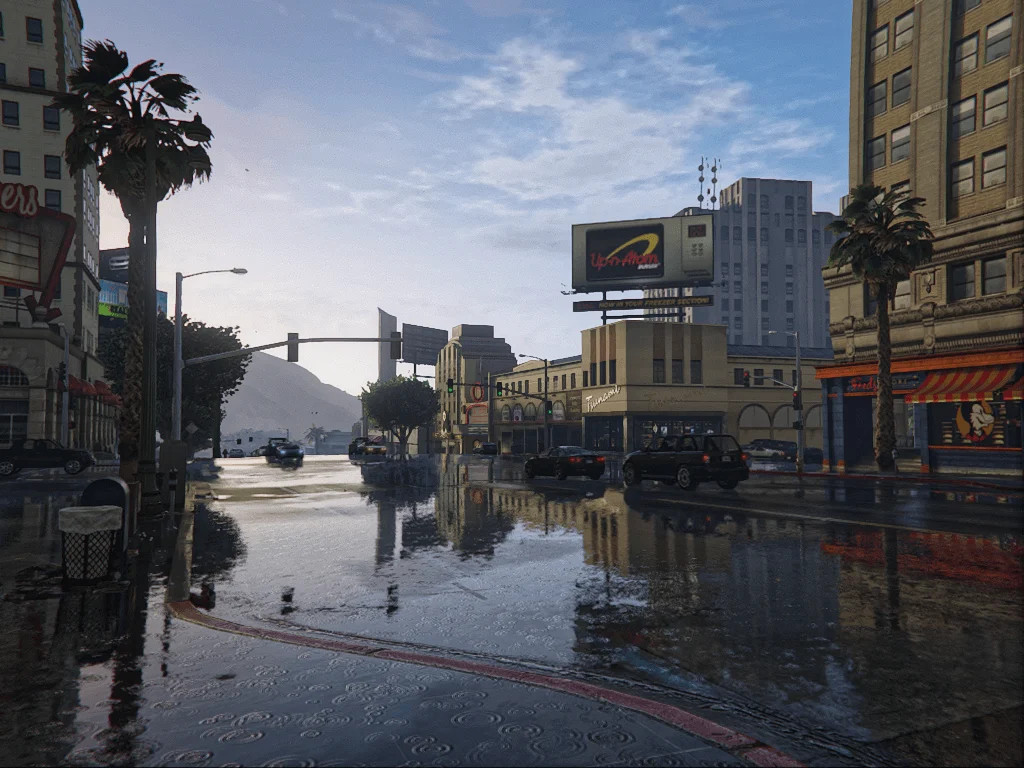
V-Enhanced is a ReShade preset that makes the graphics in GTA V ENHANCED look better by mixing modern photorealism with a cinematic feel. It keeps the skies from getting too bright or too dark, so it always looks like the next generation, no matter what the weather or lighting is like.
Important Technical Details:
– Dynamic HDR and Exposure Control: Clouds and skies keep their detail whether it's sunny or cloudy. Tested a lot at LSIA.
– Cinematic Nights: Wet asphalt reflections that are perfect for immersion, and neon lights that stay sharp without blurring.
– Realistic Color Balance: Colors that look like they are in Southern California light. Greens and grays are set up to keep fake tones from showing up.
– Precision Sharpening (LumaSharpen): Makes textures on cars and places look better without adding grain or aliasing.
– Deep Shadows: The ambient occlusion and black levels were changed to add depth without losing detail in dark areas.
TioO_LuU (Vitor230303) is the developer.
1.0 (2026)
Compatibility: GTA V ENHANCED (PC)
What you need:
– ReShade (latest version)
– During setup, install all of the ReShade effect packages.
How to Install:
– Get ReShade from reshade.me
– Use the DirectX 10/11/12 API to install to GTA5.exe
– During installation, choose all effect packages. – Move "V-Enhanced.ini" to the folder where your game is installed (where GTA5_enhanced.exe is).
– In the game, press "HOME" to open the ReShade menu. Then, from the top bar, choose "V-Enhanced."
Suggestions for how to play:
– Turn on RayTracing for the best results. – Keep the brightness in the game at 50%.
About:
V-Enhanced is a ReShade preset that makes the graphics in GTA V ENHANCED look better by mixing modern photorealism with a cinematic feel. It keeps the skies from getting too bright or too dark, so it always looks like the next generation, no matter what the weather or lighting is like.
Important Technical Details:
– Dynamic HDR and Exposure Control: Clouds and skies keep their detail whether it's sunny or cloudy. Tested a lot at LSIA.
– Cinematic Nights: Wet asphalt reflections that are perfect for immersion, and neon lights that stay sharp without blurring.
– Realistic Color Balance: Colors that look like they are in Southern California light. Greens and grays are set up to keep fake tones from showing up.
– Precision Sharpening (LumaSharpen): Makes textures on cars and places look better without adding grain or aliasing.
– Deep Shadows: The ambient occlusion and black levels were changed to add depth without losing detail in dark areas.
TioO_LuU (Vitor230303) is the developer.
1.0 (2026)
Compatibility: GTA V ENHANCED (PC)
What you need:
– ReShade (latest version)
– During setup, install all of the ReShade effect packages.
How to Install:
– Get ReShade from reshade.me
– Use the DirectX 10/11/12 API to install to GTA5.exe
– During installation, choose all effect packages. – Move "V-Enhanced.ini" to the folder where your game is installed (where GTA5_enhanced.exe is).
– In the game, press "HOME" to open the ReShade menu. Then, from the top bar, choose "V-Enhanced."
Suggestions for how to play:
– Turn on RayTracing for the best results. – Keep the brightness in the game at 50%.
External Download Links:
Direct Download Links
Version: v1.0Updated: 6 months ago
Total Size: 16.54 KB d6708a-ReShade_V-Enhanced_Photorealism_&_Cinematic_Atmosphere_modland.zip direct download · 8.27 KB · added 6 months ago
You Might Also Like »










0 Comments
There are no comments. Be first to comment!