WeaponHUD v1.1

0/5,
0
votes
WeaponHUD 🎯
About:
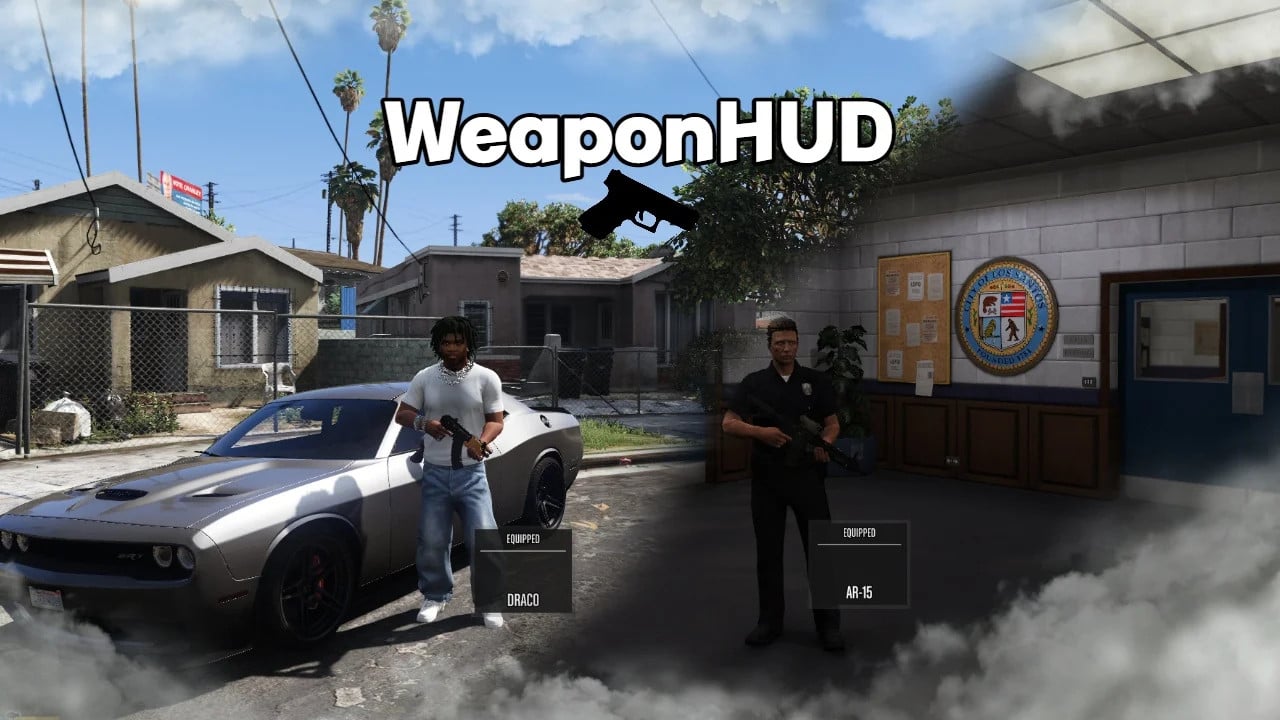
A small script that adds a modern, clean weapon HUD to GTA V singleplayer.
It shows the weapon you have chosen and its status (EQUIPPED / HOLSTERED) with smooth fade transitions. It can be fully customized and is optimized for performance, so it runs smoothly without affecting gameplay.
Characteristics:
– Modern HUD panel that shows the name and status of the weapon – Smooth fade-in and fade-out animations – Adjustable position, size, and display duration – Automatically detects the currently selected weapon – Works with all GTA V weapon types, such as melee, pistols, rifles, shotguns, SMGs, LMGs, snipers, heavy weapons, and throwables – Shows the name of the last weapon equipped when holstered – Optional in-game configuration menu with quick access
Setup:
– PosX and PosY: where the HUD is on the screen
– DisplayDuration: How long the HUD stays on screen (ms) – You can change the names of the weapons in the INI file.
What you need:
– Script Hook V .NET (Nightly Build) – GTA V Legacy
Older versions of SHVDN may cause crashes. Use the most recent version at all times.
Putting it in place:
– Before installing, uninstall any older versions. – Put WeaponHUD.dll, INIFileParser.dll, and the WeaponHUD folder in your scripts folder.
How to Uninstall:
– Get rid of the DLL files and the WeaponHUD folder.
Changes:
– v1.0: First release
– v1.0.1 (Hotfix): Fixed a problem that happened when the wrong DLL was uploaded
– v1.0.2 (Hotfix): Added INIFileParser.dll for users who didn't have it before; this is needed to read the INI configuration
– v1.1: Major update
– Added a new configuration menu in the game. To open the full customization menu, press the tilde key and type weaponhud. Live preview mode has been added. The HUD stays visible while the menu is open, so you can see all the changes as they happen. There are also more ways to customize. You can change the position, size, colors, padding, scales, line settings, and more right in the game. F10 now opens and closes the menu. Closing the menu saves all changes to WeaponHUD.ini. The automatic creation of folders and INIs has been removed to make the installation process cleaner. Just put WeaponHUD.ini in your scripts folder. The new menu replaces the old F9 reload system. The new code is cleaner and more optimized. The new menu is better at detecting the tilde key, which makes input more reliable. There are also general stability improvements to make it work better with the latest Script Hook V .NET nightly builds.
In short:
– A fully working modern weapon HUD
– Smooth fade animations
– Full INI customization support
– Works with all GTA V weapons
About:
A small script that adds a modern, clean weapon HUD to GTA V singleplayer.
It shows the weapon you have chosen and its status (EQUIPPED / HOLSTERED) with smooth fade transitions. It can be fully customized and is optimized for performance, so it runs smoothly without affecting gameplay.
Characteristics:
– Modern HUD panel that shows the name and status of the weapon – Smooth fade-in and fade-out animations – Adjustable position, size, and display duration – Automatically detects the currently selected weapon – Works with all GTA V weapon types, such as melee, pistols, rifles, shotguns, SMGs, LMGs, snipers, heavy weapons, and throwables – Shows the name of the last weapon equipped when holstered – Optional in-game configuration menu with quick access
Setup:
– PosX and PosY: where the HUD is on the screen
– DisplayDuration: How long the HUD stays on screen (ms) – You can change the names of the weapons in the INI file.
What you need:
– Script Hook V .NET (Nightly Build) – GTA V Legacy
Older versions of SHVDN may cause crashes. Use the most recent version at all times.
Putting it in place:
– Before installing, uninstall any older versions. – Put WeaponHUD.dll, INIFileParser.dll, and the WeaponHUD folder in your scripts folder.
How to Uninstall:
– Get rid of the DLL files and the WeaponHUD folder.
Changes:
– v1.0: First release
– v1.0.1 (Hotfix): Fixed a problem that happened when the wrong DLL was uploaded
– v1.0.2 (Hotfix): Added INIFileParser.dll for users who didn't have it before; this is needed to read the INI configuration
– v1.1: Major update
– Added a new configuration menu in the game. To open the full customization menu, press the tilde key and type weaponhud. Live preview mode has been added. The HUD stays visible while the menu is open, so you can see all the changes as they happen. There are also more ways to customize. You can change the position, size, colors, padding, scales, line settings, and more right in the game. F10 now opens and closes the menu. Closing the menu saves all changes to WeaponHUD.ini. The automatic creation of folders and INIs has been removed to make the installation process cleaner. Just put WeaponHUD.ini in your scripts folder. The new menu replaces the old F9 reload system. The new code is cleaner and more optimized. The new menu is better at detecting the tilde key, which makes input more reliable. There are also general stability improvements to make it work better with the latest Script Hook V .NET nightly builds.
In short:
– A fully working modern weapon HUD
– Smooth fade animations
– Full INI customization support
– Works with all GTA V weapons
External Download Links:
- Modsfire.com - 9c60e2-WeaponHUD v1.1.rar [23.91 KB]
Direct Download Links
Version: v1.1Updated: 6 months ago
Total Size: 47.82 KB 9c60e2-WeaponHUD_v11_modland.rar direct download · 23.91 KB · added 6 months ago
You Might Also Like »










0 Comments
There are no comments. Be first to comment!