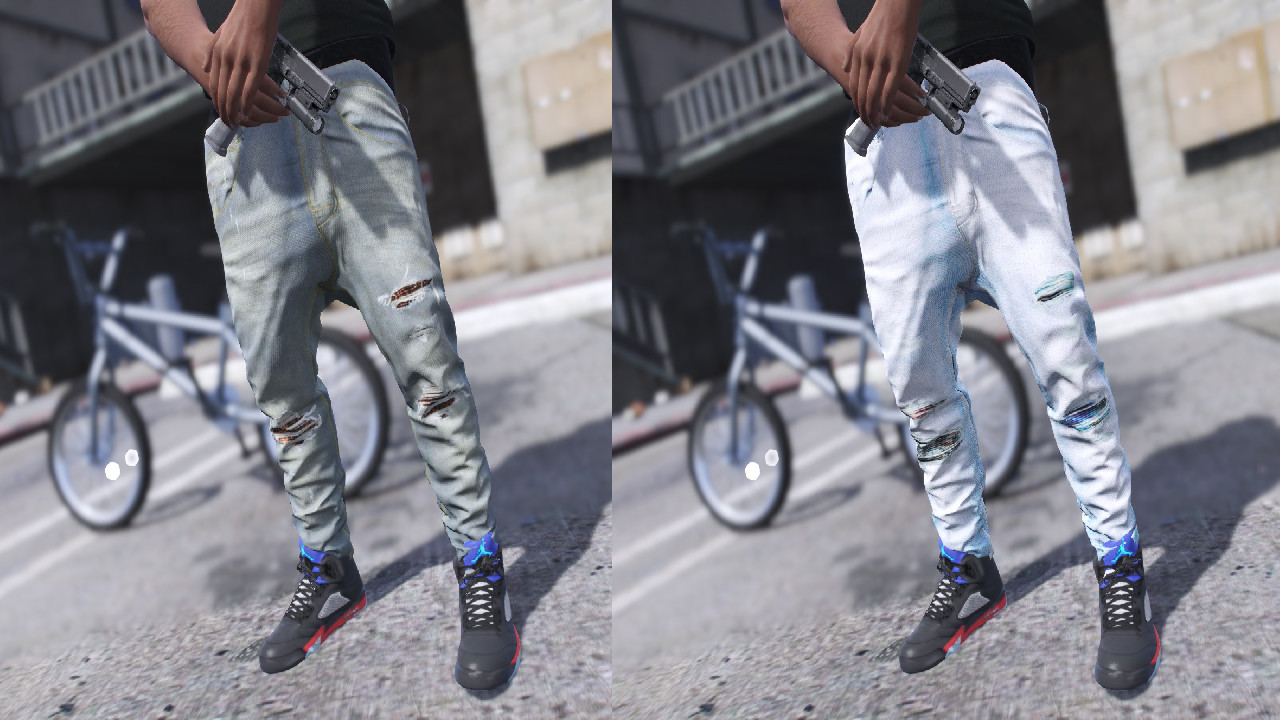
Amiri Sagged Jeans 2-Pack -

0/5,
0
votes
The Amiri Sagged Jeans 2-Pack is a clothing mod for Grand Theft Auto 5. It allows players to customize their characters with a new look - a pair of stylishly sagged jeans from the high-end fashion brand, Amiri. With this mod, players can break away from the standard outfits usually available in the game and add more personal touch to their character’s wardrobe.
It contains two different styles of sagged jeans - one might be lightly distressed denim and the other could be a plain, undamaged pair depending on the skin texture provided. Both are created with realistic texture, ensuring that they look as close to the real thing as possible in the game.
While this mod doesn't affect the gameplay itself, it can significantly enhance the player's experience, adding more depth to the character customization and making the game world feel more immersive and realistic.
How to install:
1.Open OpenIV
2.Navigate to "x64v.rpf/models/cdimages/streamedpeds_players.rpf/player_one"
3.Turn on Edit Mode
4.Drag and drop the .ytd file into the directory
5.Enjoy !!!
Credits:
tobi7
It contains two different styles of sagged jeans - one might be lightly distressed denim and the other could be a plain, undamaged pair depending on the skin texture provided. Both are created with realistic texture, ensuring that they look as close to the real thing as possible in the game.
While this mod doesn't affect the gameplay itself, it can significantly enhance the player's experience, adding more depth to the character customization and making the game world feel more immersive and realistic.
How to install:
1.Open OpenIV
2.Navigate to "x64v.rpf/models/cdimages/streamedpeds_players.rpf/player_one"
3.Turn on Edit Mode
4.Drag and drop the .ytd file into the directory
5.Enjoy !!!
Credits:
tobi7
Direct Download Links
Version: -Updated: 2 years ago
Total Size: 7.51 MB Amiri_Jeans_2_Pack_modland.rar direct download · 7.51 MB · added 2 years ago
You Might Also Like »










0 Comments
There are no comments. Be first to comment!