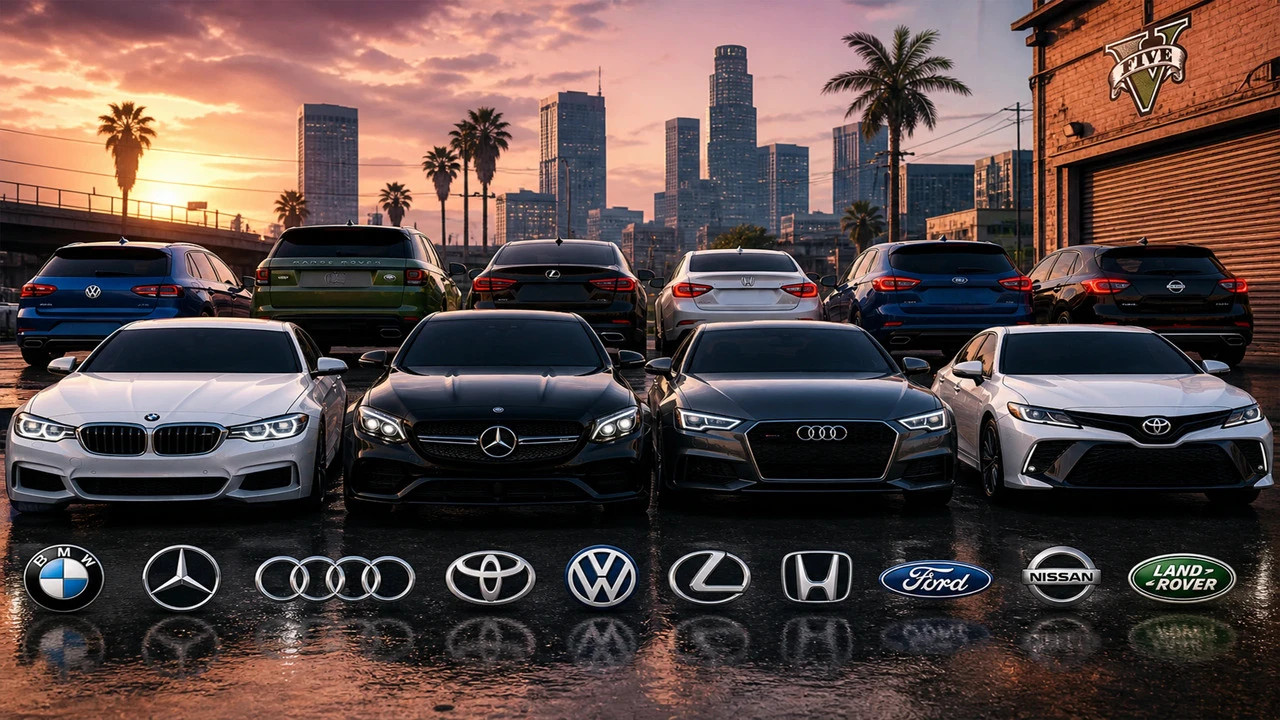
Real Life Vehicle Logos & Textures Pack | Enhanced & Legacy 2.9

5/5,
1
votes
**Version 2.9**
Real Life Vehicle Logos & Textures Pack is a complete visual overhaul for GTA V vehicles, supporting both **GTA V Legacy** and **GTA V Enhanced**.
This pack replaces original vehicle logos, badges, liveries, and textures with realistic real-world inspired designs.
The mod improves all types of vehicles, including civilian cars, sports cars, luxury vehicles, commercial vehicles, taxis, police vehicles, emergency vehicles, and service vehicles.
Experience a more realistic GTA V world with detailed vehicle branding, improved designs, and high-quality textures.
## Features
* Realistic vehicle logos and badges
* New vehicle branding designs
* Improved commercial vehicle liveries
* Improved taxi designs
* Police vehicle textures
* Emergency vehicle improvements
* Service and delivery vehicle designs
* High-quality texture replacements
* Improved commercial vehicle branding
* Detailed visual improvements across various vehicles
* Compatible with GTA V Legacy and GTA V Enhanced
## Version 2.9 Changelog
* Fixed an issue that could cause sudden game crashes and unexpected exits.
* Improved several commercial vehicle designs.
* Completed missing visual details on some commercial vehicles.
* Improved commercial vehicle branding and liveries.
* Improved various vehicle textures and design elements.
* Updated the mod folder name to **SX_vehicles**.
## Requirements
Before installing, make sure you have:
* GTA V Legacy or GTA V Enhanced (PC)
* OpenIV / OpenRPF, depending on your game version and setup
* Script Hook V / Script Hook V Enhanced, if required by your setup
* A working mods folder
* Enough storage space for the texture files
## Installation
### GTA V Enhanced
For **GTA V Enhanced**, especially when using **NaturalVision Enhanced**, follow these steps:
1. Open your GTA V Enhanced installation folder.
2. Navigate to:
`Grand Theft Auto V Enhanced\onigiri\common\data`
3. Open **dlclist.xml** using Notepad or another text editor.
4. Add the following line:
`<Item>dlcpacks:/SX_vehicles/</Item>`
5. Save the file.
The mod folder should be located at:
`Grand Theft Auto V Enhanced\onigiri\dlcpacks\SX_vehicles`
Make sure the **SX_vehicles** folder contains the required **dlc.rpf** file.
### GTA V Legacy
Follow the installation instructions included with the Legacy version of the mod.
The mod should be installed inside your **mods** folder without modifying the original GTA V files.
Always use the correct version of the mod for your GTA V installation.
## File Structure
The DLC should look similar to:
```text
SX_vehicles
│
└── dlc.rpf
│
├── content.xml
├── setup2.xml
│
└── x64
│
└── vehicles.rpf
│
└── Vehicle Textures (.ytd)
```
## Important Notes
* Always install mods using the recommended modding structure for your game version.
* Do not modify original GTA V files.
* Make a backup before installing.
* Use the version specifically made for GTA V Legacy or GTA V Enhanced.
* If you use other vehicle texture mods, load order or file conflicts may affect the results.
* Make sure your game is updated to a compatible version.
* Do not install both Legacy and Enhanced versions together unless specifically instructed.
* If you use **NaturalVision Enhanced**, make sure the mod is installed in the correct **onigiri** directory.
## Uninstall
### GTA V Enhanced
Remove the following line from:
`Grand Theft Auto V Enhanced\onigiri\common\data\dlclist.xml`
```xml
<Item>dlcpacks:/SX_vehicles/</Item>
```
Then delete:
`Grand Theft Auto V Enhanced\onigiri\dlcpacks\SX_vehicles`
### GTA V Legacy
Remove the **SX_vehicles** DLC from your Legacy mods folder and remove its entry from the appropriate **dlclist.xml** file.
## Credits
**Created by: SalkorX**
**Version: 2.9**
Do not re-upload, modify, or redistribute this mod without permission.
Real Life Vehicle Logos & Textures Pack is a complete visual overhaul for GTA V vehicles, supporting both **GTA V Legacy** and **GTA V Enhanced**.
This pack replaces original vehicle logos, badges, liveries, and textures with realistic real-world inspired designs.
The mod improves all types of vehicles, including civilian cars, sports cars, luxury vehicles, commercial vehicles, taxis, police vehicles, emergency vehicles, and service vehicles.
Experience a more realistic GTA V world with detailed vehicle branding, improved designs, and high-quality textures.
## Features
* Realistic vehicle logos and badges
* New vehicle branding designs
* Improved commercial vehicle liveries
* Improved taxi designs
* Police vehicle textures
* Emergency vehicle improvements
* Service and delivery vehicle designs
* High-quality texture replacements
* Improved commercial vehicle branding
* Detailed visual improvements across various vehicles
* Compatible with GTA V Legacy and GTA V Enhanced
## Version 2.9 Changelog
* Fixed an issue that could cause sudden game crashes and unexpected exits.
* Improved several commercial vehicle designs.
* Completed missing visual details on some commercial vehicles.
* Improved commercial vehicle branding and liveries.
* Improved various vehicle textures and design elements.
* Updated the mod folder name to **SX_vehicles**.
## Requirements
Before installing, make sure you have:
* GTA V Legacy or GTA V Enhanced (PC)
* OpenIV / OpenRPF, depending on your game version and setup
* Script Hook V / Script Hook V Enhanced, if required by your setup
* A working mods folder
* Enough storage space for the texture files
## Installation
### GTA V Enhanced
For **GTA V Enhanced**, especially when using **NaturalVision Enhanced**, follow these steps:
1. Open your GTA V Enhanced installation folder.
2. Navigate to:
`Grand Theft Auto V Enhanced\onigiri\common\data`
3. Open **dlclist.xml** using Notepad or another text editor.
4. Add the following line:
`<Item>dlcpacks:/SX_vehicles/</Item>`
5. Save the file.
The mod folder should be located at:
`Grand Theft Auto V Enhanced\onigiri\dlcpacks\SX_vehicles`
Make sure the **SX_vehicles** folder contains the required **dlc.rpf** file.
### GTA V Legacy
Follow the installation instructions included with the Legacy version of the mod.
The mod should be installed inside your **mods** folder without modifying the original GTA V files.
Always use the correct version of the mod for your GTA V installation.
## File Structure
The DLC should look similar to:
```text
SX_vehicles
│
└── dlc.rpf
│
├── content.xml
├── setup2.xml
│
└── x64
│
└── vehicles.rpf
│
└── Vehicle Textures (.ytd)
```
## Important Notes
* Always install mods using the recommended modding structure for your game version.
* Do not modify original GTA V files.
* Make a backup before installing.
* Use the version specifically made for GTA V Legacy or GTA V Enhanced.
* If you use other vehicle texture mods, load order or file conflicts may affect the results.
* Make sure your game is updated to a compatible version.
* Do not install both Legacy and Enhanced versions together unless specifically instructed.
* If you use **NaturalVision Enhanced**, make sure the mod is installed in the correct **onigiri** directory.
## Uninstall
### GTA V Enhanced
Remove the following line from:
`Grand Theft Auto V Enhanced\onigiri\common\data\dlclist.xml`
```xml
<Item>dlcpacks:/SX_vehicles/</Item>
```
Then delete:
`Grand Theft Auto V Enhanced\onigiri\dlcpacks\SX_vehicles`
### GTA V Legacy
Remove the **SX_vehicles** DLC from your Legacy mods folder and remove its entry from the appropriate **dlclist.xml** file.
## Credits
**Created by: SalkorX**
**Version: 2.9**
Do not re-upload, modify, or redistribute this mod without permission.
Videos


Direct Download Links
Version: 2.9Updated: 2 days ago
Total Size: 1.78 GB Legacy_vehicles_modland.rar [Legacy] direct download · 918.82 MB · added 2 days ago Enhanced_vehicles_modland.rar direct download · 904.93 MB · added 2 days ago
About Mod
| Latest Version | 2.9 |
| Game | GTA 5 |
| Category | Other |
| Downloads | 48 |
| Forum Thread | Visit forum thread |
| Created | 2 days ago |
You Might Also Like »



0 Comments
There are no comments. Be first to comment!